Get started with production planning in minutes using our free Production Capacity Planning Template.
Available in Google Sheets, Excel, and PDF, this editable template helps you track production capacity, assign resources, monitor utilization, and plan output with confidence.
What Is a Production Capacity Planning Template?
A production capacity planning template is a structured tool used by manufacturers and operations teams to assess and manage how much output their facilities, equipment, and workforce can realistically produce within a given timeframe.
By providing a standardized framework for tracking and analyzing capacity data, the template helps businesses make informed decisions about resource allocation, scheduling, hiring, and equipment investments to meet customer demand efficiently.
Download Spreadsheet Daddy’s Free Production Capacity Planning Template
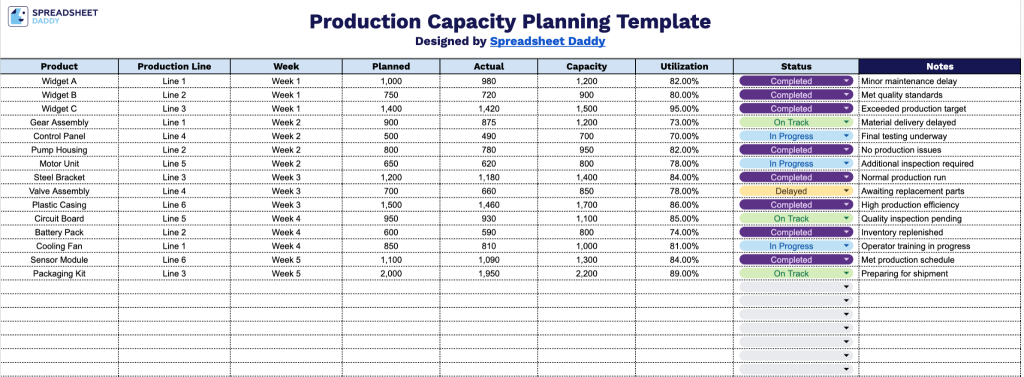
Our Production Capacity Planning Template helps you track planned versus actual output across production lines and weeks, so you can monitor utilization rates and stay on top of status updates and notes for each item.
What’s included
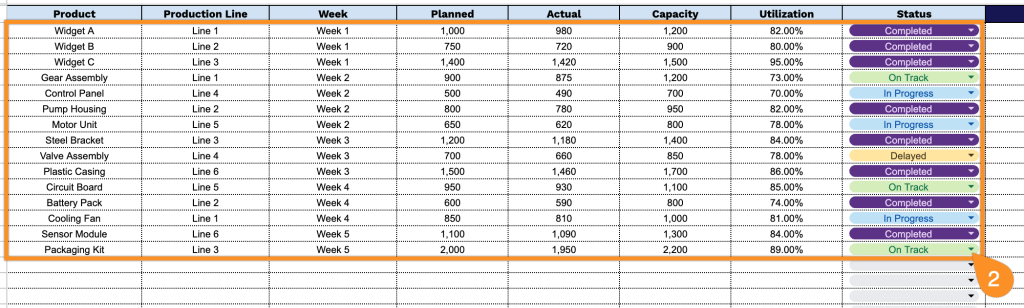
- Structured production tracking columns: The template includes nine dedicated columns, Product, Production Line, Week, Planned, Actual, Capacity, Utilization, and Status, giving you a complete framework to log output against targets for every item you manufacture.
- Weekly planned vs. actual comparison: Side-by-side Planned and Actual columns let you record forecasted production volume next to real output for each week, making it easy to spot shortfalls or overages at a glance.
- Built-in capacity and utilization fields: Dedicated Capacity and Utilization columns let you document each production line’s maximum output and the percentage of that capacity used, helping you identify underused lines or bottlenecks.
You can easily add or remove columns to match your specific tracking needs.
Choose your preferred format below to get a free Production Capacity Planning Template:
How to Use Our Production Capacity Planning Template
1. Open this Production Capacity Planning template in Google Sheets, or download it as an Excel or PDF file.
2. Fill in the product details, production line, week, planned production, actual production, capacity, utilization, and production status to monitor performance.
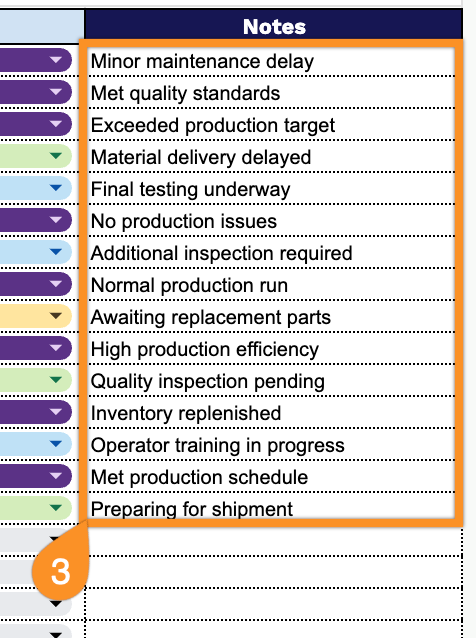
3. Use the Notes section to document production constraints, maintenance schedules, staffing changes, or other planning considerations.