Keep your incentive programs organized with a free Incentive Tracking Template designed for easy recordkeeping.
Available in Google Sheets, Excel, and PDF formats, it provides a convenient way to track employee incentives, bonus payments, goals, and performance-related rewards.
What Is an Incentive Tracking Template?
An incentive tracking template is a structured spreadsheet used by businesses and managers to monitor, record, and evaluate the performance-based rewards offered to employees, sales teams, or partners.
By centralizing this information, the template helps ensure transparency, reduce errors in compensation calculations, and motivate participants by giving them clear visibility into their progress and potential rewards.
Download Spreadsheet Daddy’s Free Incentive Tracking Template
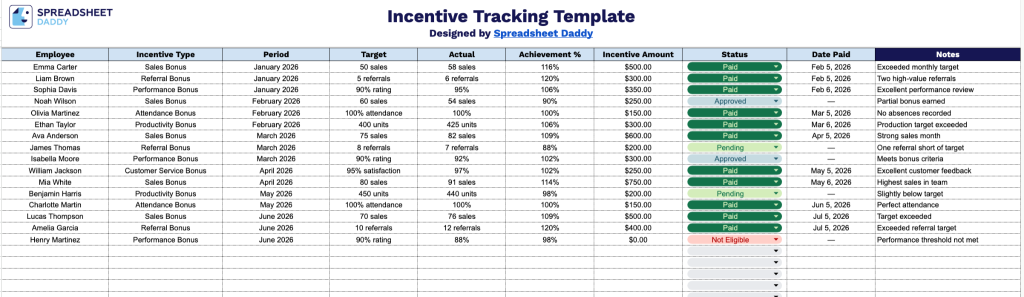
Our Incentive Tracking Template helps you monitor employee bonuses and incentive payouts in one organized spreadsheet, from targets and actual results to achievement percentages and payment status.
What’s included
- Comprehensive tracking columns for full incentive visibility: The template includes ten dedicated columns: Employee, Incentive Type, Period, Target, Actual, Achievement %, Incentive Amount, Status, Date Paid, and Notes, giving you a complete record of who earned what, when, and how their performance measured against goals.
- Built-in achievement percentage tracking: A dedicated Achievement % column lets you calculate and monitor how actual performance compares to target goals for each employee and incentive period, making it simple to determine payout eligibility at a glance.
- Status and payment tracking fields: The Status and Date Paid columns allow you to monitor where each incentive stands, whether it’s pending, approved, or paid, and log the exact date payment was issued, keeping your payroll and incentive records fully auditable.
Columns can be added or removed so the template adapts to whatever incentive types or details your team needs to track.
Get your free Incentive Tracking Template by selecting the format you need from the download options below:
How to Use Our Incentive Tracking Template
1. Choose your preferred format and download the Incentive Tracking template in Excel or PDF, or create a personalized Google Sheets version.
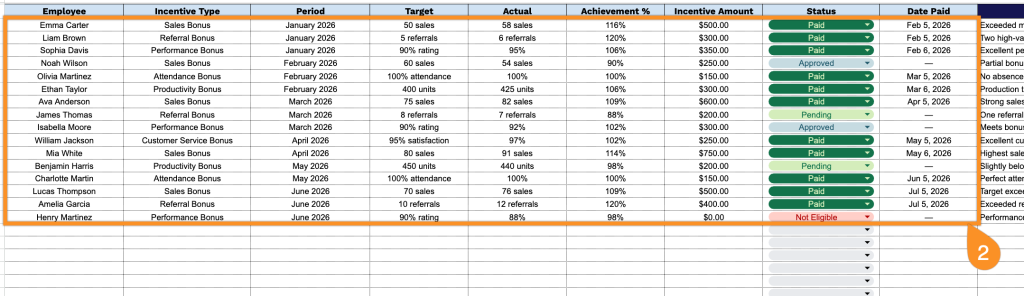
2. Track employee performance incentives by entering the recipient’s name, incentive type, evaluation period, assigned goals, achieved results, completion rate, awarded amount, status, and payment date.
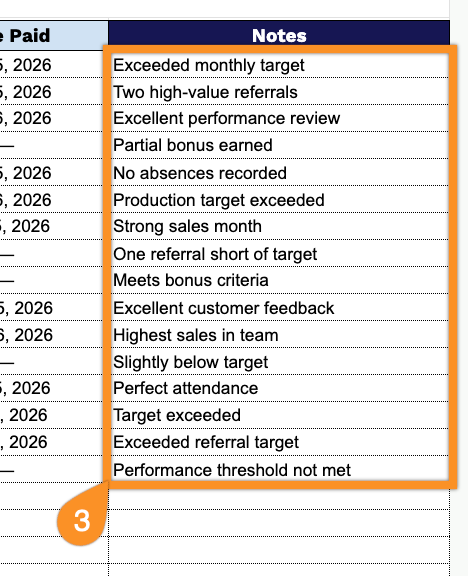
3. Use the Notes section to add any additional comments, eligibility requirements, manager feedback, or important details related to the incentive program.