No need to create a downtime log from scratch.
Our free Downtime Tracker Template provides a ready-to-use format for recording downtime details, tracking lost time, and monitoring operational disruptions.
Edit it easily in Google Sheets, Excel, or PDF to fit your tracking needs.
What Is a Downtime Tracker Template?
A downtime tracker template is a structured document or spreadsheet used by businesses and operations teams to record, monitor, and analyze periods when equipment, systems, or processes are unavailable or not functioning as intended.
By systematically logging this information, organizations can identify recurring patterns and make data-driven decisions to reduce future downtime and improve operational efficiency.
Download Spreadsheet Daddy’s Free Downtime Tracker Template
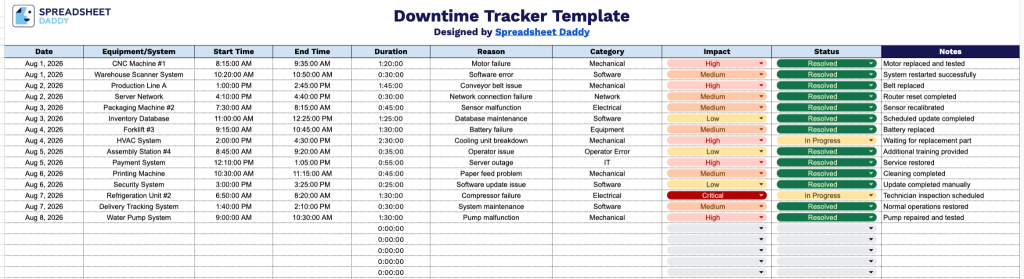
Our Downtime Tracker Template helps you log and monitor equipment or system outages in one organized place.
What’s included
- Structured downtime log with ten tracking fields: Each row captures Date, Equipment/System, Start Time, End Time, Duration, Reason, Category, Impact, Status, and Notes, giving you a complete record of every downtime event from start to finish in a single line.
- Dedicated equipment and reason columns for root-cause tracking: The Equipment/System and Reason columns let you pinpoint exactly which asset failed and why, while the separate Category field lets you group incidents (e.g., mechanical, electrical, human error, scheduled maintenance) for pattern analysis over time.
- Automatic-feel duration tracking with Start and End Time columns: By logging Start Time and End Time side by side, you can calculate downtime duration for each incident, making it easy to total hours lost per equipment, shift, or reporting period.
- Impact and Status columns for prioritization and follow-up: The Impact column lets you flag how each incident affected production, safety, or output, while the Status column (e.g., Open, In Progress, Resolved) helps teams track which downtime events still require action versus those that are closed out.
Add or remove columns to match the specific equipment, systems, or workflow details you need to track.
Use the download links below to access a customizable Downtime Tracker Template in the format you prefer:
How to Use Our Downtime Tracker Template
1. Choose the format that works best for you: download the template as an Excel or PDF file, or create your own editable Google Sheets version.
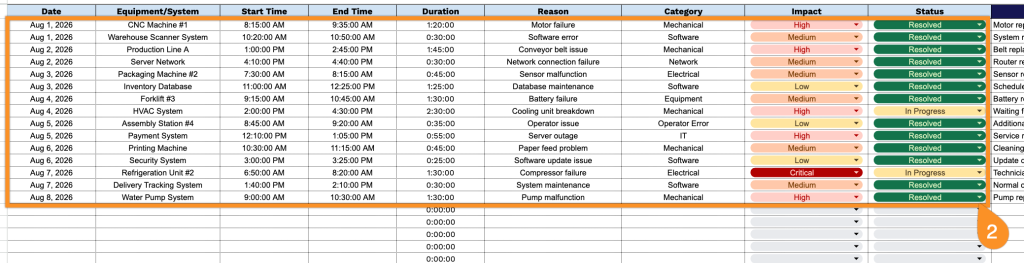
2. Log downtime incidents by entering key details such as the date, equipment or system affected, start and recovery times, cause of the issue, downtime category, business impact, and status. The duration will be calculated automatically for accurate tracking.
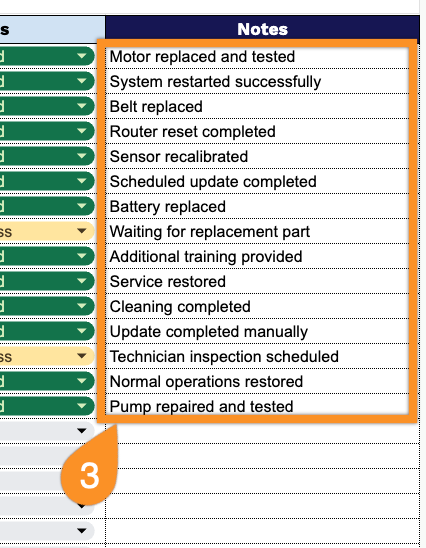
3. Use the Notes section to add additional comments, corrective actions, or recommendations to help prevent future downtime.