Don’t want to build a petty cash log from the ground up?
Download our free Petty Cash Log Template in Google Sheets, Excel, or PDF.
The ready-to-use format makes it simple to document petty cash transactions and keep your expense records organized.
What Is a Petty Cash Log Template?
A petty cash log checklist template is a structured document used by businesses to track small, everyday cash expenditures that are too minor to process through formal accounting channels, such as office supplies, postage, or minor repairs.
By maintaining this log, businesses can easily reconcile their petty cash fund, detect discrepancies, and demonstrate financial accountability during audits or internal reviews.
Download Spreadsheet Daddy’s Free Petty Cash Log Template
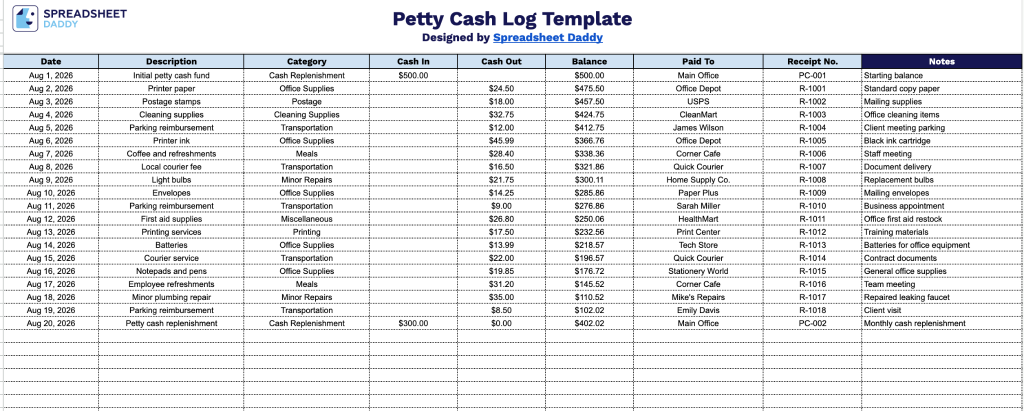
Our Petty Cash Log Template gives you a simple, organized way to track cash disbursements and replenishments over time, with running balances calculated automatically as entries are added.
What’s included
- Detailed transaction tracking fields: The log includes nine dedicated fields: Date, Description, Category, Cash In, Cash Out, Balance, Paid To, Receipt No., and Notes, so you can capture exactly when a transaction occurred, what it was for, who received the funds, and any supporting receipt reference.
- Running balance calculation: The Balance field updates with each entry, automatically reflecting your current petty cash on hand after every cash-in or cash-out transaction, so you never have to manually recalculate totals.
- Expense categorization: The Category field lets you classify each transaction (e.g., office supplies, travel, or postage), making it easy to track spending patterns and prepare for reconciliation or tax reporting.
- Accountability and audit-trail fields: Paid To and Receipt No. fields let you document who received the funds and reference the corresponding physical receipt, creating a clear audit trail for internal reviews or accounting audits.
- Space for additional context: The Notes field provides room to record any extra details about a transaction, such as the reason for an unusual expense or approval information, ensuring nothing gets lost when it’s time to review the log.
It’s fully customizable, so you can add or remove columns as needed to fit your own tracking requirements.
Use the download links below to access a free Petty Cash Log template:
How to Use Our Petty Cash Log Template
1. Download the Petty Cash Log in Excel or PDF format, or save an editable copy to your Google Sheets account.
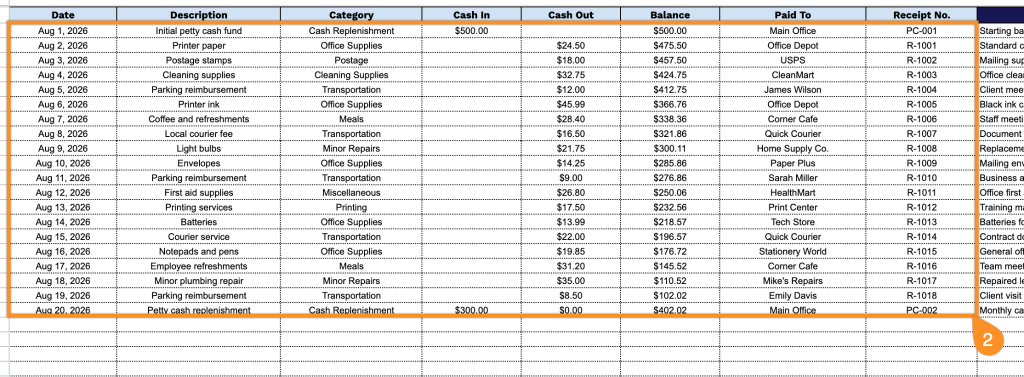
2. Enter the transaction date, description, category, amount received or spent, payee, and receipt number. The template automatically updates the running balance as you record each cash transaction.
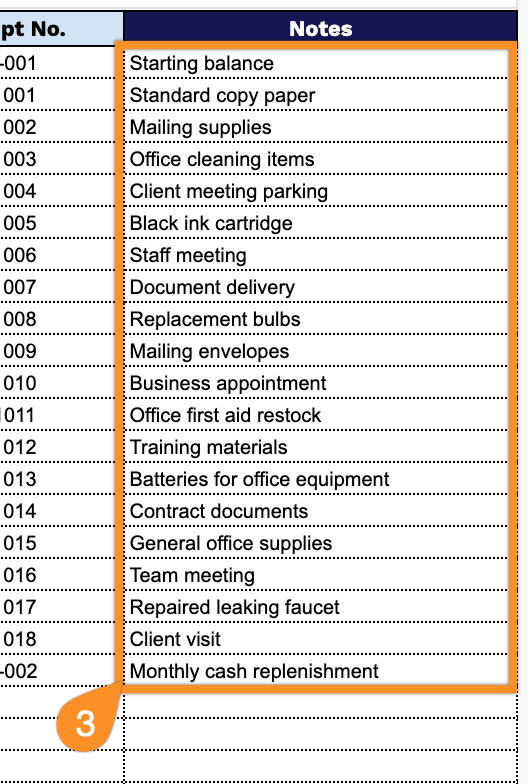
3. Use the Notes section to add important details about each expense, such as the purpose of the payment, receipt information, or any additional comments.