Make choosing the right college easier with our free College Comparison Template.
Available in Google Sheets, Excel, and PDF, it helps you compare important details such as costs, programs, locations, financial aid, housing, and application requirements.
What Is a College Comparison Template?
A college comparison template is a structured tool that helps prospective students systematically evaluate and compare multiple colleges or universities side by side across key criteria.
By consolidating all relevant information in one place, the template makes it easier for students and their families to weigh the pros and cons of each school and make a well-informed enrollment decision.
Download Spreadsheet Daddy’s Free College Comparison Template
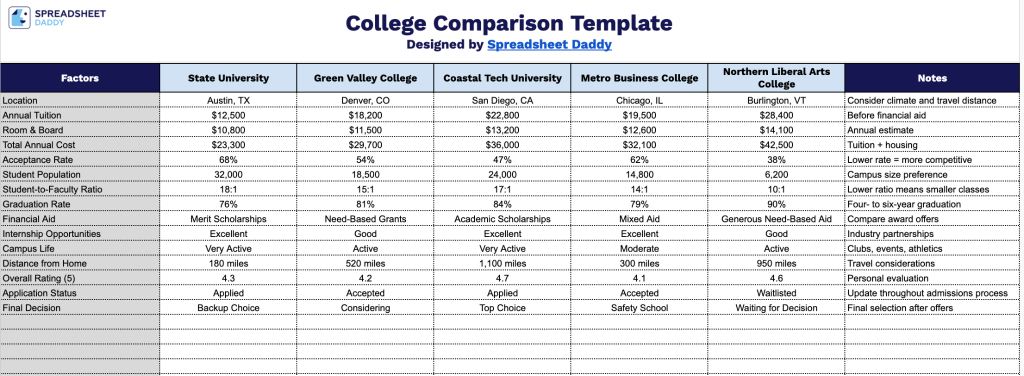
Our College Comparison Template helps you organize and evaluate schools side-by-side across key factors.
What’s included
- Editable college name columns: Five side-by-side columns labeled [College 1] through [College 5] sit in light blue header cells, giving you placeholders to swap in the actual names of the schools you’re evaluating so each column becomes a dedicated comparison slot.
- Shaded factors column for easy scanning: The leftmost “Factors” column is shaded in light gray and spans over 30 blank rows, providing a dedicated space to list every criterion you want to compare, such as tuition, acceptance rate, location, or program offerings, so the same factor lines up across all five colleges.
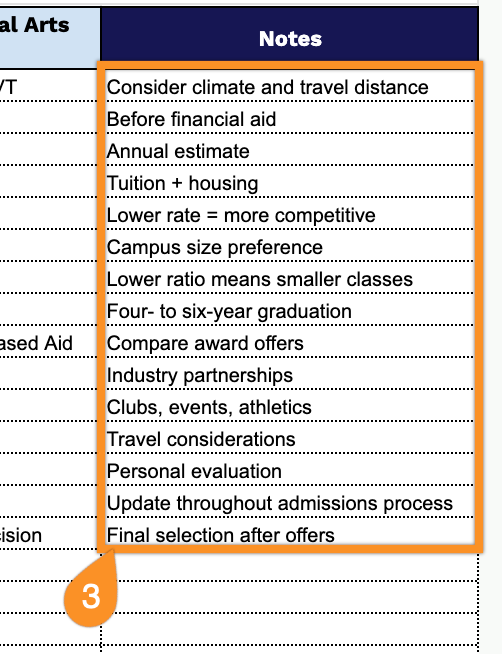
- Dedicated Notes column: A “Notes” column runs along the far right edge, giving you a consistent space to jot down additional context, caveats, or reminders for each factor row without cluttering the comparison cells.
Add or remove columns to match the number of schools you’re considering or the specific factors that matter most to you.
Pick your preferred format below to download a free template for comparing colleges:
How to Use Our College Comparison Template
1. Save the College Comparison Template as an Excel or PDF file, or duplicate it into Google Sheets for online editing.
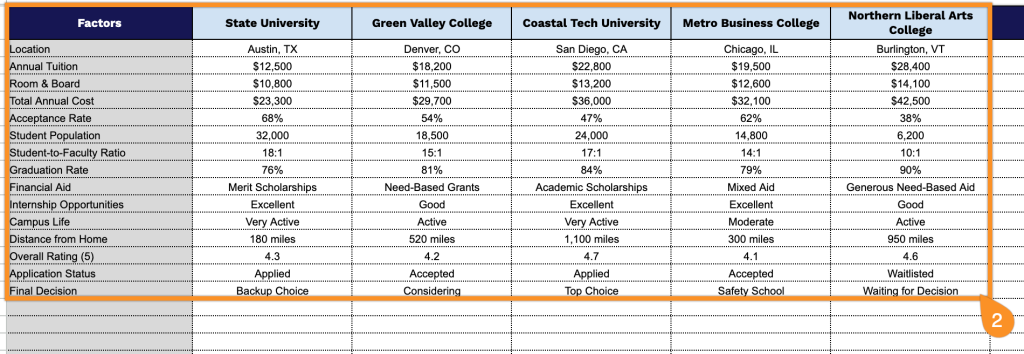
2. List each college in the template, choose the factors you want to evaluate, and complete the information for every school to compare your options side by side.
3. Use the Notes section to record campus visit impressions, questions for admissions, personal priorities, or any other observations to help with your final decision.