Need a simple way to evaluate performance gaps?
Our free Gap Analysis Template is available in Google Sheets, Excel, and PDF, making it easy to organize findings and develop actionable improvement plans.
What Is a Gap Analysis Template?
A gap analysis template is a structured tool for comparing an organization’s current performance or capabilities with its desired future goals or standards.
It helps teams prioritize actions, allocate resources, and develop targeted strategies to close the identified gaps and achieve their objectives.
Download Spreadsheet Daddy’s Free Gap Analysis Template
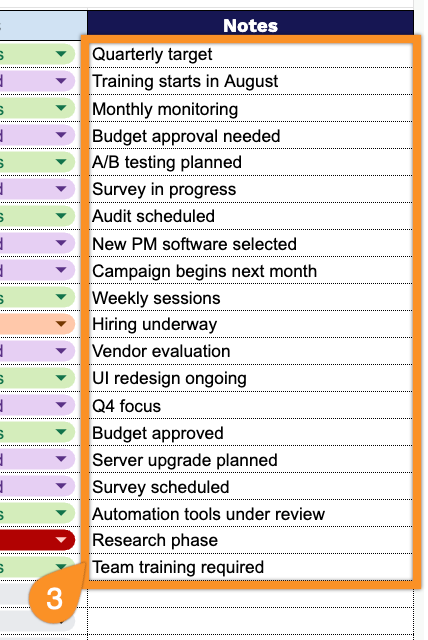
Our Gap Analysis Template helps you compare your current state to your desired state across any area of your business, so you can spot gaps, prioritize what matters, and track progress toward closing them.
What’s included
- Structured eight-column analysis framework: The template includes dedicated columns for Area, Current State, Desired State, Gap, Priority, Action Plan, Owner, Status, and Notes, giving you a logical left-to-right flow that walks each line item from identifying a shortfall all the way through to resolution and accountability.
- Pre-formatted rows with light gridlines: Over 30 rows come pre-built with subtle dashed gridlines and alternating light shading, so you can start typing entries immediately without needing to format borders, row heights, or spacing yourself.
- Ready-to-use Priority and Status tracking fields: Dedicated columns for Priority and Status let teams flag which gaps need urgent attention and track progress (e.g., Not Started, In Progress, Complete) at a glance, making the template equally useful for one-time assessments or ongoing performance reviews.
You can easily add or remove columns to fit the specific needs of your own analysis.
Pick your preferred file format below and download a free Gap Analysis Template:
How to Use Our Gap Analysis Template
1. Save the Gap Analysis template as an Excel or PDF document, or create an editable version in Google Sheets.
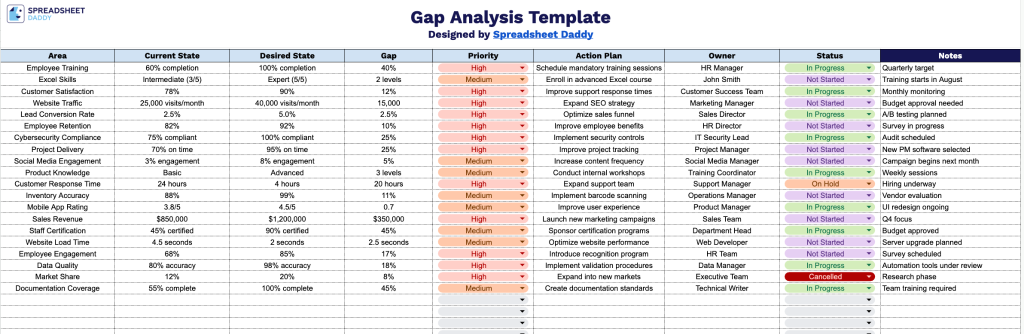
2. Enter the area being evaluated, describe the current and desired states, identify the gap, assign a priority, outline the action plan, specify the owner, and update the current status.
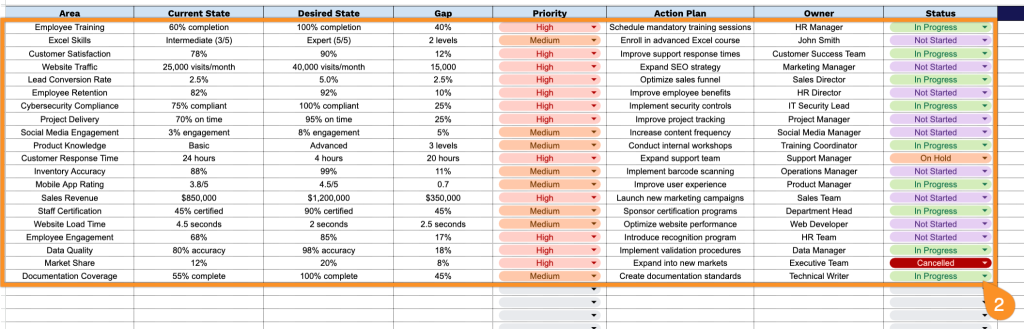
3. Use the Notes section to record additional observations, assumptions, risks, dependencies, or recommendations that support the analysis.