Skip the setup process and download a ready-made Grant Tracking Template in Google Sheets, Excel, or PDF.
It provides a structured way to track grants, manage funding details, and keep everything organized in one place.
What Is a Grant Tracking Template?
A grant tracking template is an organizational tool used by nonprofits, researchers, and institutions to monitor and manage the various grants they have applied for or received.
The template helps teams stay on top of critical deadlines, maintain compliance with funder requirements, and make informed decisions about their overall funding strategy.
Download Spreadsheet Daddy’s Free Grant Tracking Template
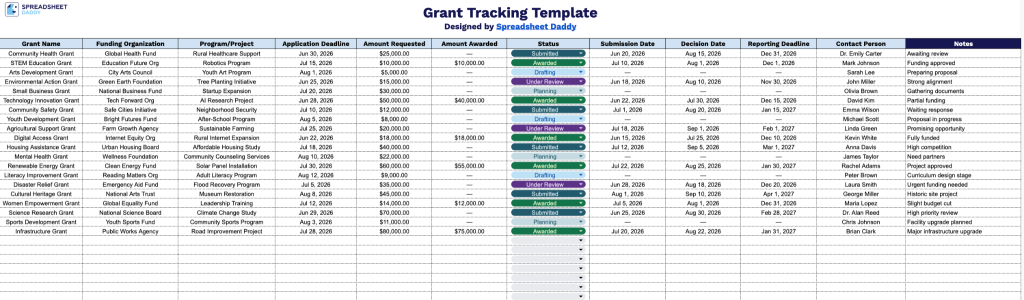
Our Grant Tracking Template gives you a clear, organized way to manage all your grant applications in one place, from initial drafting through final reporting.
What’s included
- 11-column tracking layout across a single sheet: The template features one clean tracking tab with 11 pre-labeled columns, including Grant Name, Funding Organization, Program/Project, Application Deadline, Amount Requested, Amount Awarded, Status, Submission Date, Decision Date, Reporting Deadline, Contact Person, and Notes, covering the full grant lifecycle from prospecting to reporting in a single view.
- Deadline and date management columns: Three date fields (Application Deadline, Submission Date, and Decision Date) alongside a Reporting Deadline column allow you to track every critical milestone in the grant process, making it easy to spot upcoming deadlines and avoid missed opportunities.
- Financial tracking fields for requested vs. awarded amounts: Separate columns for Amount Requested and Amount Awarded let you compare what was applied for against what was received, giving you a clear picture of funding success rates and helping inform future grant strategy.
- Status and relationship columns for pipeline management: A Status column allows you to categorize each grant (e.g., In Progress, Submitted, Awarded, Rejected), while the Contact Person column keeps key funder relationships organized and accessible at a glance, all without needing a separate CRM.
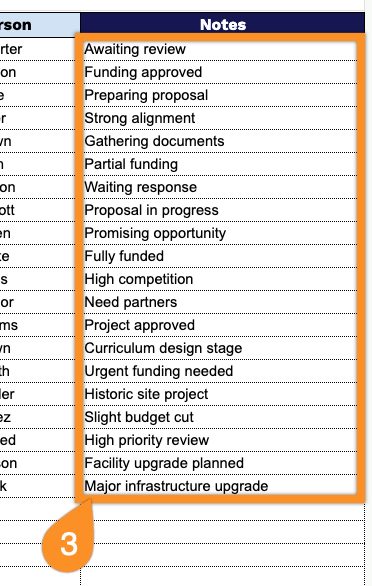
- Open-ended Notes column for custom context: The final Notes column provides a flexible free-text field for capturing additional details specific to each grant, such as eligibility requirements, required attachments, funder preferences, or internal approval steps, keeping all relevant context in a single row.
You can easily add or remove columns to track additional details such as grant categories, funding sources, or internal approval stages as your grant portfolio grows.
Use the links provided to download a free Grant Tracking Template in your desired file type:
How to Use Our Grant Tracking Template
1. Save this template as an Excel or PDF document, or create a working version in Google Sheets.
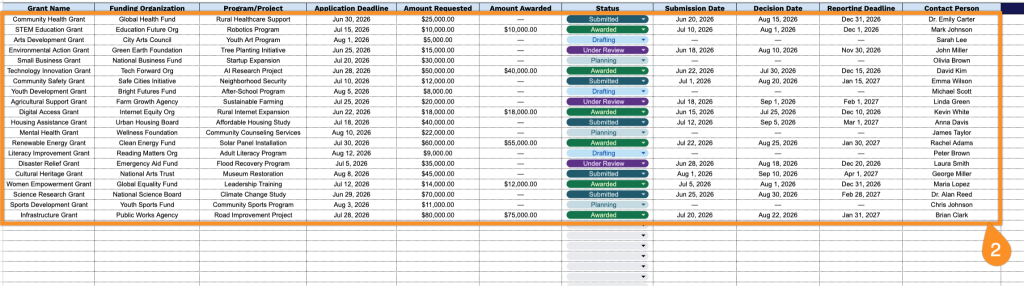
2. Enter the grant details, including the grant title, funding organization, and associated project or program name. Add key dates such as the application deadline, submission date, decision date, and reporting deadline. Record the requested and awarded funding amounts, select the current application status, and include the relevant contact person for easy tracking and follow-up.
3. Use the Notes section to record key context such as reporting requirements, compliance updates, funding conditions, progress explanations, or any important administrative details related to the grant lifecycle.