Make workforce planning more organized with a free, professionally designed Headcount Planning Template.
Available in Google Sheets, Excel, and PDF formats, it can be quickly edited to help you monitor current headcount, plan new hires, and track staffing requirements.
What Is a Headcount Planning Template?
A headcount planning template is a structured tool used by HR and finance teams to forecast, track, and manage an organization’s workforce needs over a given period.
By consolidating workforce data into a single, organized format, the template enables more accurate resource planning, supports strategic decision-making, and helps ensure the right people are in the right roles at the right time.
Download Spreadsheet Daddy’s Free Headcount Planning Template
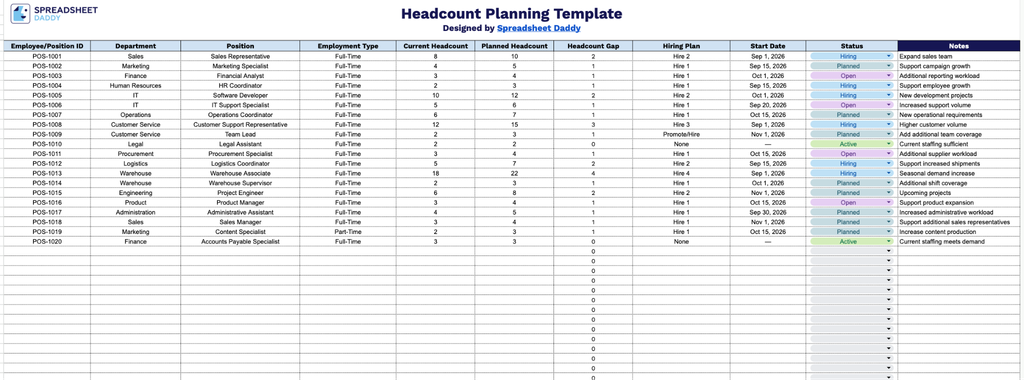
Our Headcount Planning Template helps you track current and planned staffing across departments, showing hiring gaps, timelines, and status for each open position.
What’s included
- Structured tracking columns: Each row includes fields for Employee/Position ID, Department, Position, and Employment Type, giving you a clear, consistent way to log and identify every role across your organization.
- Automated headcount gap calculation: The Headcount Gap column automatically calculates the difference between Current Headcount and Planned Headcount, instantly flagging where you’re understaffed or overstaffed for each position.
- Hiring plan and timeline fields: Dedicated columns for Hiring Plan and Start Date let you document staffing strategy and track exactly when new hires are expected to begin, keeping recruiting efforts aligned with business needs.
- Status tracking for visibility: A Status column allows you to mark the progress of each position (e.g., open, in progress, filled), giving stakeholders an at-a-glance view of where hiring stands across departments.
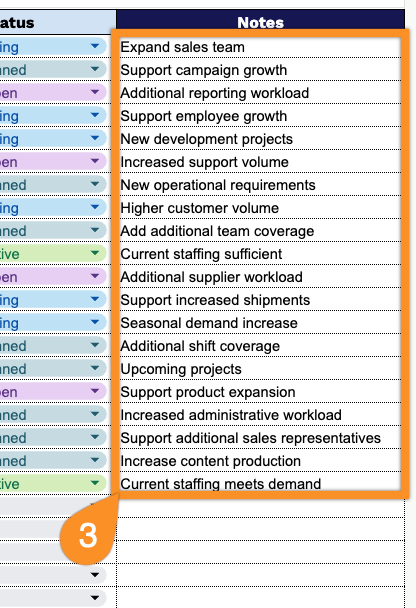
- Notes section for context: A dedicated Notes column at the end of each row provides space to capture additional details, special considerations, or updates relevant to that specific position or hire.
Add or remove columns to match how your team likes to plan.
Start planning your workforce with a free blank Headcount Planning Template, available in the formats listed below:
How to Use Our Headcount Planning Template
1. Download the Headcount Planning template as an Excel or PDF file, or make your own copy in Google Sheets.
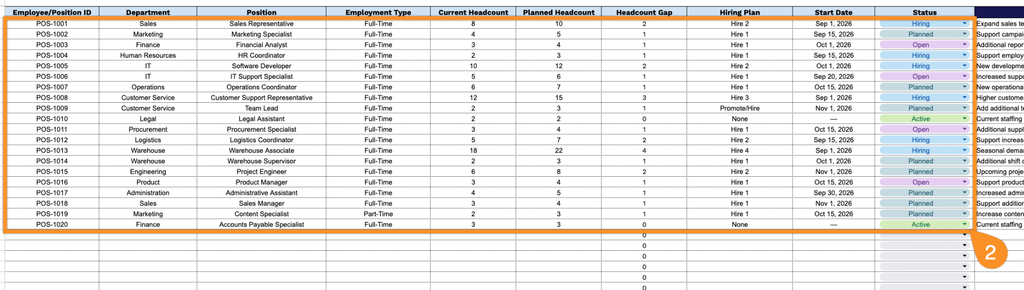
2. Enter the employee or position ID, department, position, employment type, current headcount, planned headcount, hiring plan, start date, and current status. The template automatically calculates the headcount gap, making it easy to identify staffing needs and plan future hiring.
3. Use the Notes section to add important details, hiring considerations, or special instructions related to each position or staffing plan.