Make overtime scheduling easier with a ready-to-use Overtime Sign-Up Sheet Template.
Available in Google Sheets, Excel, and PDF, this free template can be customized to fit your workplace and provides a clear way to record employee overtime requests and availability.
What Is an Overtime Sign-Up Sheet Template?
An overtime sign-up sheet template is a pre-formatted document used by organizations to systematically track and manage employees who volunteer or are scheduled for overtime work.
This template streamlines the scheduling process, ensures fair distribution of overtime opportunities, and creates a clear paper trail for payroll and compliance purposes.
Download Spreadsheet Daddy’s Free Overtime Sign-Up Sheet Template
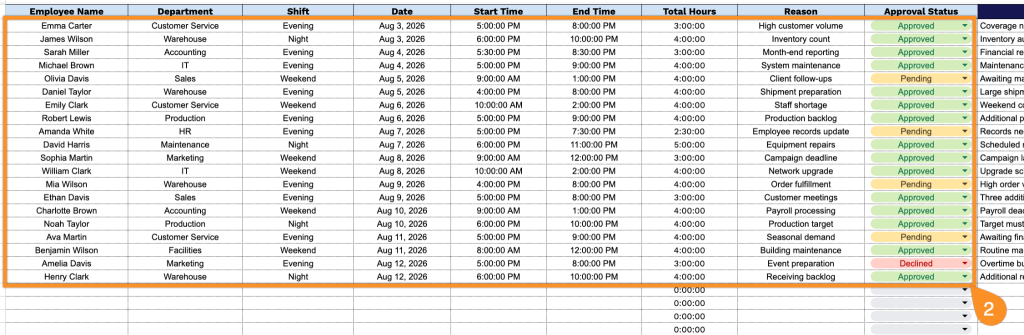
Our Overtime Sign-Up Sheet Template gives you a clean, ready-to-use way to track employee overtime requests, shifts, hours, and approval status all in one place.
What’s included
- Complete shift-tracking fields: The sheet includes dedicated columns for Employee Name, Department, Shift, Date, Start Time, and End Time, giving you everything you need to log exactly who worked overtime and when.
- Automatic total hours calculation: The Total Hours column is pre-formatted in hour-minute-second format, so once start and end times are entered, the total overtime duration is calculated automatically rather than tallied by hand.
- Reason field for context and justification: A dedicated Reason column lets employees or managers note why the overtime was needed, such as covering a shift, meeting a deadline, or handling unexpected workload.
- Built-in approval workflow: An Approval Status column allows managers or supervisors to mark each overtime request as approved, denied, or pending, turning the sheet into a lightweight sign-off tool in addition to a time log.
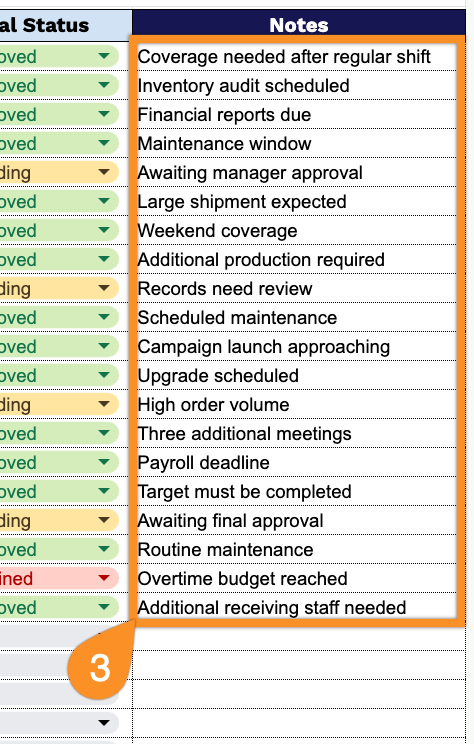
- Notes field for additional details: A Notes column provides space to record any extra information relevant to the overtime request, such as special instructions, follow-ups, or exceptions to standard policy.
You can add or remove columns to match your own tracking needs.
Use the links below to download a blank Overtime Sign-Up Sheet template:
How to Use Our Overtime Sign-Up Sheet Template
1. Get the Overtime Sign-Up Sheet in the format that works best for you: Excel, PDF, or a customizable Google Sheets copy.
2. Enter the employee’s name, department, shift, date, start and end times, reason for overtime, and approval status. The template automatically calculates the total overtime hours based on the entered times.
3. Use the Notes section to include any additional information, special instructions, or comments related to the overtime request.