Skip the hassle of creating a payroll checklist from scratch. Download our free Payroll Processing Checklist Template in Google Sheets, Excel, or PDF and easily adapt it to your payroll workflow.
Use it to organize key processing steps, double-check payroll details, and keep each pay period on track.
What Is a Payroll Processing Checklist Template?
A payroll processing checklist template is a structured document that outlines the essential steps and tasks required to process employee payroll accurately and efficiently within an organization.
By using this template, payroll administrators can minimize errors, maintain compliance with tax laws and labor regulations, and create a consistent, repeatable process that reduces the risk of missed steps or financial discrepancies.
Download Spreadsheet Daddy’s Free Payroll Processing Checklist Template
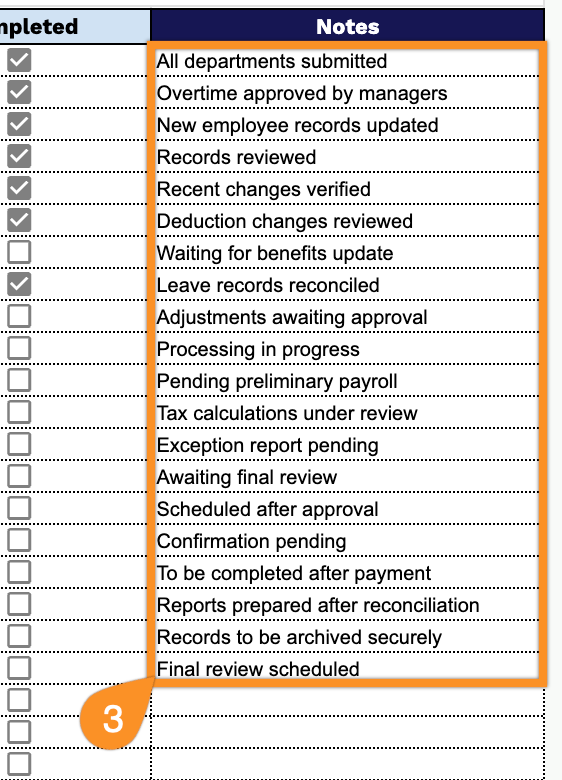
Our Payroll Processing Checklist Template helps you track every step of your payroll cycle, from collecting timesheets to final approval and archiving, keeping tasks organized by category, owner, due date, and priority.
What’s included
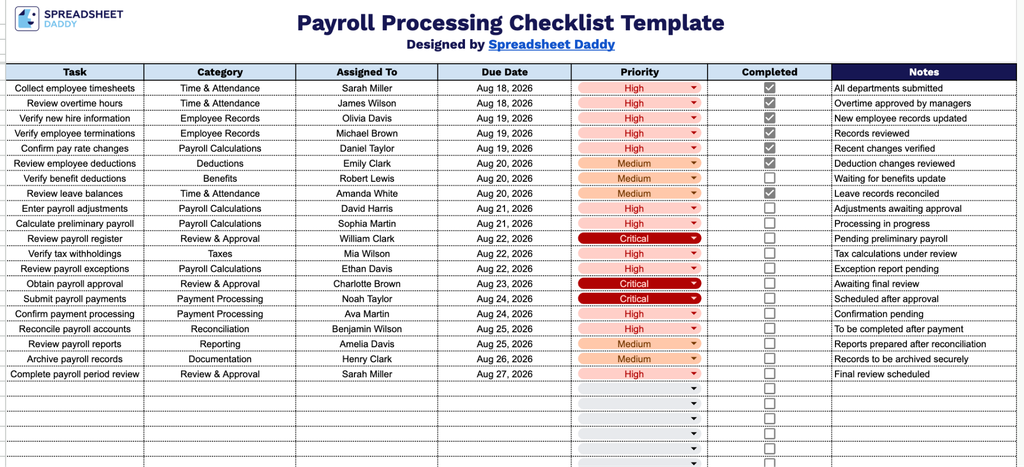
- Structured task-tracking columns: The table includes seven dedicated columns: Task, Category, Assigned To, Due Date, Priority, and Completed, giving you a clear framework to log every payroll action item, assign ownership, set deadlines, and flag urgency all in one place.
- Built-in completion checkboxes: Each row includes a clickable checkbox in the Completed column, letting you track progress at a glance and quickly identify which payroll tasks are still outstanding and which are finished.
- Dedicated Notes column for context: A wide Notes column runs along the right side of the table, giving you space to record additional details, exceptions, reminders, or follow-up actions tied to each specific payroll task.
You can add or remove columns to fit your company’s specific payroll steps and approval process.
Choose your preferred file format below to get a free, ready-to-use Payroll Processing Checklist template:
How to Use Our Payroll Processing Checklist Template
1. Get the Payroll Processing Checklist as an Excel or PDF file, or make a personal Google Sheets copy to customize as needed.
2. Add each payroll task, category, assignee, due date, and priority, then check the box as each task is completed.
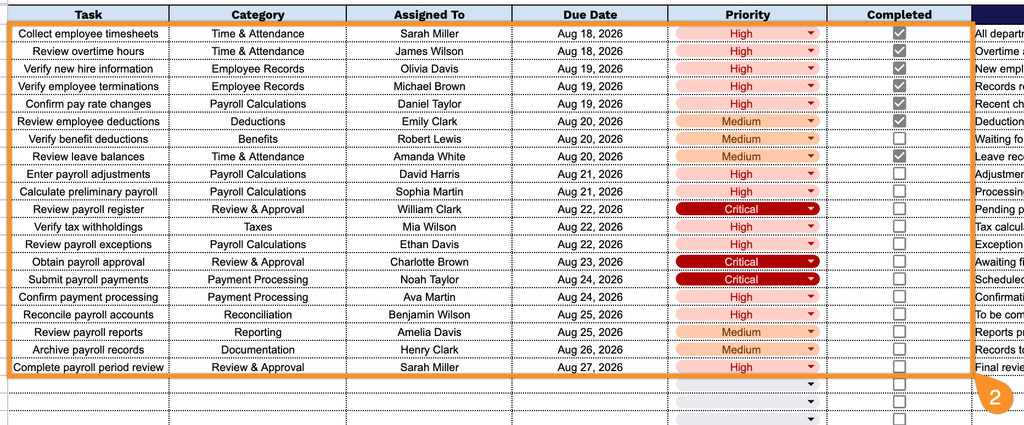
3. Use the Notes section to document important payroll-related details, exceptions, pending items, or special instructions that need to be addressed before payroll is finalized.