Want a simple way to manage your product backlog without spending time creating a spreadsheet yourself?
Our free Product Backlog Template gives you a ready-to-use structure for documenting tasks, user stories, priorities, and progress.
Download it in Google Sheets, Excel, or PDF and customize it to fit your team’s workflow.
What Is a Product Backlog Template?
A product backlog template is a pre-structured document or tool used by product and development teams to organize, prioritize, and track all the work items that need to be completed for a product.
By standardizing how backlog items are captured and managed, the template helps teams maintain clarity, improve sprint planning, and ensure that nothing falls through the cracks throughout the product development lifecycle.
Download Spreadsheet Daddy’s Free Product Backlog Template
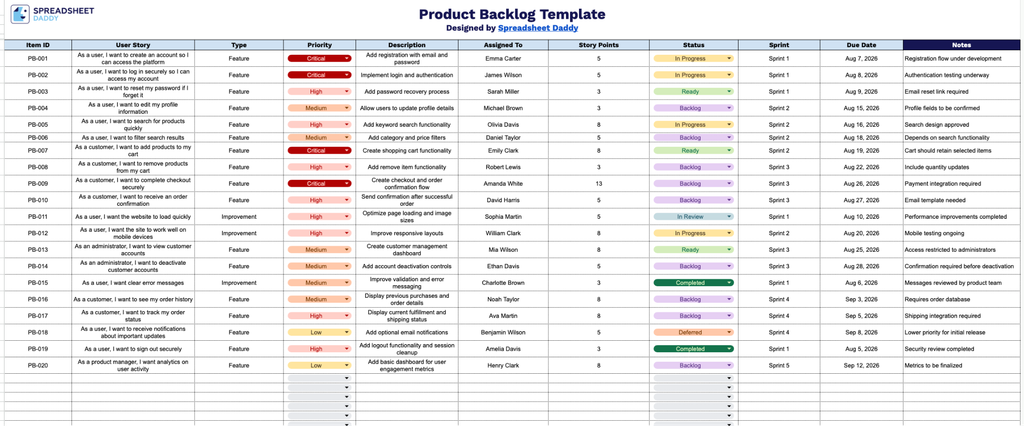
Our Product Backlog Template gives you a simple, organized way to track user stories, priorities, story points, and sprint status all in one place.
What’s included
- Complete backlog-tracking columns: The sheet includes 10 dedicated columns: Item ID, User Story, Type, Priority, Description, Assigned To, Story Points, Status, Sprint, and Due Date, giving your team a structured, end-to-end view of every backlog item from creation to completion.
- Prioritization and estimation fields: Built-in Priority and Story Points columns let your team rank items by urgency or business value and assign relative effort estimates, making sprint planning and capacity forecasting easier at a glance.
- Status and sprint tracking: The Status and Sprint columns allow you to monitor where each item stands in the workflow and which sprint or iteration it’s assigned to, keeping the whole team aligned on current progress.
- Ownership and accountability tracking: The Assigned To column makes it easy to see who is responsible for each backlog item, promoting clear accountability and reducing confusion over task ownership.
The layout is fully customizable, so you can add or remove columns to match the details your team needs to track.
Choose your preferred file format below and get a free, ready-to-use Product Backlog template:
How to Use Our Product Backlog Template
1. Download the template in Excel or PDF format, or duplicate it in Google Sheets to create your own working copy.
2. Add the key details for each backlog item, including the item ID, user story, type, priority, description, assignee, story points, status, sprint, and due date.
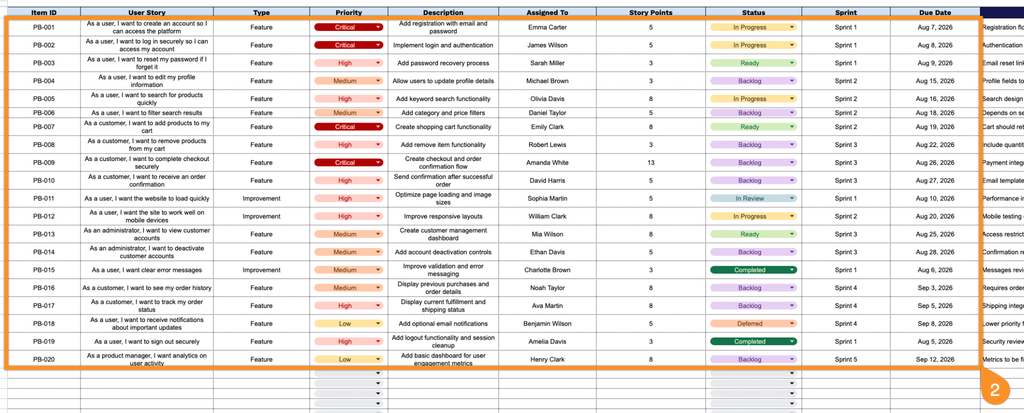
3. Use the Notes section to add additional requirements, dependencies, acceptance criteria, or other important information related to each backlog item.