Keeping projects on track requires focus, organization, and the right tools.
Our RAID Log Template offers a professional, easy-to-use solution that helps you manage your projects more effectively.
It is suitable for teams of any size and provides a clear and structured way to stay ahead of potential issues while keeping everyone aligned.
What Is a RAID Log Template?
A RAID log template is a project management tool used to track and manage Risks, Assumptions, Issues, and Dependencies throughout a project’s lifecycle.
This centralized tracking system helps project managers maintain visibility, prioritize actions, and ensure nothing critical falls through the cracks.
Download Spreadsheet Daddy’s Free RAID Log Template
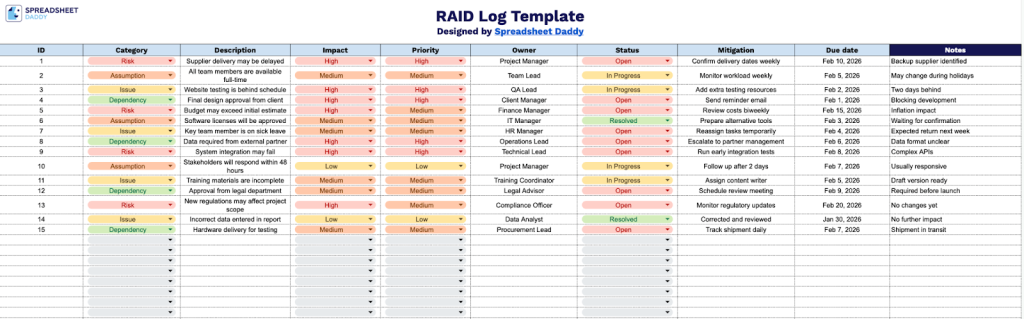
Our RAID Log Template helps you track and manage Risks, Assumptions, Issues, and Dependencies throughout your project lifecycle.
What’s included
- Comprehensive RAID tracking structure: The template features a systematic table with nine dedicated columns (ID, Category, Description, Impact, Priority, Owner, Status, Mitigation, Due Date, and Notes) designed to capture all essential details for managing Risks, Assumptions, Issues, and Dependencies throughout your project lifecycle.
- Category classification system: The Category column enables you to easily distinguish between the four RAID elements, Risks (potential future problems), Assumptions (conditions presumed valid), Issues (current problems requiring resolution), and Dependencies (external factors affecting progress), keeping your project management organized and comprehensive.
- Priority and impact assessment fields: Dedicated Impact and Priority columns allow you to evaluate and rank each entry’s significance to your project, helping teams focus resources on high-priority items and understand potential consequences on project timelines and deliverables.
- Ownership and accountability tracking: The Owner and Status columns clearly assign responsibility for each RAID item and enable real-time progress monitoring, ensuring nothing falls through the cracks and that stakeholders remain informed of mitigation efforts.
- Mitigation planning with timeline management: The Mitigation column, paired with the Due Date field, allows you to document specific action plans for addressing each item, set deadlines for resolution, and maintain a clear roadmap for risk prevention and issue resolution, with an additional Notes column for supplementary context and updates.
You can adjust the template by adding or removing columns to fit your specific project management needs.
Use the links below to quickly download a ready-to-use RAID Log Template in the format of your choice:
How to Use Our RAID Log Template
1. Download the RAID Log in Excel or PDF format, or set up your own version in Google Sheets.
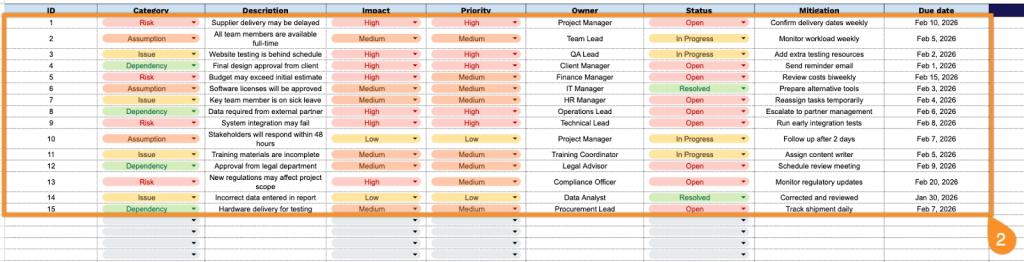
2. Complete the columns by documenting all critical information for each identified item:
- ID: Enter the unique identifier assigned to each RAID entry for tracking and reference purposes.
- Category: Select the appropriate classification (Risk, Assumption, Issue, or Dependency).
- Description: Provide a clear and concise explanation of the RAID item, including relevant context and details.
- Impact: Assess and document the potential effect on the project (low, medium, or high).
- Priority: Indicate the urgency level for addressing this item based on impact and likelihood.
- Owner: Assign the team member responsible for monitoring and managing this RAID entry.
- Status: Record the current state (open, in progress, resolved, or closed).
- Mitigation: Outline the planned actions or strategies to address or minimize the RAID item.
- Due Date: Specify the target date by which the mitigation actions should be completed or reviewed.
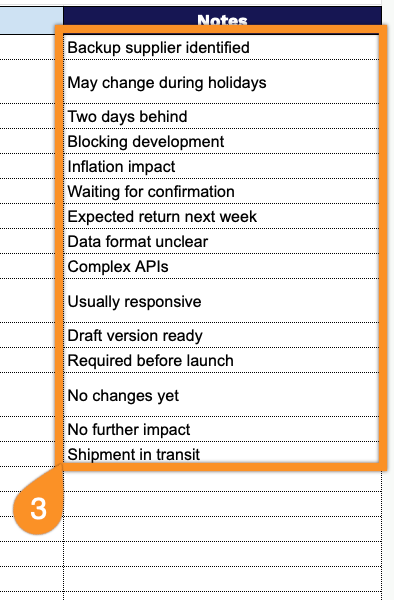
3. Use the Notes section to capture additional context, clarifications, or any other essential details.