Save time by starting with a ready-to-use route planner instead of building one yourself.
Download our free Route Planner Template in Google Sheets, Excel, or PDF to organize destinations, map efficient travel routes, schedule stops, and keep every trip well planned.
The template is fully customizable and works for personal travel, deliveries, field visits, and business route planning.
What Is a Route Planner Template?
A route planner template is a structured tool for organizing and optimizing the sequence of stops, destinations, or waypoints for a journey or delivery run.
By laying out all stops in advance, a route planner template helps save time, reduce fuel costs, minimize missed stops, and ensure a smoother, more predictable workflow for drivers, field teams, or logistics coordinators.
Download Spreadsheet Daddy’s Free Route Planner Template
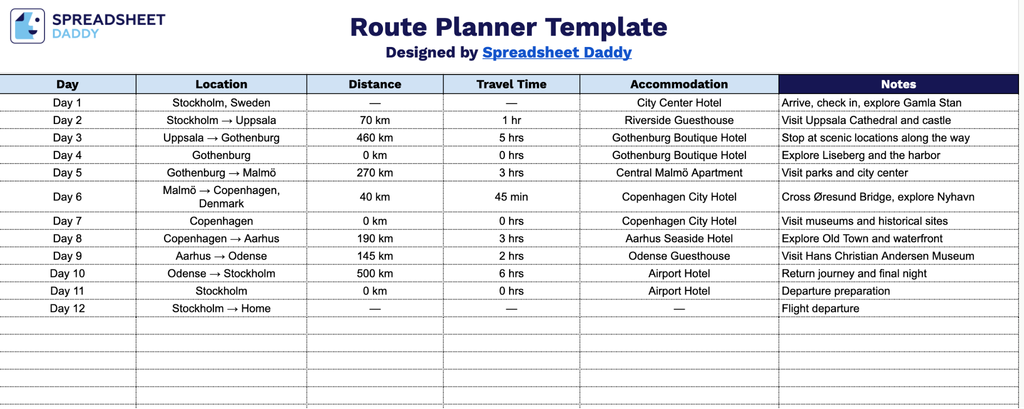
Our Route Planner Template helps you organize a multi-day trip in one simple, easy-to-follow layout.
What’s included
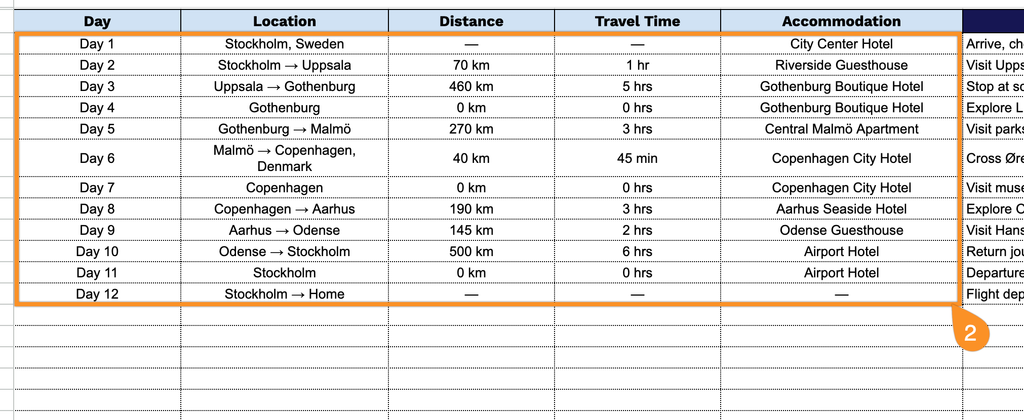
- Day-by-day itinerary tracking: A dedicated Day column lets you log each stage of your trip in sequence, making it easy to follow the route chronologically from departure to final destination.
- Location and distance fields for route mapping: Editable Location and Distance columns let you record each stop along the way and the mileage or kilometers between them, giving you a running record of your total travel distance.
- Travel time estimates for scheduling: A Travel Time column allows you to note the expected or actual duration between each stop, helping you plan arrival times and stay on schedule throughout the trip.
- Accommodation details for overnight planning: The Accommodation column lets you record hotel names, addresses, or booking confirmations for each overnight stay along your route.
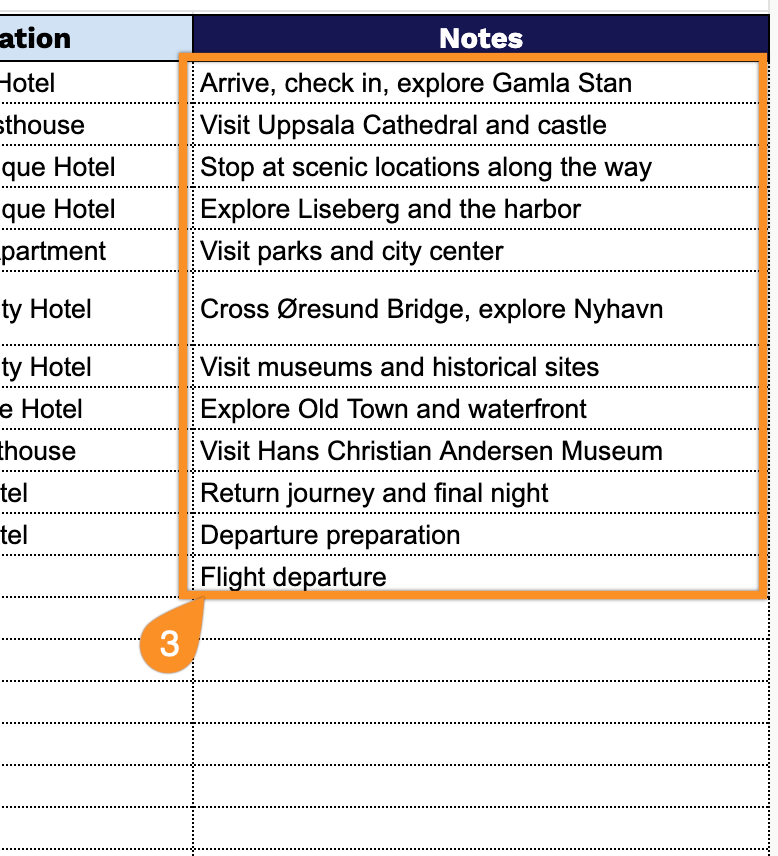
- Open-ended Notes section for extra details: The Notes column provides space to capture any additional information relevant to each leg of the journey, such as fuel stops, tolls, contact numbers, or special reminders.
Add or remove columns to fit your own trip’s needs.
Use the links below to access a free Route Planner template in multiple file formats:
How to Use Our Route Planner Template
1. Save the Route Planner template as an Excel or PDF file, or create a personal Google Sheets version for easy editing.
2. Fill in each stop by adding the day, location, distance, travel time, and accommodation.
3. Use the Notes section to add important route information, such as road closures, parking details, traffic considerations, or other special requirements.