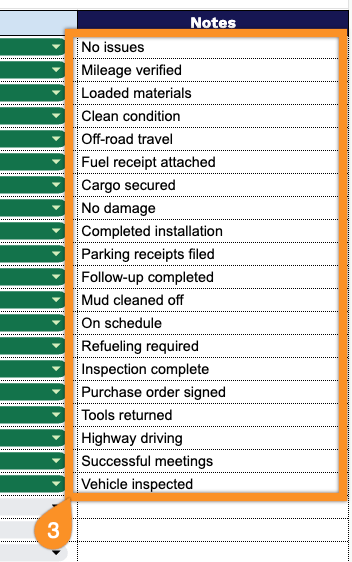
Manage company vehicle usage with ease using our free Vehicle Sign Out Sheet Template.
Available in Google Sheets, Excel, and PDF, it’s fully editable and designed to simplify vehicle tracking.
What Is a Vehicle Sign Out Sheet Template?
A Vehicle Sign Out Sheet Template is a standardized document used by organizations to track and record the usage of company or fleet vehicles.
By maintaining a consistent log of vehicle activity, the template also supports maintenance scheduling, fuel cost tracking, and can serve as a reference in case of accidents, disputes, or audits.
Download Spreadsheet Daddy’s Free Vehicle Sign Out Sheet Template
Our Vehicle Sign Out Sheet Template helps you track vehicle usage across your team, including who checked out each vehicle, when, and for what purpose.
What’s included
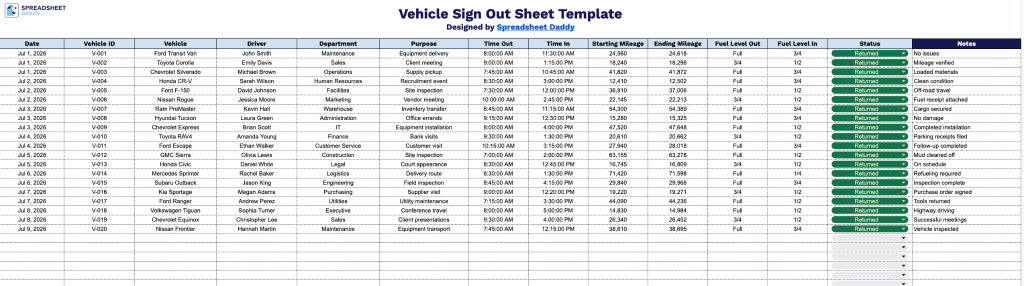
- Comprehensive trip-tracking columns: The sheet includes dedicated fields for Date, Vehicle ID, Vehicle, Driver, Department, and Purpose, providing a complete record of who took which vehicle, when, and why for every checkout.
- Time and mileage logging fields: Time Out and Time In columns paired with Starting Mileage and Ending Mileage fields let you track exactly how long a vehicle was in use and how many miles were driven on each trip.
- Fuel level monitoring: The Fuel Level Out and Fuel Level In columns allow staff to record fuel status before and after each trip, helping to ensure vehicles are returned with adequate fuel and flagging any discrepancies.
- Status and notes tracking: A Status column lets you mark whether a vehicle is currently out, returned, or needs maintenance, while the Notes column provides space to document any issues, damage, or special circumstances from the trip.
You can add or remove columns as needed to fit your organization’s specific tracking requirements.
Use the links below to access a free Vehicle Sign Out Sheet template for tracking vehicle usage:
How to Use Our Vehicle Sign Out Sheet Template
1. Download the template in Excel or PDF, or duplicate it into your Google Sheets account for easy customization.
2. Enter all required vehicle usage details, including the date, vehicle ID, vehicle name or model, driver, department, reason for use, sign-out and return times, mileage, fuel levels, and vehicle status.
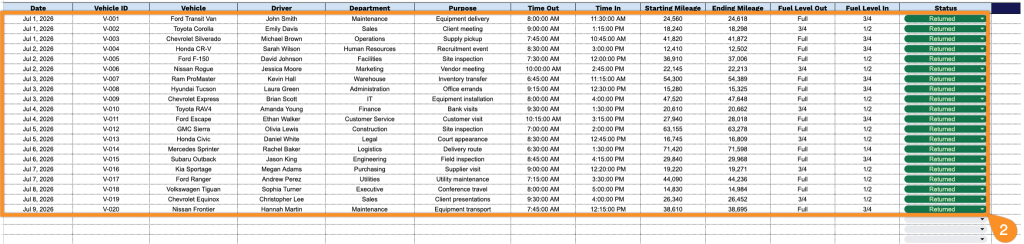
3. Use the Notes or Comments section to record additional information, such as special instructions, required maintenance, accident reports, or signatures confirming the vehicle’s sign-out and return.