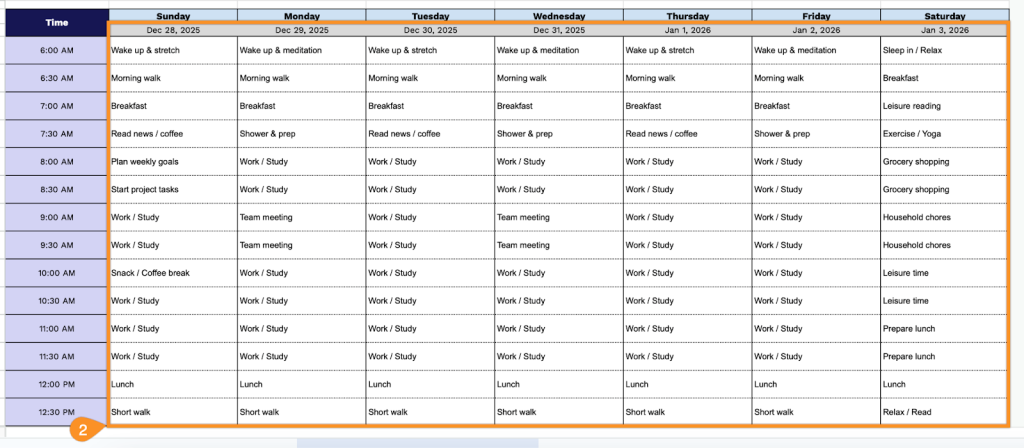
Take control of your day with our Daily Planner Template, ready to download in Google Sheets, Excel, and PDF.
Quickly customize it to schedule tasks, set priorities, and boost productivity.
What Is a Daily Planner Template?
A daily planner template is a pre-designed organizational document that helps you structure and manage your day by providing designated spaces for tasks, appointments, priorities, and notes.
It serves as a reusable framework that eliminates the need to create a planning layout from scratch each day, allowing you to focus on filling in your actual schedule and to-dos.
Download Spreadsheet Daddy’s Free Daily Planner Template
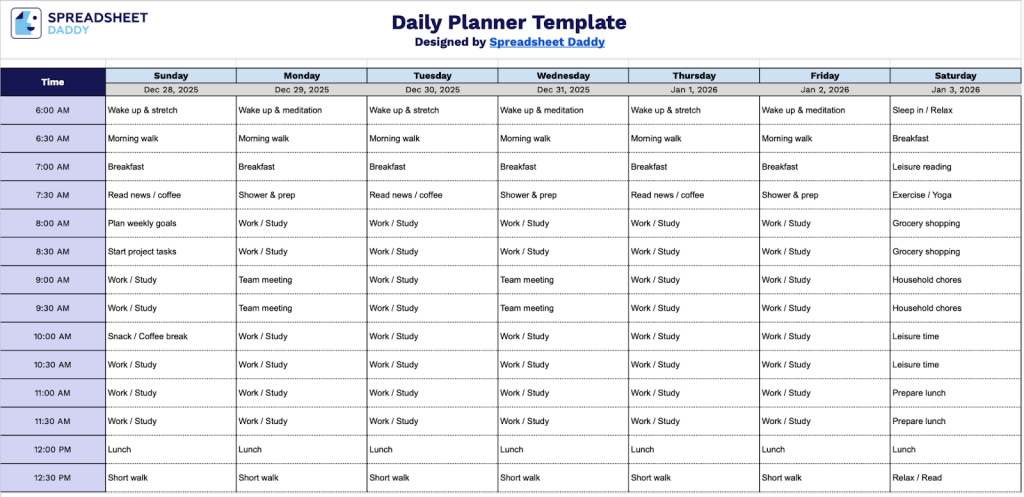
Our Daily Planner Template helps you organize your schedule across an entire week with time slots from 6:00 AM to 9:00 PM.
What’s included
- Comprehensive time-slot scheduling grid: The template provides 30-minute time blocks from 6:00 AM to 9:00 PM, giving you 15 hours of detailed scheduling capacity per day to plan appointments, tasks, meetings, and activities with precise time management during your active hours.
- Seven-day weekly layout: A whole week spread displays Sunday through Monday in separate columns, each with a customizable date field at the top, enabling you to plan and visualize your entire week at a glance while maintaining clear day-by-day organization for better time allocation.
- Blank planning cells for maximum flexibility: Each intersection of day and time creates an empty cell with ample space for writing in appointments, color-coding activities, adding notes, or blocking out time segments, allowing you to adapt the planner to your personal scheduling style and preferences.
You can easily customize the template by adding or removing columns to fit your specific needs.
Use the links below to access a free blank daily planner template in the format that works best for you:
How to Use Our Daily Planner Template
1. Get started by downloading the template in PDF or Excel, or save a copy to Google Sheets.
2. Enter the dates for the week and schedule your activities or tasks in each time slot.