Take control of your sales pipeline with our ready-made Sales Funnel Template.
Download in Google Sheets, Excel, or PDF and effortlessly organize leads, track progress, and boost your conversion performance.
What Is a Sales Funnel Template?
A sales funnel template is a pre-designed framework that maps out the customer journey from initial awareness to final purchase.
These templates help businesses visualize their sales process, identify bottlenecks, and systematically convert leads into customers without having to build the funnel structure from scratch.
Download Spreadsheet Daddy’s Free Sales Funnel Template
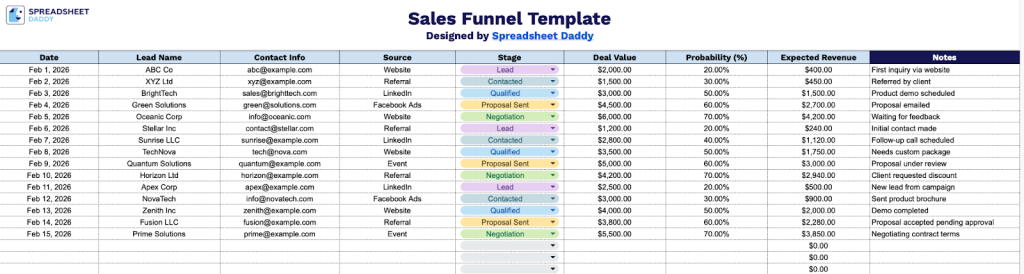
Our Sales Funnel Template helps you track and manage your leads from first contact through to closing, giving you a clear view of your pipeline at every stage.
What’s included
- Lead tracking columns across a single structured sheet: The template features eight dedicated columns, including Date, Lead Name, Contact Info, Source, Stage, Deal Value, Probability (%), and Notes, laid out in a clean, row-by-row format that allows you to log every prospect in your pipeline with full context in one centralized view.
- Pre-built Expected Revenue calculation column: The Expected Revenue column is automatically calculated based on the Deal Value and Probability (%) inputs you enter, giving you a real-time weighted revenue figure for each lead without any manual math required.
- Stage and Source tracking fields for pipeline visibility: Dedicated columns for Source (e.g., referral, social media, cold outreach) and Stage (e.g., Prospecting, Qualified, Proposal, Closed) let you categorize and filter leads by where they came from and where they stand in your funnel, giving you a clear snapshot of pipeline health at any given time.
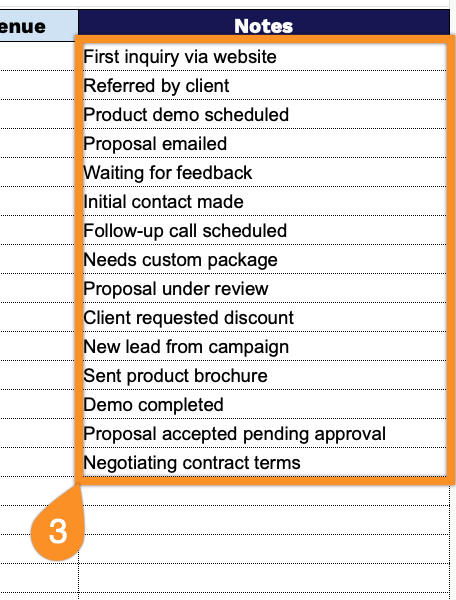
- Notes column for contextual deal intelligence: A freeform Notes column at the far right of each row gives your sales team space to log follow-up reminders, objections, next steps, or any other deal-specific details, keeping all relevant information tied directly to each lead record without needing a separate document.
You can add or remove columns to fit your specific workflow and business needs.
Pick your favorite format and download a free Sales Funnel Template using the links below:
How to Use Our Sales Funnel Template
1. Access the template in Excel or PDF, or save your own Google Sheets version.
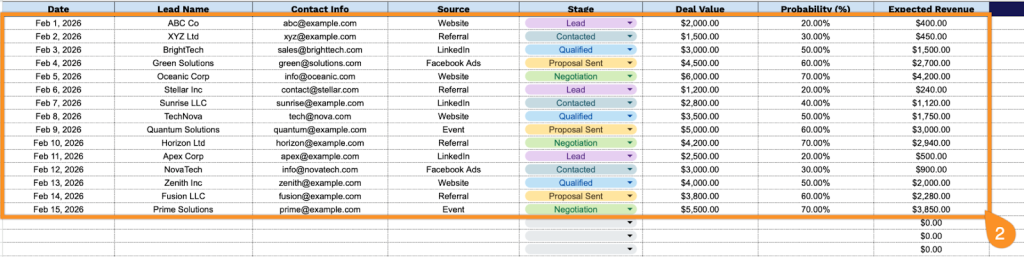
2. Complete the columns by entering all essential pipeline and contact information:
- Date: Record when the lead was first entered into your system or when contact was made.
- Lead Name: Enter the full name of the prospect or company you’re tracking.
- Contact Info: Include the primary contact details such as phone number, email address, or preferred communication method.
- Source: Specify where this lead originated (referral, website, social media, trade show, cold outreach, etc.).
- Stage: Set the current position in your sales pipeline (lead, qualified, proposal, negotiation, closed-won, or closed-lost).
- Deal Value: Enter the total potential revenue amount for this opportunity.
- Probability (%): Assign the likelihood of closing this deal based on the current stage (this typically increases as leads progress through your funnel).
- Expected Revenue: This field is calculated automatically by multiplying the Deal Value by the Probability percentage.
3. Use the Notes column to track reminders, follow-up actions, client preferences, obstacles, or any special circumstances that might affect the deal.