Make reflection sessions more organized with our free Start Stop Continue Template.
Download it as a Google Sheets, Excel, or PDF file and use its easy-to-edit format to gather feedback, evaluate workflows, and turn team suggestions into meaningful improvements.
What Is a Start Stop Continue Template?
A start stop continue template is a simple yet effective feedback and retrospective framework used by teams and individuals to evaluate performance and drive improvement.
It is widely used in team meetings, performance reviews, and project retrospectives as a straightforward way to structure constructive feedback and encourage open, balanced dialogue.
Download Spreadsheet Daddy’s Free Start Stop Continue Template
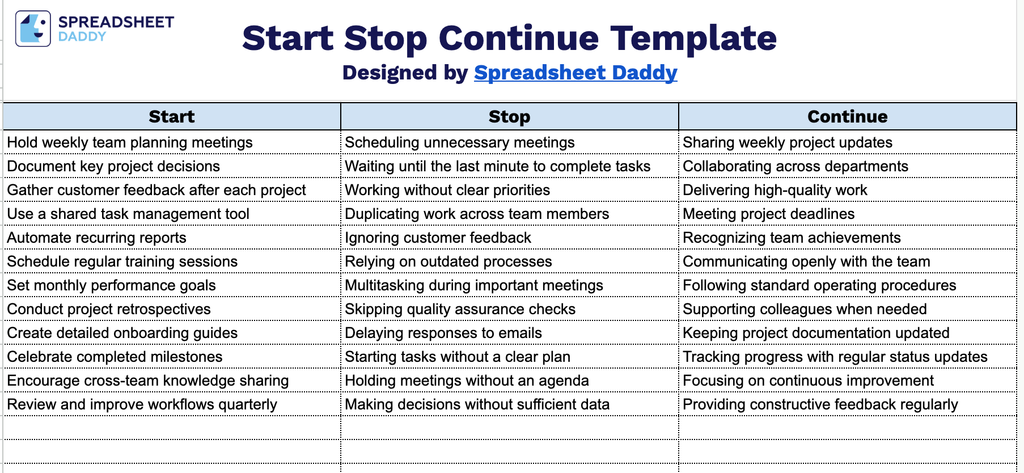
Our Start Stop Continue Template helps teams reflect on what’s working and what isn’t, so they can plan clear next steps together.
What’s included
- Three-column feedback framework: The template includes a simple, ready-to-use table with Start, Stop, and Continue columns, giving you a clear structure for capturing actionable feedback during retrospectives, performance reviews, or team check-ins.
- Dedicated “Start” column for new actions: This field lets you list behaviors, processes, or initiatives the team or individual should begin doing, making it easy to identify opportunities for growth and improvement.
- Dedicated “Stop” column to eliminate inefficiencies: This field provides space to note behaviors, habits, or processes that aren’t working and should be discontinued, helping teams quickly zero in on what’s holding back progress.
- Dedicated “Continue” column for reinforcing strengths: This field highlights what’s already working well and should be maintained, ensuring positive practices don’t get lost in the conversation about change.
You can easily add or remove columns to fit your team’s specific process.
Access the free Start Stop Continue template below and download it in your preferred format for easy editing and use:
How to Use Our Start Stop Continue Template
1. Choose the format that works best for you by downloading the template in Excel or PDF, or duplicating it directly in Google Sheets.
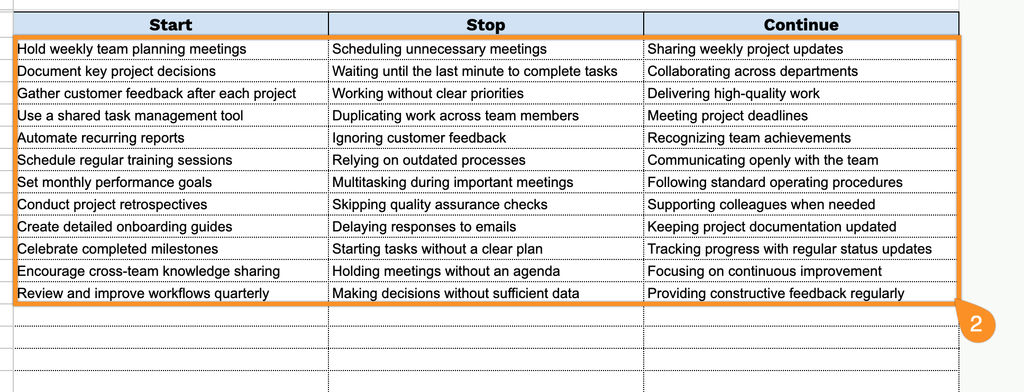
2. Complete the template by documenting what to begin, what to discontinue, and what to keep doing moving forward.