Create fair and consistent assessments with our free Rubric Template.
Available in Google Sheets, Excel, and PDF, it provides a simple framework for defining criteria, assigning scores, and tracking results.
What Is a Rubric Template?
A rubric template is a structured evaluation tool used to assess performance, work, or behavior against predefined criteria and standards.
Rubric templates are widely used in education, business, and hiring to ensure consistent, objective, and transparent assessment across multiple evaluators or submissions.
Download Spreadsheet Daddy’s Free Rubric Template
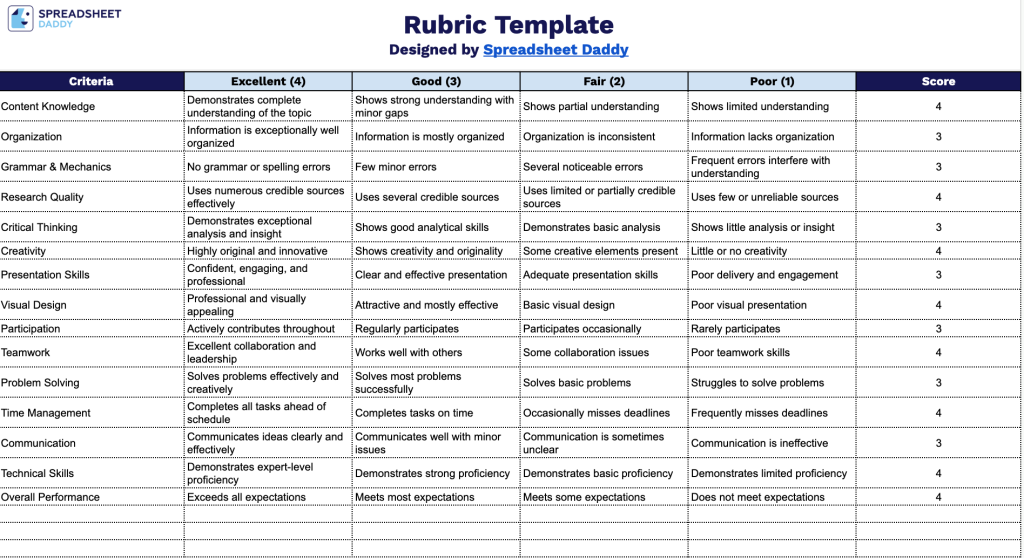
Our Rubric Template lets you score any project, assignment, or presentation across multiple criteria.
What’s included
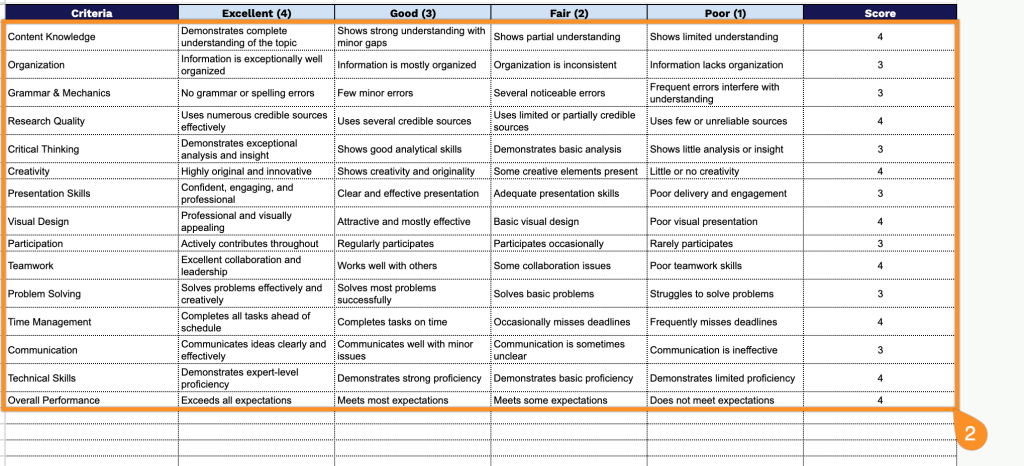
- Four-tier scoring structure with point values: The column headers are pre-labeled as Excellent (4), Good (3), Fair (2), and Poor (1), giving you a ready-made numeric scale so you can define performance descriptors for each criterion without having to build a grading scale from scratch.
- Dedicated Criteria and Score columns: The leftmost column provides blank rows for listing each evaluation criterion, while the far-right Score column gives you a clean, isolated space to record the final point value awarded for each row, keeping your grading standards and results visually separated.
- 40+ pre-formatted blank rows: The template comes with dozens of ready-to-use rows, so you can immediately start typing in criteria and descriptors for a multi-item rubric without adjusting row heights or borders.
Add or remove rows and columns as needed to fit your specific evaluation needs.
Select a format below to download a free printable and editable rubric template:
How to Use Our Rubric Template
1. Download the rubric template in Excel or PDF, or create an editable Google Sheets version for your own use.
2. Add your assessment criteria, define what each performance level means, and assign the corresponding score.