Stop building an issue tracker from the ground up.
Download our free Issue Tracker Template in Google Sheets, Excel, or PDF to quickly log issues, assign responsibility, prioritize tasks, and monitor resolution progress in one organized place.
What Is an Issue Tracker Template?
An issue tracker template is a prebuilt framework for logging, organizing, and monitoring problems, bugs, or tasks within a project, ensuring nothing slips through the cracks.
By standardizing how issues are recorded and tracked, the template improves team collaboration, accountability, and overall workflow efficiency across projects of any size.
Download Spreadsheet Daddy’s Free Issue Tracker Template
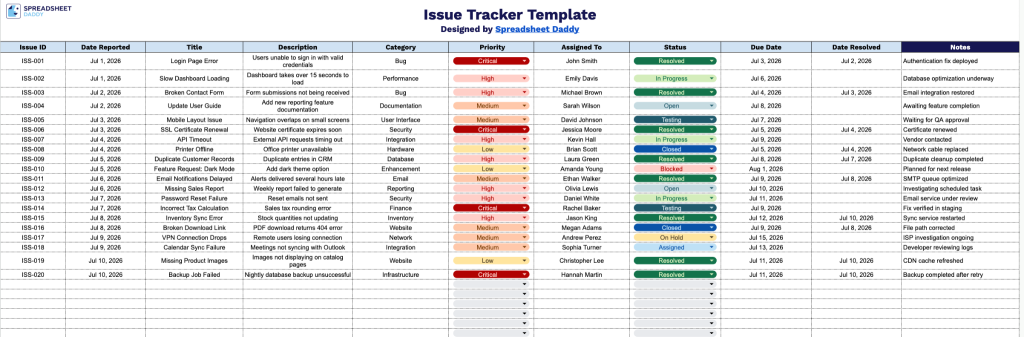
Our Issue Tracker Template helps you log, prioritize, and monitor issues from report to resolution in one organized spreadsheet.
What’s included
- Comprehensive issue-tracking columns: The template includes eleven dedicated columns, Issue ID, Date Reported, Title, Description, Category, Priority, Assigned To, Status, Due Date, Date Resolved, and Notes, giving you a complete framework to log, categorize, and monitor every issue from initial report through resolution.
- Prioritization and categorization fields: Built-in Category and Priority columns let you classify issues by type and urgency, making it simple to sort, filter, and focus attention on the most critical items first.
- Full lifecycle date tracking: With both a Date Reported and Date Resolved column alongside a Due Date field, you can easily track turnaround time, monitor overdue issues, and measure how quickly problems are being addressed.
Add or remove columns to match your own workflow.
Select your preferred file format to download the free Issue Tracker template:
How to Use Our Issue Tracker Template
1. Save this Issue Tracker template in Excel or PDF format, or create your own Google Sheets version with a single copy.
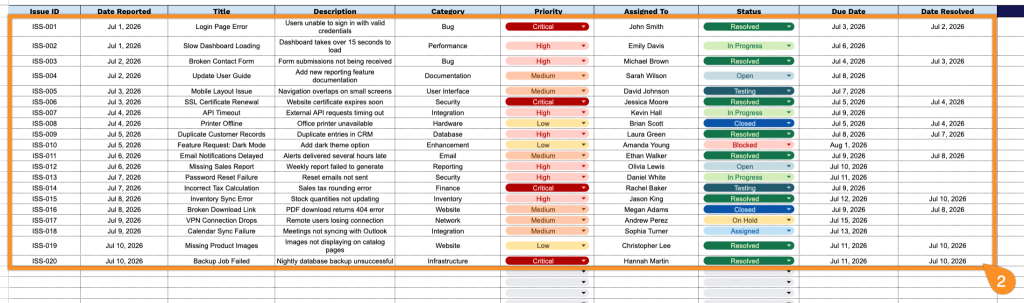
2. Log the details for every issue, including its ID, report date, title, description, category, priority, assigned owner, current status, due date, and resolution date.
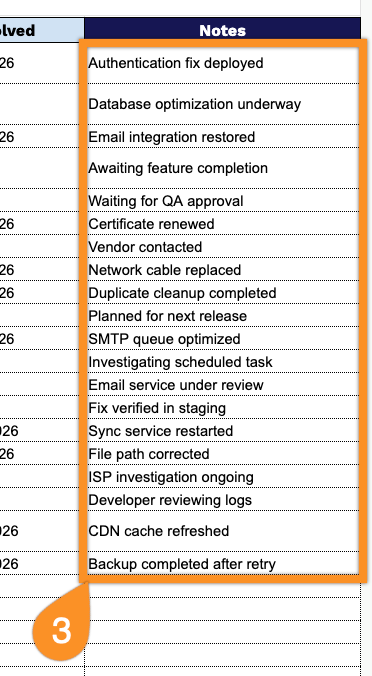
3. Use the Notes section to capture additional observations, follow-up actions, safety concerns, or any important information related to the issue.