Save time on creating shipping records with our free Shipping and Receiving Template.
Available in Google Sheets, Excel, and PDF, this editable template makes it simple to monitor received items, shipped orders, supplier details, quantities, and delivery information in a structured format.
What Is a Shipping and Receiving Template?
A shipping and receiving template is a standardized document used by businesses to track and manage the movement of goods in and out of a facility.
By providing a consistent format for logging incoming and outgoing inventory, the template helps reduce errors, resolve disputes, streamline warehouse operations, and maintain a clear paper trail for auditing and accountability purposes.
Download Spreadsheet Daddy’s Free Shipping and Receiving Template
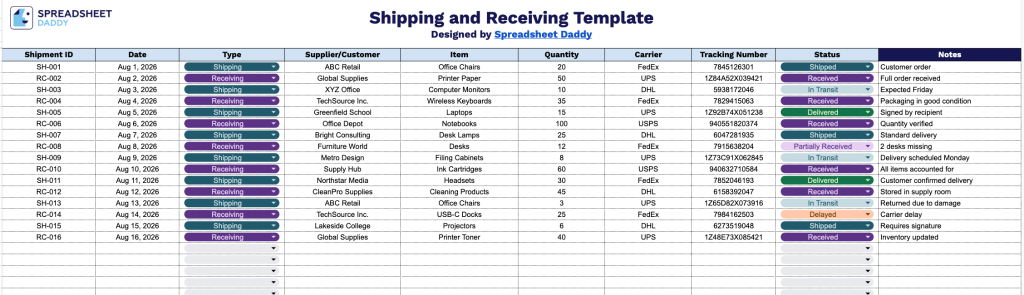
Our Shipping and Receiving Template helps you track every incoming and outgoing shipment in a single organized spreadsheet, from the shipment ID and date to the carrier, tracking number, and status.
What’s included
- Comprehensive shipment tracking columns: The template includes ten dedicated columns: Shipment ID, Date, Type, Supplier/Customer, Item, Quantity, Carrier, Tracking Number, Status, and Notes, giving you a complete record of every inbound and outbound shipment in one place.
- Dual-purpose shipping and receiving log: The “Type” column lets you distinguish between incoming and outgoing shipments on the same sheet, so you don’t need separate shipping and receiving logs.
- Status tracking for real-time visibility: A dedicated Status column allows you to mark each shipment’s current stage (e.g., pending, in transit, delivered, delayed), making it easy to see at a glance what needs attention.
Since every business tracks shipments a little differently, you can add or remove columns to match the details that matter most to you.
Use the links below to download a free, ready-to-use Shipping and Receiving template in the format that works best for your needs:
How to Use Our Shipping and Receiving Template
1. Get the Shipping and Receiving template in your preferred format by downloading it in Excel or PDF, or create your own editable version in Google Sheets.
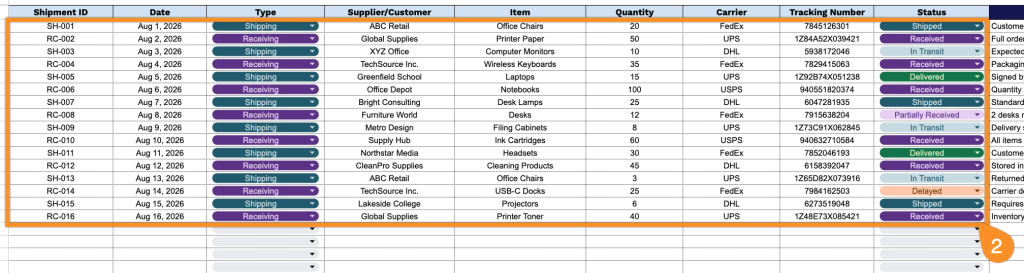
2. Record key shipment details, including the shipment ID, date, shipment type, supplier or customer information, item details, quantity, carrier, tracking number, and current delivery status.
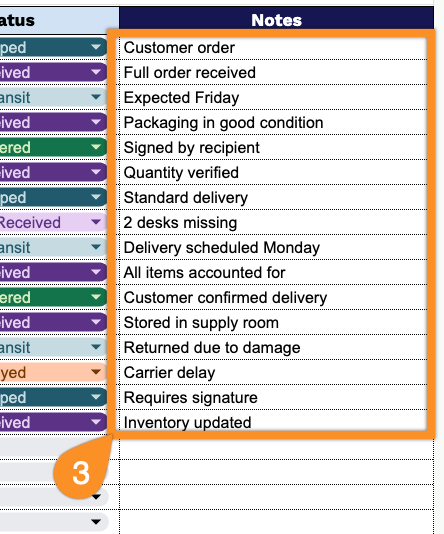
3. Use the Notes section to add important information about damaged items, special handling instructions, delivery updates, or any other comments related to the shipment.