Looking for a simple way to manage multiple projects?
Download our free Multiple Project Tracking Template in Google Sheets, Excel, or PDF.
It’s easy to customize and helps you organize project details, track progress, manage deadlines, and keep your work on schedule.
What Is a Multiple Project Tracking Template?
A multiple project tracking template is a structured tool that allows managers and teams to monitor the progress, status, deadlines, and resources of several projects simultaneously in one centralized location.
By consolidating key information such as task ownership, completion percentages, and due dates into a single view, it helps teams stay organized, improve communication, and make informed decisions without having to switch between multiple tools or documents.
Download Spreadsheet Daddy’s Free Multiple Project Tracking Template
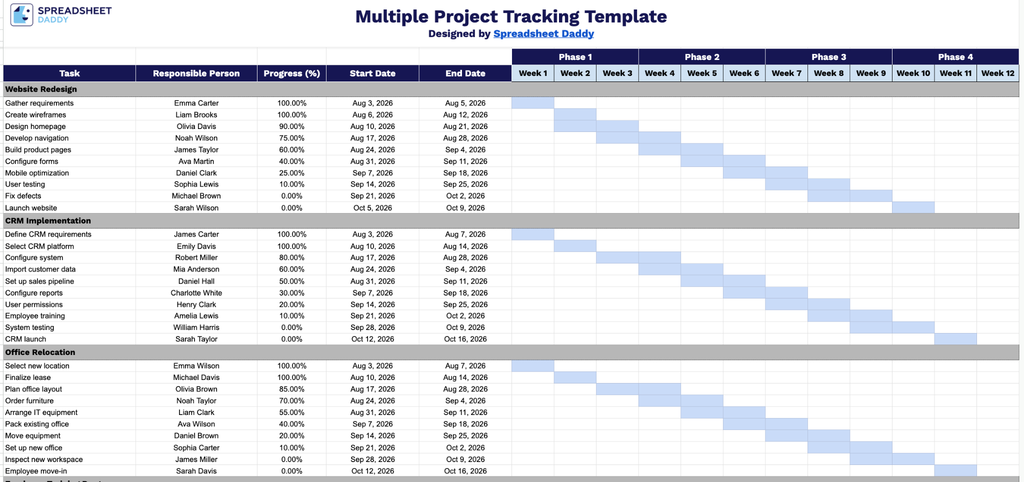
Our Multiple Project Tracking Template lets you track tasks, owners, progress, and timelines across multiple projects in one place, with a simple Gantt-style view to see how everything lines up week by week.
What’s included
- Task identification fields: Each project section includes an editable Task column where you can list out every task, deliverable, or milestone associated with that specific project, keeping all related work items grouped together.
- Ownership tracking: A Responsible Person column lets you assign a name or team member to each task, making accountability clear and giving you a quick reference for who to follow up with on any given item.
- Progress monitoring: A Progress (%) field allows you to log how far along each task is at any point in time, so you can quickly identify what’s on track, behind, or completed without digging into details.
- Timeline fields: The Start Date and End Date columns let you record the planned or actual duration of each task, providing a straightforward way to track scheduling and deadlines across all projects.
- 12-week phased tracking grid: A week-by-week breakdown from Week 1 through Week 12, grouped into Phases 1 through 4, lets you monitor task progress over a full quarter and organize work into major project stages or milestones.
It’s fully customizable, so you can add or remove columns as needed to fit your own workflow.
Use the links below to download a free blank Multiple Project Tracking Template in the format that works best for you:
How to Use Our Multiple Project Tracking Template
1. Pick the format that works best for you: download the template as an Excel or PDF file, or make a copy in Google Sheets.
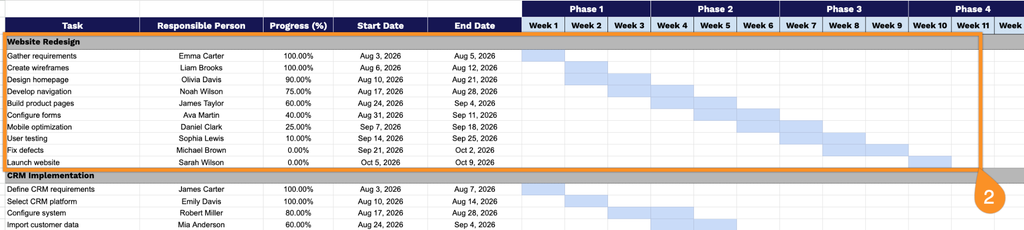
2. Enter each project’s name, list its key tasks, assign responsibilities, track progress, add start and end dates, and update the timeline grid to see how everything is moving forward.