Stay on top of your schedule with our free Appointment Template.
Designed for Google Sheets, Excel, and PDFs, it’s simple to customize and perfect for managing meetings, client bookings, and daily appointments.
What Is an Appointment Template?
An appointment template is a pre-designed format that standardizes the scheduling process.
It serves as a reusable framework that saves time and ensures consistency when booking appointments, whether for medical visits, business meetings, consultations, or other scheduled events.
Using templates helps reduce scheduling errors and streamlines communication between all parties involved.
Download Spreadsheet Daddy’s Free Appointment Template
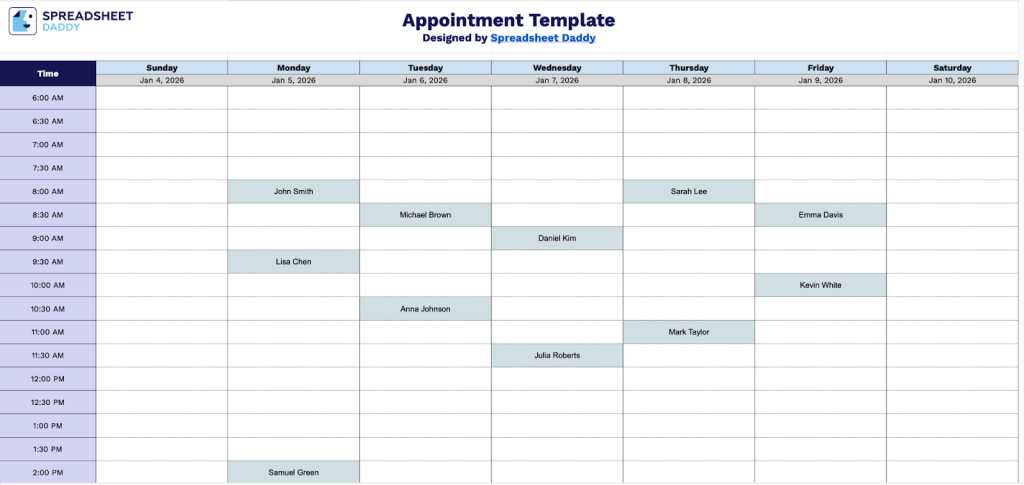
Our Appointment Template provides a weekly schedule view with time slots from 6:00 AM to 9:00 PM, allowing you to organize and track appointments throughout the week.
What’s included
- Comprehensive weekly time grid: The template displays all seven days of the week in a columnar format, with each day containing 30 time slots running from 6:00 AM to 9:00 PM in 30-minute increments, providing detailed scheduling capabilities for an entire week at a glance.
- Customizable date fields: Each day column includes an editable date placeholder at the top, allowing you to quickly update the template for any week of the year and maintain accurate scheduling records across different time periods.
- Half-hour interval scheduling: The left-hand time column breaks each day into precise 30-minute blocks, enabling you to schedule appointments, meetings, and tasks with accuracy while easily identifying available time slots throughout the day.
- Flexible customization space: Each time slot cell provides ample blank space for adding appointment details, client names, color-coding categories, or task descriptions, allowing you to personalize the template with your own organizational system, notes, or visual indicators to match your specific scheduling needs.
The layout is flexible and customizable, allowing you to add or remove columns and rows based on your scheduling needs.
Download a free blank appointment template in your preferred format using the links below:
How to Use Our Appointment Template
1. Access this template in Excel or PDF, or duplicate it to your Google Sheets account.
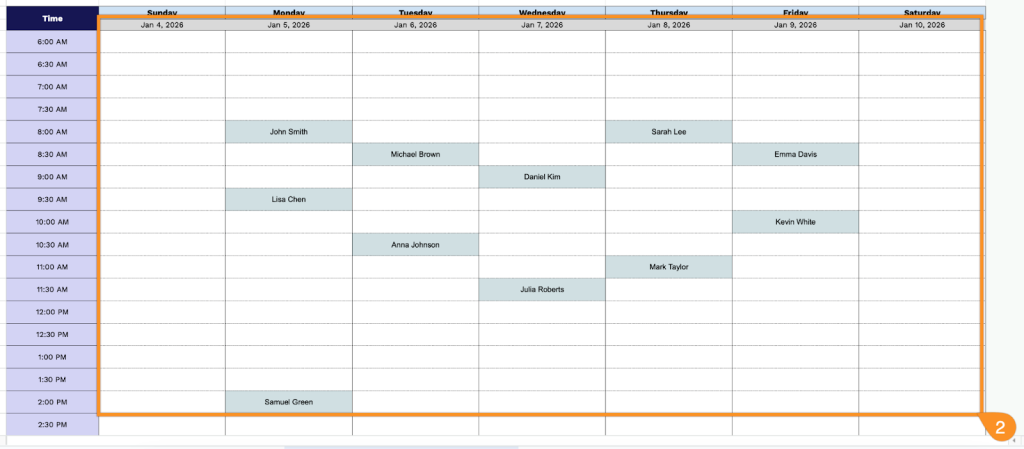
2. Fill in the week’s dates and record each appointment in the corresponding time slots.