Need a head start on organizing your college applications?
Skip building a spreadsheet from scratch; our free College Application Template is ready to use in Google Sheets, Excel, and PDF.
Professionally designed and easy to customize, it helps you track application deadlines, submission status, fees, and more, all in one convenient place.
What Is a College Application Template?
A college application template is a structured spreadsheet that helps students organize and track multiple college applications in one centralized location.
This template serves as a project management tool, ensuring you stay on top of all deadlines and requirements while managing the complex process of applying to multiple colleges simultaneously.
Download Spreadsheet Daddy’s Free College Application Template
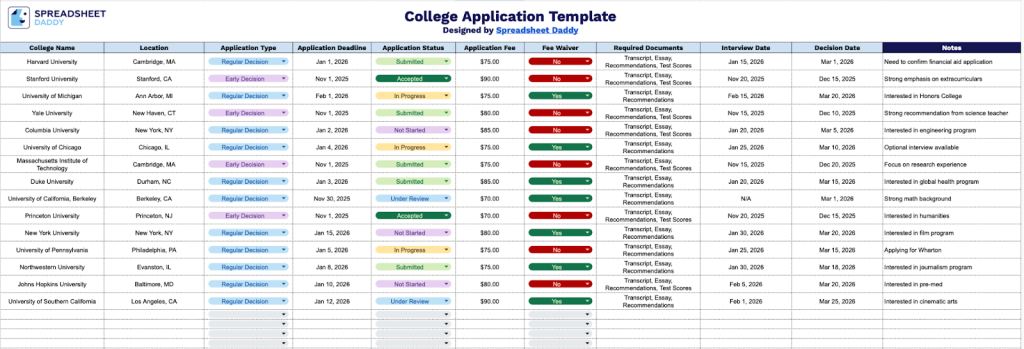
Our College Application Template helps you organize and track your applications in one convenient place.
What’s included
- Comprehensive application tracking columns: The template features essential tracking fields, including College Name, Location, Application Type, Application Deadline, Application Status, Application Fee, Fee Waiver, Required Documents, Interview Date, Decision Date, and Notes, providing a complete overview of every aspect of your college application process in one centralized spreadsheet.
- Deadline and decision date management: Dedicated date columns for Application Deadline, Interview Date, and Decision Date allow you to monitor critical timelines, ensuring you never miss an essential submission or interview opportunity while keeping track of when you can expect to hear back from each institution.
- Financial tracking capabilities: The template includes specific fields for Application Fee and Fee Waiver status, enabling you to budget for application costs, track which schools offer fee waivers, and maintain a clear picture of your total investment in the college application process.
- Application status monitoring: The Application Status column provides a centralized location to track where each application stands in the process, whether it’s not started, in progress, submitted, under review, or decided, giving you instant visibility into your overall application portfolio at a glance.
- Customizable notes and document tracking: The Required Documents field allows you to list specific materials needed for each school (transcripts, essays, recommendations, test scores), while the Notes column provides space for additional details such as scholarship opportunities, campus visit impressions, or special program requirements unique to each institution.
You can customize it by adding or removing columns to fit your specific needs and preferences.
It’s designed to keep all your essential application information readily accessible throughout the college admissions process.
Click one of the links below to get your free blank college application template in the format that works best for you:
How to Use Our College Application Template
1. Save the template as an Excel file or PDF, or make a personal version in Google Sheets.
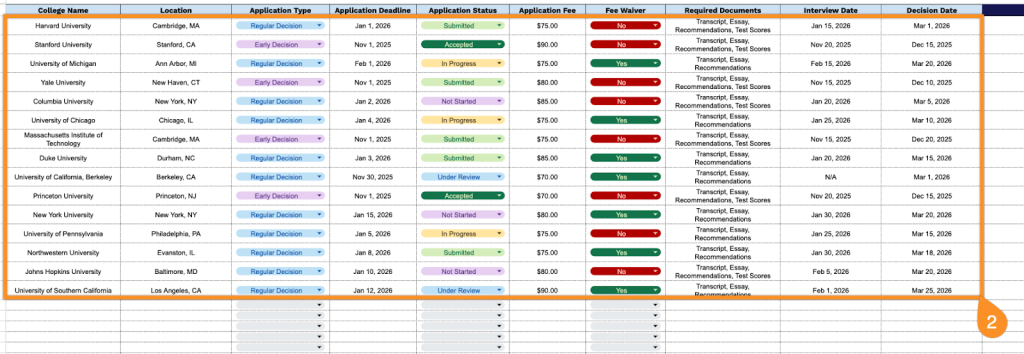
2. Complete the columns by entering all essential college application information:
- College Name: Enter the full official name of each institution you’re applying to for accurate record-keeping.
- Location: Specify the city and state (or country) where the college is located.
- Application Type: Select the admission plan you’re pursuing (Early Decision, Early Action, Regular Decision, Rolling Admission, etc.).
- Application Deadline: Record the exact submission date and time for each application to ensure timely completion.
- Application Status: Track your progress (not started, in progress, submitted, under review, etc.).
- Application Fee: Document the required fee amount for each application.
- Fee Waiver: Indicate whether you’ve applied for or received a fee waiver for this application.
- Required Documents: List all necessary materials (transcripts, essays, recommendation letters, test scores, portfolio, etc.).
- Interview Date: Note any scheduled interview appointments with admissions representatives or alumni.
- Decision Date: Record when you expect to receive or have received the admission decision.
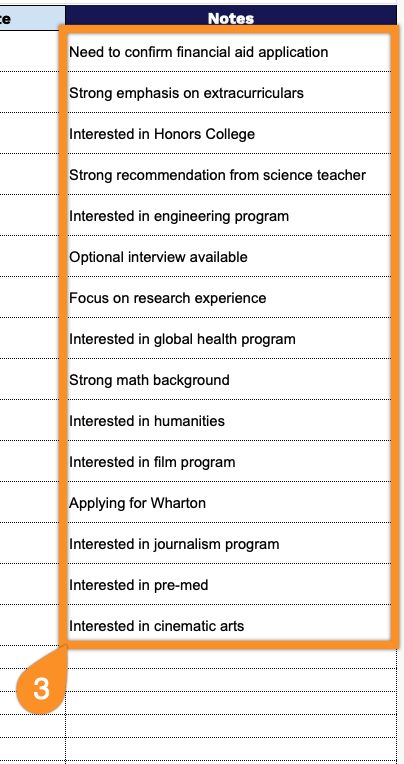
3. Use the Notes section to include any extra information or essential details.