Keep your construction bids organized with a professionally designed template you can start using right away.
Our free Construction Bid Tracking Template comes in Google Sheets, Excel, and PDF formats and can be customized to track contractors, bid prices, project details, deadlines, and more.
What Is a Construction Bid Tracking Template?
A construction bid-tracking template is a structured document or spreadsheet used by contractors, project managers, and construction firms to organize and monitor all active bids for various projects.
By centralizing this information in one place, the template helps construction professionals improve their win rates, maintain accountability, and make more informed decisions about which projects to pursue.
Download Spreadsheet Daddy’s Free Construction Bid Tracking Template
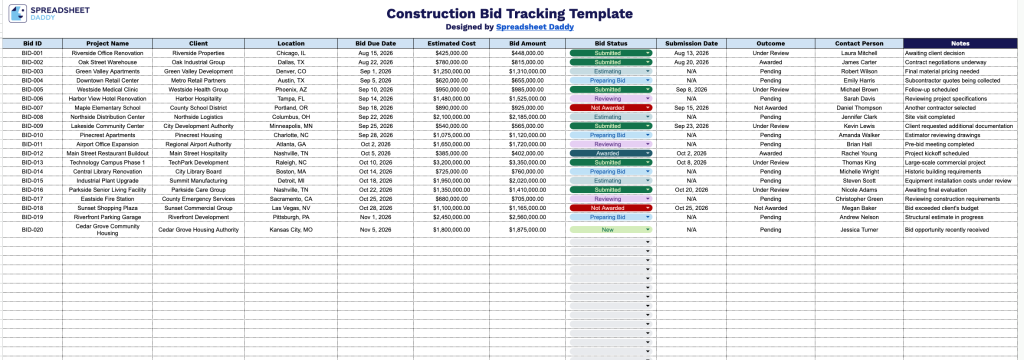
Our Construction Bid Tracking Template provides a clean, organized way to log and monitor every bid from submission through outcome.
What’s included
- Comprehensive bid tracking columns: The sheet includes twelve dedicated fields: Bid ID, Project Name, Client, Location, Bid Due Date, Estimated Cost, Bid Amount, Bid Status, Submission Date, Outcome, Contact Person, and Notes, giving you a complete record of every bid from initial estimate through final outcome.
- Built-in bid status and outcome tracking: Dedicated Bid Status and Outcome columns let you monitor where each bid stands (e.g., pending, submitted, under review) and log the final result (won, lost, declined), making it easy to see your pipeline and win rate at a glance.
- Cost comparison fields: Side-by-side Estimated Cost and Bid Amount columns make it simple to compare your internal projections against the amount actually submitted, helping you spot discrepancies and refine future estimates.
- Client and contact management: Client, Location, and Contact Person fields store key project and relationship details for each bid, so you always know whom to follow up with and where the work is located.
- Deadline and timeline tracking: Bid Due Date and Submission Date columns help you stay on top of upcoming deadlines and confirm when each bid was actually sent, reducing the risk of missed submissions.
Add or remove columns to match how your team works.
Select a format below to download a free, ready-to-use Construction Bid Tracking template:
How to Use Our Construction Bid Tracking Template
1. Get started by downloading the template in your preferred Excel or PDF format, or create an editable Google Sheets version.
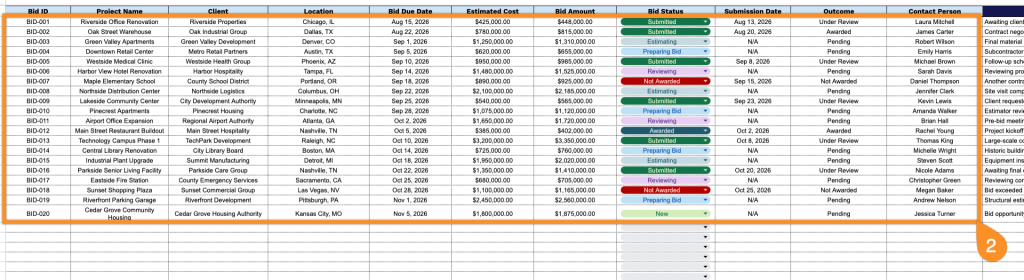
2. Enter key bid details, including the bid ID, project name, client, project location, bid due date, estimated project cost, proposed bid amount, current status, submission date, outcome, and primary contact person.
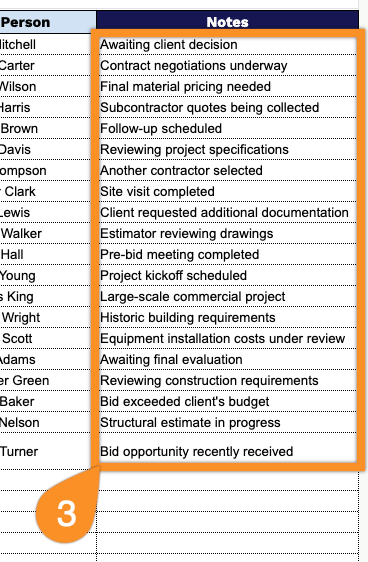
3. Use the Notes section to record additional project information, special requirements, follow-up reminders, or other details that may help your team manage each construction bid.