

Don’t waste time building a project timeline from scratch.
Download our ready-to-use Construction Schedule Template to organize phases, track milestones, and keep your crew aligned.
Compatible with Google Sheets, Excel, and PDF for maximum flexibility.
What Is a Construction Schedule Template?
A construction schedule template is a pre-formatted document that outlines the timeline, tasks, and milestones for a construction project from start to finish.
By using a template, construction teams can ensure all critical phases, from site preparation and foundation work to final inspections, are properly sequenced and completed on time.
Download Spreadsheet Daddy’s Free Construction Schedule Template
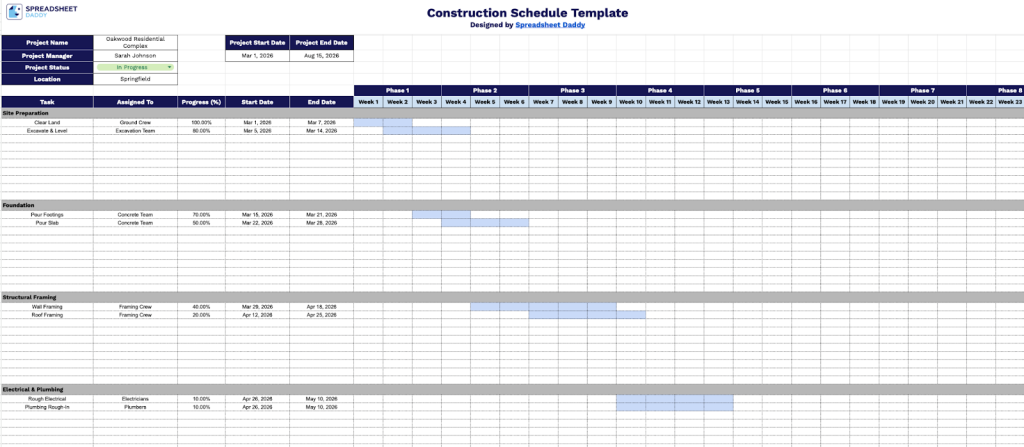
Our Construction Schedule Template provides a clear, visual overview of your project timeline, helping you track tasks, assigned team members, progress percentages, and key dates all in one place.
What’s included
- Project overview header fields: The top section includes dedicated input fields for Project Name, Project Start Date, Project End Date, Project Manager, Project Status, and Location, giving you a centralized snapshot of key project details at a glance for easy reporting and stakeholder communication.
- Phase-based column organization: The Gantt-style timeline is divided into 8 labeled phase columns (Phase 1 through Phase 8) spanning 24 weekly intervals, allowing project managers to visually map task durations across a full 24-week construction lifecycle with clear phase boundaries for each stage of the build.
- Task tracking rows with progress indicators: Each row includes dedicated columns for Task name, Assigned To, and Progress (%) alongside Start Date and End Date fields, enabling teams to monitor individual task ownership, completion status, and scheduling at a granular level without needing separate tracking tools.
- Category-based row grouping: Tasks are organized into 5 collapsible category sections, each with multiple sub-task rows beneath a dark gray header bar, making it easy to group related work by trade, phase, or department, such as framing, electrical, or finishing, for a cleaner, more readable schedule.
You can add or remove columns as needed to tailor the schedule to your project’s specific requirements.
Access your free, ready-to-use Construction Schedule Template by selecting your preferred file format below:
How to Use Our Construction Schedule Template
1. Save the template in Excel or PDF format, or generate your own working copy in Google Sheets.
2. At the top of the sheet, fill in the key project details: Project Name, Project Manager, Project Status, Location, Project Start Date, and Projected End Date. This provides a clear overview of the job and helps keep stakeholders aligned.

3. Break the schedule into major construction categories. Under each category, list the individual tasks, assign a responsible team member or subcontractor, indicate the current progress (%), and enter the planned start and end dates. Then, visually map each task’s timeline across the 24-week schedule to track sequencing, overlaps, and overall project flow.

