Stop guessing what your customers think.
Our professionally designed Customer Satisfaction Survey Template helps you collect structured feedback and automatically calculate averages for clear performance insights.
Available in Google Sheets, Excel, and PDF formats.
What Is a Customer Satisfaction Survey Template?
A customer satisfaction survey template is a pre-designed questionnaire that businesses use to gather feedback about their products, services, or overall customer experience.
Using a template saves time and ensures consistent data collection, making it easier to track satisfaction trends and identify areas for improvement.
Download Spreadsheet Daddy’s Free Customer Satisfaction Survey Template
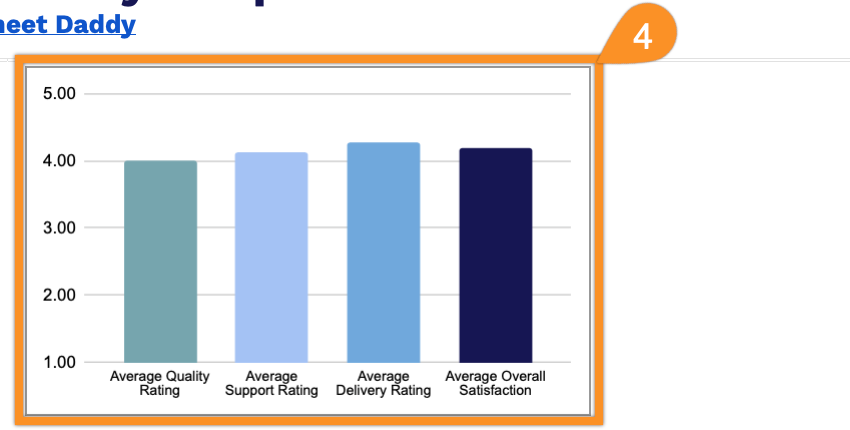
Our Customer Satisfaction Survey Template provides a clean, organized way to track and analyze customer feedback against key service metrics.
What’s included
- Summary dashboard with auto-calculated averages: The top section features four prominently styled summary cells, including Average Quality Rating, Average Support Rating, Average Delivery Rating, and Average Overall Satisfaction, each powered by live formulas that automatically update as new survey responses are entered, giving you an at-a-glance performance snapshot without any manual calculations.
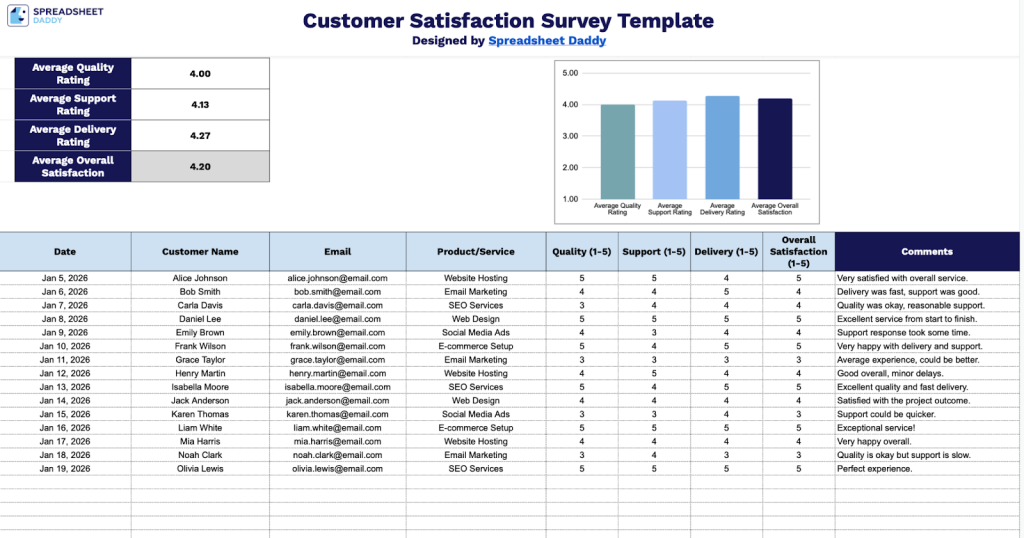
- Color-coded header and data entry table: The template uses a navy blue header row with white bold text to clearly label all nine data columns, including Date, Customer Name, Email, Product/Service, Quality, Support, Delivery, Overall Satisfaction, and Comments, with alternating row shading in the data entry area to improve readability as responses accumulate.
- Standardized 1–5 rating scale columns: Four dedicated numeric rating columns capture granular feedback across the most critical customer experience dimensions, including product or service quality, customer support, delivery speed, and overall satisfaction, using a consistent 1-to-5 scale that feeds directly into the summary averages at the top of the sheet.
- Open-ended comments column: A freeform Comments field at the far right of each row gives respondents space to provide qualitative feedback beyond the numeric ratings, allowing your team to capture context, complaints, compliments, or suggestions that numbers alone can’t convey.
- Built-in chart placeholder for data visualization: A dedicated chart area sits alongside the summary metrics at the top of the template, pre-positioned and ready for you to add a data series, so you can start visualizing trends as soon as your first responses are logged.
Add or remove columns to tailor the template to your specific business needs and the data points that matter most to you.
Pick your preferred format and download a free blank template for measuring customer satisfaction via the links below:
How to Use Our Customer Satisfaction Survey Template
1. Get this survey template in Excel or PDF, or make your own copy in Google Sheets.
2. Complete the columns by recording all customer feedback details:
- Date: Enter the date when the customer feedback was collected or the survey was completed.
- Customer Name: Record the customer’s full name for feedback reference and follow-up.
- Email: Include the customer’s email address to enable direct communication and response tracking.
- Product/Service: Specify the particular product purchased or service received that is being evaluated.
- Quality (1-5): Rate the customer’s assessment of product/service quality on a scale from 1 (very poor) to 5 (excellent).
- Support (1-5): Document the customer’s rating of customer service and support experience from 1 (very poor) to 5 (excellent).
- Delivery (1-5): Record the customer’s satisfaction with delivery timeliness and condition on a scale from 1 (very poor) to 5 (excellent).
- Overall Satisfaction (1-5): Capture the customer’s overall satisfaction rating on a scale of 1 (very dissatisfied) to 5 (very satisfied).
- Comments: Note any additional feedback, suggestions, or detailed explanations the customer provided.
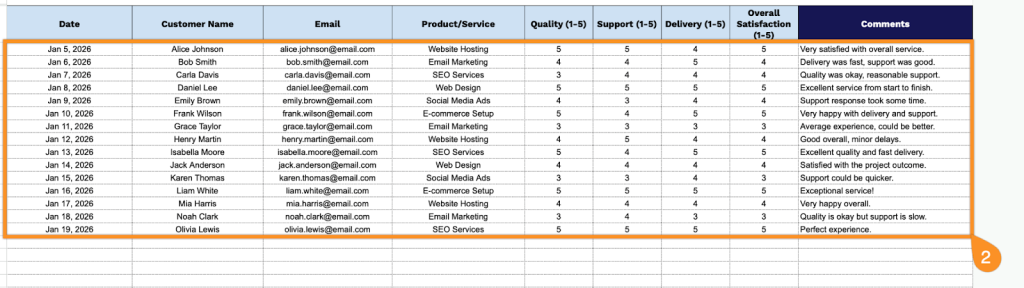
3. The template automatically calculates the average ratings for Quality, Support, Delivery, and Overall Satisfaction as you enter data into the table.
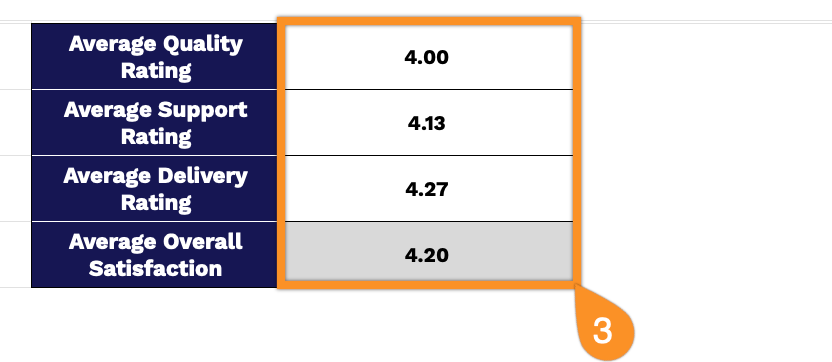
4. The chart updates automatically to reflect the average ratings, giving you a clear visual summary of customer feedback.