Save time and stay organized with our Donation Tracker Template.
Quickly record donor info, donation amounts, and payment details in a ready-to-use template for Google Sheets, Excel, or PDF. Ideal for managing fundraising campaigns effortlessly.
What Is a Donation Tracker Template?
A donation tracker template is a pre-formatted spreadsheet designed to help organizations systematically record and monitor charitable contributions.
These templates streamline the process of managing fundraising efforts and ensure compliance with reporting requirements for nonprofits and charitable organizations.
Download Spreadsheet Daddy’s Free Donation Tracker Template
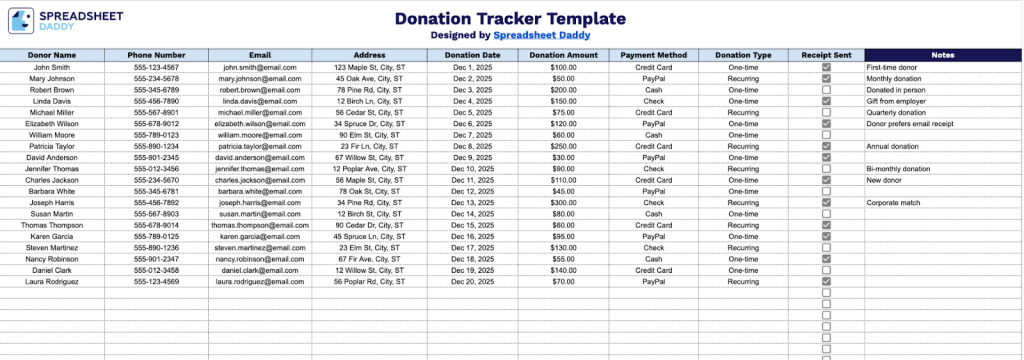
Our Donation Tracker Template helps you organize and manage all your donor information in one convenient place.
What’s included
- Comprehensive donor information fields: The template includes dedicated columns for capturing complete donor details, including Donor Name, Phone Number, and Email Address, ensuring you maintain accurate contact information for future outreach, thank-you communications, and building lasting donor relationships.
- Essential transaction-tracking columns: Each entry captures critical donation details through the Donation Date, Donation Amount, and Payment Method fields, providing a complete financial record that simplifies bookkeeping and tax reporting and helps you analyze giving patterns over time.
- Donation classification and type tracking: The Donation Type column lets you categorize contributions as monetary gifts, in-kind donations, pledges, or recurring contributions, making it easy to segment your donor base and generate targeted reports for different fundraising campaigns.
- Receipt management functionality: A dedicated Receipt Sent column helps you track the acknowledgment status for each donation, ensuring timely thank-you letters and tax receipts are sent to every donor while maintaining compliance with nonprofit documentation requirements.
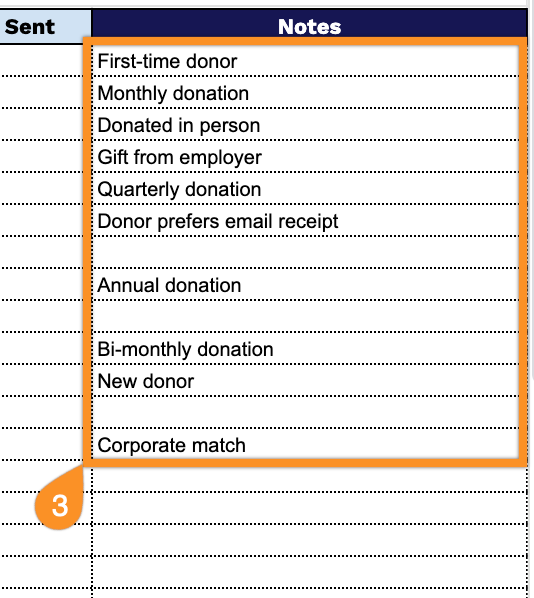
- Flexible notes and documentation field: The Notes column provides space to record crucial contextual information, such as campaign attribution, memorial or honorarium details, donor preferences, matching gift opportunities, or special instructions, enhancing personalization and improving donor stewardship.
Customize it by adding or removing columns to match your organization’s specific needs.
Select one of the links below to get a free donation tracker template in the format that works best for you:
How to Use Our Donation Tracker Template
1. Access this template in Excel or PDF format, or copy it to Google Sheets for personal use.
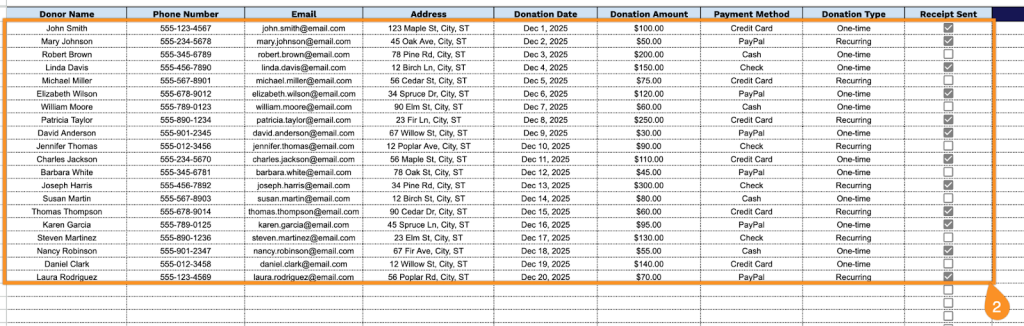
2. Complete the columns by entering all essential donation details:
- Donor Name: Enter the full name of the individual or organization contributing.
- Phone Number: Record the primary contact number for follow-up communication and acknowledgment.
- Email: Include the donor’s email address for digital receipts and ongoing correspondence.
- Address: Document the complete mailing address for tax documentation and official records.
- Donation Date: Specify the exact date when the contribution was received or pledged.
- Donation Amount: Record the monetary value or estimated worth of the donation.
- Payment Method: Select the transaction type (cash, check, credit card, bank transfer, etc.).
- Donation Type: Classify the contribution category (monetary, in-kind, recurring, one-time, etc.).
- Receipt Sent: Check the box once the official donation receipt has been issued to the donor.
3. Use the Notes section to include any essential details or special instructions about the donation.