Don’t want to build an expiration tracker from scratch?
Download our free Expiration Date Tracking Template in Google Sheets, Excel, or PDF format.
It provides an easy way to organize products, add expiration dates, and monitor upcoming deadlines so you can keep your inventory up to date.
What Is an Expiration Date Tracking Template?
An expiration date tracking template is a structured document or spreadsheet used to record and monitor the expiration dates of products, items, or assets in an organized manner.
By centralizing this information in one place, the template helps individuals and businesses reduce waste, avoid using expired items, and stay compliant with safety or regulatory requirements.
Download Spreadsheet Daddy’s Free Expiration Date Tracking Template
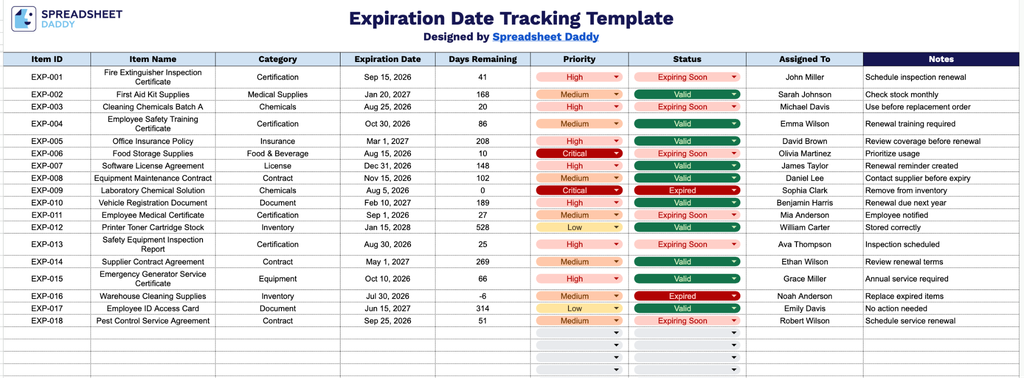
Our Expiration Date Tracking Template helps you keep tabs on important items, certifications, and agreements before they lapse.
What’s included
- Comprehensive item-tracking columns: The sheet includes nine dedicated columns: Item ID, Item Name, Category, Expiration Date, Days Remaining, Priority, Status, Assigned To, and Notes, providing a complete record of every item that needs monitoring, from identification through resolution.
- Priority and status fields for at-a-glance triage: Dedicated Priority and Status columns let you flag how urgent an item is and track its status in the process (e.g., active, expiring soon, expired, replaced), helping teams quickly sort through what needs action.
- Built-in accountability with assignment tracking: The Assigned To column lets you designate a specific person or department responsible for each item, ensuring nothing falls through the cracks when it’s time to renew, restock, or dispose of expiring items.
Add or remove columns as needed to fit your own workflow.
Get your free blank Expiration Date Tracker template by selecting the format you need from the download options below:
How to Use Our Expiration Date Tracking Template
1. Choose your preferred format and download the Expiration Date Tracking template in Excel or PDF, or create a personal Google Sheets version.
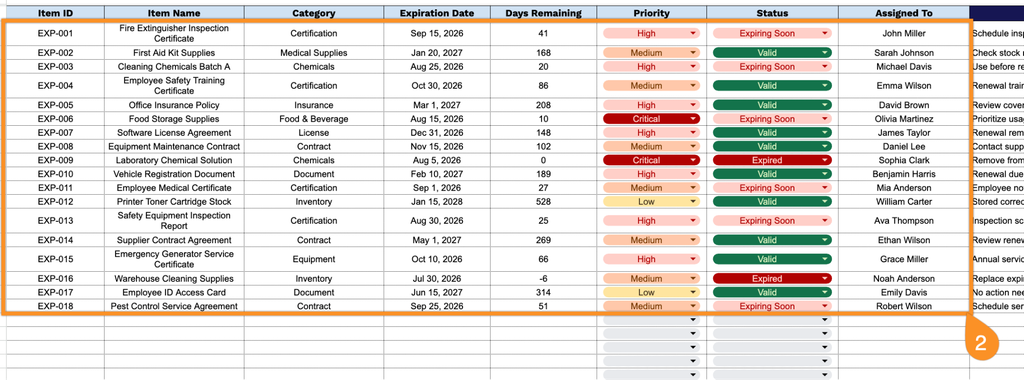
2. Record key information for each item, such as its ID, name, category, expiration date, days left until expiration, priority, tracking status, and assigned team member.
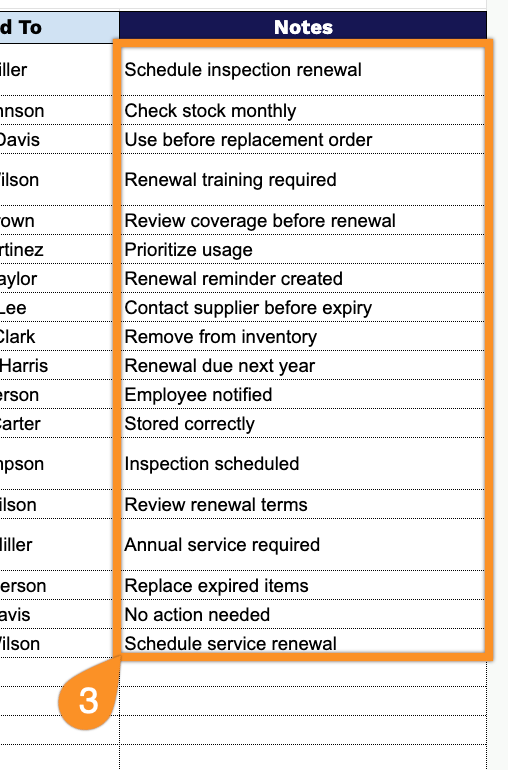
3. Use the Notes section to include additional details, such as storage requirements, supplier information, quality control notes, or special handling instructions.