Looking for an easy way to monitor fuel expenses without building a spreadsheet from scratch?
Download our free, professionally designed Fuel Tracking Template in Google Sheets, Excel, or PDF format.
Simply customize the fields and use it to record fuel purchases, track costs, monitor consumption, and keep your vehicle or fleet fuel data organized.
What Is a Fuel Tracking Template?
A fuel tracking template is a structured document or spreadsheet used to systematically record and monitor fuel consumption, costs, and efficiency for vehicles or equipment over time.
By centralizing this data, individuals, fleet managers, or businesses can make informed decisions to reduce fuel expenses, optimize routes, and improve overall operational efficiency.
Download Spreadsheet Daddy’s Free Fuel Tracking Template
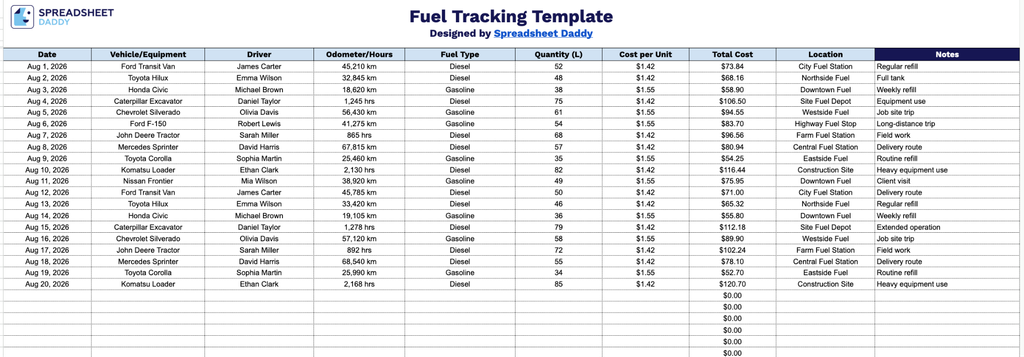
Our Fuel Tracking Template helps you log and monitor fuel usage across your vehicles and equipment in one organized spreadsheet.
What’s included
- Structured fuel log with 10 tracking columns: The main table captures Date, Vehicle/Equipment, Driver, Odometer/Hours, Fuel Type, Quantity (L), Cost per Unit, Total Cost, Location, and Notes, giving you a complete record of every fueling event in one row.
- Pre-built formulas for automatic cost calculation: The Total Cost column is ready to calculate Quantity multiplied by Cost per Unit, so totals update automatically as you enter new fuel purchases instead of requiring manual math.
- Vehicle- and driver-level details for fleet tracking: Dedicated Vehicle/Equipment and Driver columns let you track fuel usage per asset or per employee, making the template useful for anyone managing multiple vehicles, machines, or drivers, rather than just a single car.
You can add or remove columns to tailor the template to your specific tracking needs.
Get your free blank Fuel Tracking Template by selecting the download format that best suits your needs:
How to Use Our Fuel Tracking Template
1. Download the Fuel Tracking template as an Excel or PDF file, or make your own editable copy in Google Sheets.
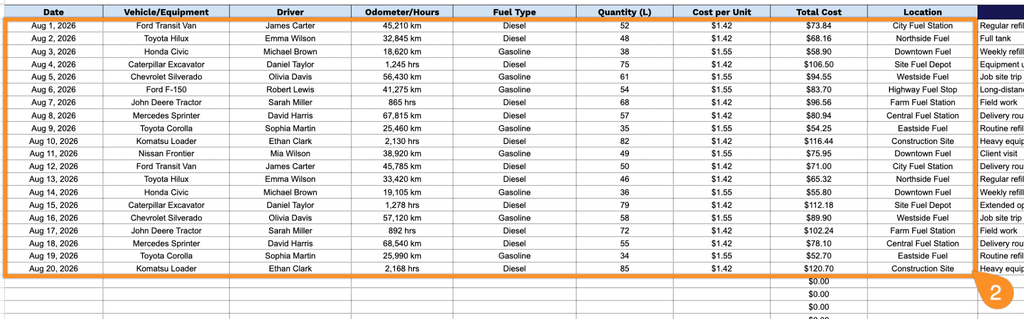
2. Enter the date, vehicle or equipment, driver, odometer or operating hours, fuel type, fuel quantity, cost per unit, and location. The template automatically calculates the total fuel cost for each entry, making it easy to track fuel expenses and usage.
3. Use the Notes section to record additional information, such as the fuel station, payment method, trip details, or any unusual fuel expenses.