Simplify your booking process with our free Restaurant Reservation Template.
Available in Google Sheets, Excel, and PDF, it’s easy to customize and ideal for tracking guest reservations and table assignments.
What Is a GTD Template?
A GTD (Getting Things Done) template is a pre-structured organizational tool based on David Allen’s productivity methodology that helps you capture, clarify, organize, and track all your tasks and commitments.
Using a GTD template, you can implement the full GTD system without building the structure from scratch.
Download Spreadsheet Daddy’s Free GTD Template
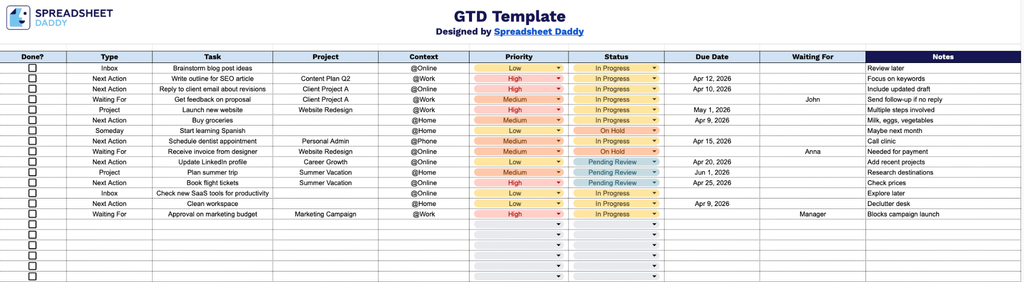
Our GTD Template gives you a clean, structured way to capture, organize, and track everything on your plate in one place.
What’s included
- Single-sheet task management layout: The template is built on one comprehensive worksheet that covers the full GTD workflow, giving you a structured, all-in-one space to manage everything from first capture to completion.
- Nine purpose-built columns for full task context: Each row captures a complete picture of a task across Done (checkbox), Type, Task, Project, Context, Priority, Status, Due Date, Waiting For, and Notes, so nothing about a task’s ownership, environment, urgency, or dependencies gets lost between reviews.
- Waiting For and Notes columns for dependency tracking: Blocked tasks include a dedicated Waiting For field naming the specific person responsible, paired with a Notes column that logs next-step reminders and follow-up cues, keeping accountability and context visible without the need for a separate tracker.
Tailor it to match exactly how you think and work by adding or removing columns as needed.
Choose your preferred format and grab a free blank GTD template using the links below:
How to Use Our GTD Template
1. Access the template in Excel or PDF format, or create a personalized version in Google Sheets.
2. For every task, fill in its type, project, context, priority, status, due date, and any items you’re waiting for to keep your workflow organized.
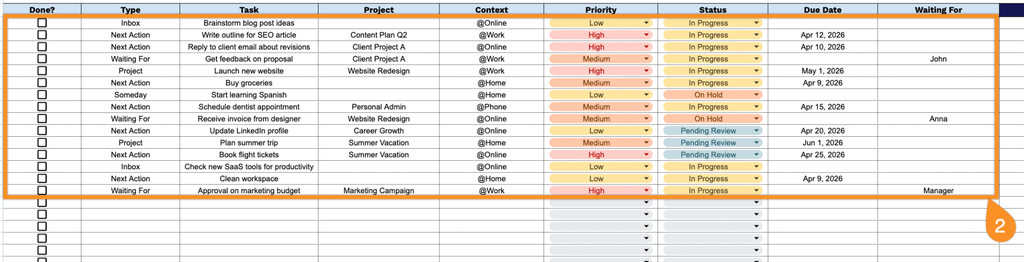
3. Use the Notes section to capture additional details, such as blockers, follow-ups, or any context that may affect task completion.