Maximize your day with ease using our Hourly Schedule Template.
Available in Google Sheets, Excel, and PDF, it lets you plan every hour, prioritize tasks, and track your progress.
What Is an Hourly Schedule Template?
An hourly schedule template is a pre-formatted document that divides the day into hourly time blocks, allowing you to plan and organize tasks, appointments, or activities.
These templates are commonly used for personal planning, work schedules, employee shift planning, and other situations requiring detailed time management.
Download Spreadsheet Daddy’s Free Hourly Schedule Template
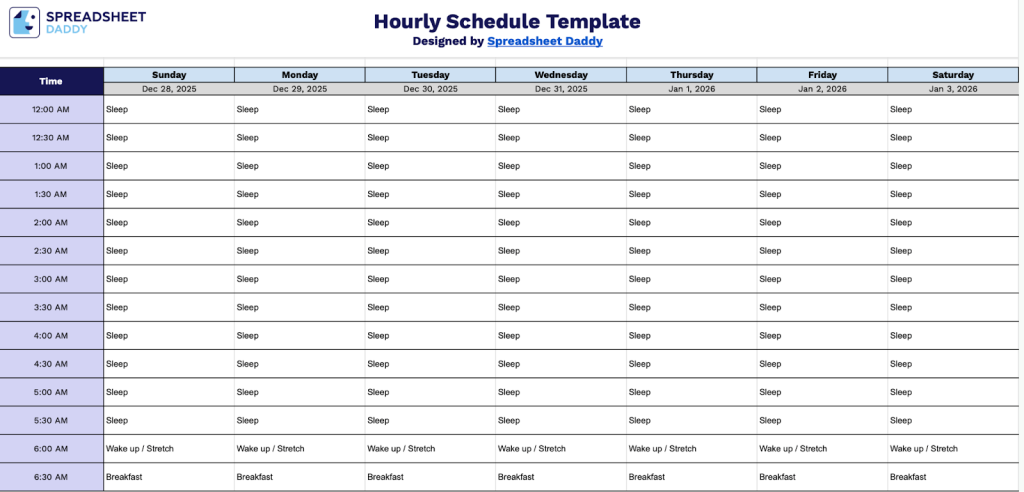
Our Hourly Schedule Template helps you organize your day in 30-minute increments from midnight to midnight.
What’s included
- Comprehensive 24-hour time grid: The template covers a full day, broken into 30-minute intervals from 12:00 AM to 11:30 PM, providing 48 time slots per day for detailed scheduling and time blocking.
- Complete weekly layout with seven-day columns: Each day of the week (Sunday through Monday) has its own dedicated column with customizable date fields at the top, allowing you to plan your entire week at a glance and track activities across multiple days simultaneously.
- Flexible blank cells for customization: Every time slot across all seven days is left blank, giving you complete freedom to add tasks, appointments, reminders, color coding, or any scheduling information that fits your personal or professional needs.
- Half-hour increment structure: The 30-minute time intervals strike an ideal balance between detailed scheduling and practical usability, allowing you to plan everything from brief meetings to longer work blocks without overcrowding the template.
You can easily customize it by adding or removing columns to fit your specific scheduling needs.
Click one of the links below to get a free blank medication list template in the format that works best for you:
How to Use Our Hourly Schedule Template
1. Save the template in Excel or PDF format, or open it in Google Sheets to customize it.
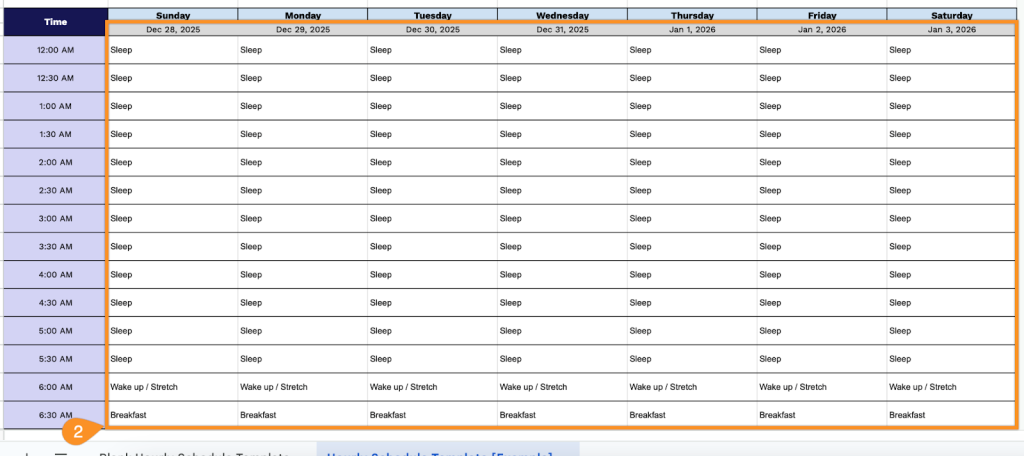
2. Enter the date for each day and fill in your tasks, appointments, or plans for each hour.