Streamline your investment tracking with our professionally designed Investment Tracker Template.
Download it for free in Google Sheets, Excel, or PDF, and easily log your holdings, monitor growth, and make smarter financial decisions.
What Is an Investment Tracker Template?
An investment tracker template is a pre-formatted spreadsheet designed to help individuals monitor and organize their investment portfolio in one centralized location.
This tool enables investors to visualize their asset allocation, track returns over time, and make informed decisions about their financial goals without building a tracking system from scratch.
Download Spreadsheet Daddy’s Free Investment Tracker Template
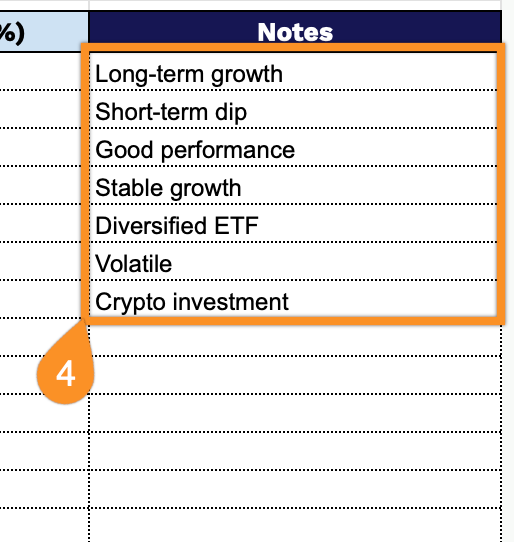
Our Investment Tracker Template helps you monitor your portfolio performance by organizing key investment details in a spreadsheet.
What’s included
- Comprehensive portfolio summary dashboard: The top section displays three key financial metrics, including Total Investment Amount, Current Portfolio Value, and Profit/Loss, providing an at-a-glance overview of your complete investment performance with automatic calculations that update as you add individual investment data.
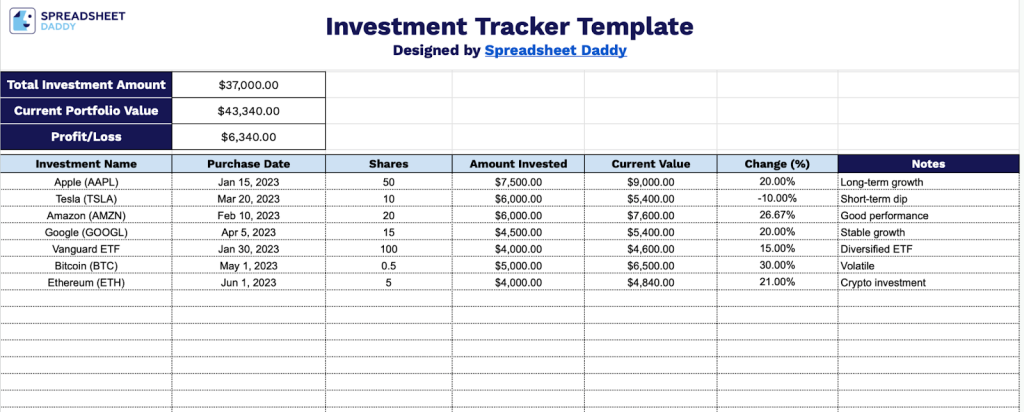
- Detailed investment tracking table: The main table includes seven columns (Investment Name, Purchase Date, Shares, Amount Invested, Current Value, Change (%), and Notes), allowing you to record and monitor up to 30 investments with all essential data points in a single, organized view.
- Automatic percentage change calculations: The Change (%) column uses built-in formulas to automatically calculate each investment’s performance by comparing your Amount Invested against Current Value, eliminating manual math and providing instant performance insights.
- Flexible notes section for investment context: Each investment row includes a dedicated Notes column where you can record important details such as investment strategy, broker information, dividend dates, rebalancing reminders, or any other relevant context to support your investment decisions.
Adjust the spreadsheet by adding or removing columns to match your specific tracking needs.
Grab your free, ready-to-use Investment Tracker Template in the format of your choice from the links below:
How to Use Our Investment Tracker Template
1. Get started with this template by downloading Excel/PDF versions or making a Google Sheets copy.
2. Complete the columns by entering all essential tracking and performance information:
- Investment Name: Enter the name or ticker symbol of the stock, fund, or asset you’re tracking.
- Purchase Date: Record when you initially acquired this investment.
- Shares: Specify the number of shares or units purchased.
- Amount Invested: Include the total dollar amount spent on this investment at purchase.
- Current Value: Enter the present market value of your investment holding.
- Change (%): This field calculates automatically to show your investment’s percentage gain or loss.
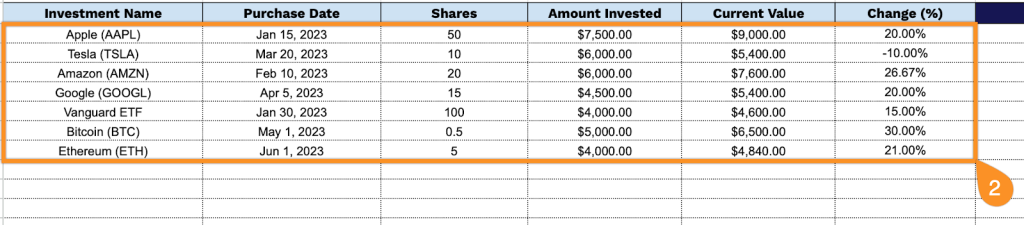
3. At the top, your Total Investment, Current Portfolio Value, and Profit/Loss will update automatically as you enter your investments in the table.
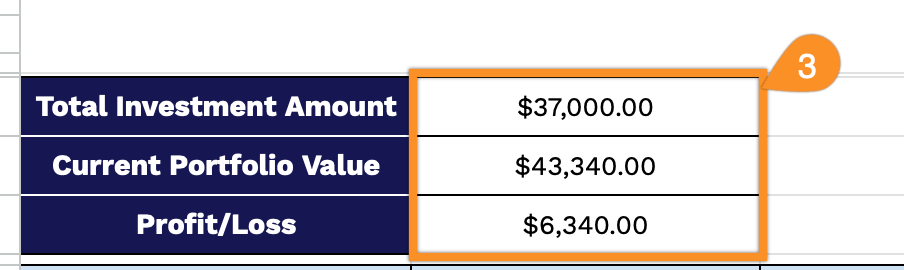
4. Record explanations for any unexpected losses or gains, reminders for upcoming investment opportunities, or special circumstances affecting your portfolio in the Notes section.