Looking for an easier way to manage your IT inventory?
Our free IT Asset Inventory Template provides a convenient format for tracking computers, equipment, software, and other business technology assets.
Available in Google Sheets, Excel, and PDF, it’s simple to edit, customize, and use for accurate asset management.
What Is an IT Asset Inventory Template?
An IT asset inventory template is a structured document or spreadsheet that organizations use to systematically record, track, and manage all their technology assets, including hardware.
By maintaining an up-to-date inventory template, organizations can improve resource planning, reduce security risks, ensure license compliance, and make informed decisions about asset lifecycle management.
Download Spreadsheet Daddy’s Free IT Asset Inventory Template
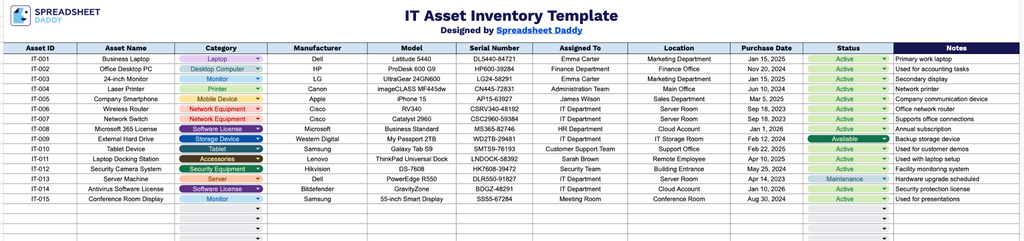
Our IT Asset Inventory Template provides a clean, organized way to track every piece of equipment and software across your organization, from laptops and monitors to network gear and licenses.
What’s included
- Comprehensive asset identification fields: The template includes Asset ID, Asset Name, Category, Manufacturer, Model, and Serial Number columns, providing everything needed to uniquely identify and distinguish each piece of IT equipment in your inventory.
- Ownership and location tracking: The Assigned To and Location columns let you record exactly who is using each asset and where it’s physically or organizationally housed, making it easy to track accountability across departments, employees, or office sites.
- Purchase and lifecycle information: A dedicated Purchase Date column lets you log when each asset was acquired, supporting depreciation calculations, warranty tracking, and planning replacement or upgrade cycles.
- Status monitoring for asset lifecycle management: The Status column lets you flag each asset as active, in repair, retired, or any other custom designation, giving you a quick way to monitor the current condition and availability of your equipment.
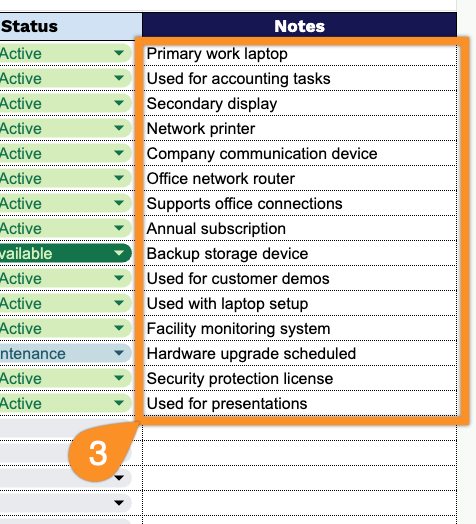
- Open-ended Notes field for additional context: A flexible Notes column allows you to capture extra details such as warranty terms, maintenance history, or special handling instructions that don’t fit neatly into the other fields.
Add or remove columns to match exactly what your team needs to track.
Select your preferred format from the options below to download a free IT Asset Inventory template designed for efficient asset management:
How to Use Our IT Asset Inventory Template
1. Get the IT Asset Inventory template in Excel or PDF format, or make a customized copy in Google Sheets to start tracking your company’s technology resources.
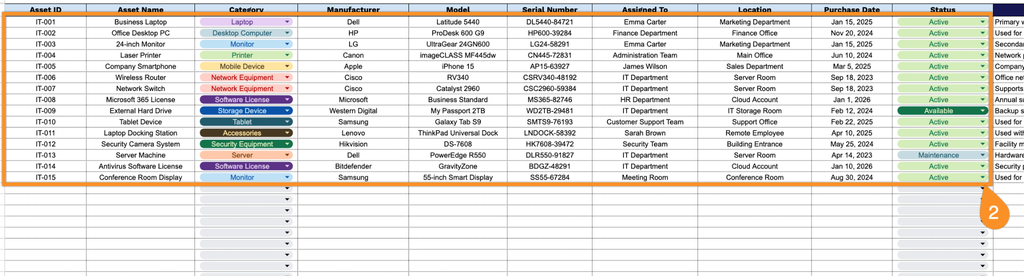
2. Document each IT asset with important details, including its ID, name, type, manufacturer, model number, serial number, assigned user, physical location, acquisition date, and lifecycle status.
3. Use the Notes section to include additional information, such as maintenance records, license details, replacement schedules, or special instructions related to the asset.