Streamline your leave management with our professionally designed Leave Tracker Template.
Available in Google Sheets, Excel, and PDF, this fully editable template lets you accurately track vacation days, sick leave, and other absences.
What Is a Leave Tracker Template?
A leave tracker template is a pre-formatted tool used by organizations to monitor and manage employee time off, including vacation days, sick leave, personal days, and other types of absences.
These templates streamline the leave management process by providing a standardized system for tracking requests, approvals, and available leave credits across the workforce.
Download Spreadsheet Daddy’s Free Leave Tracker Template
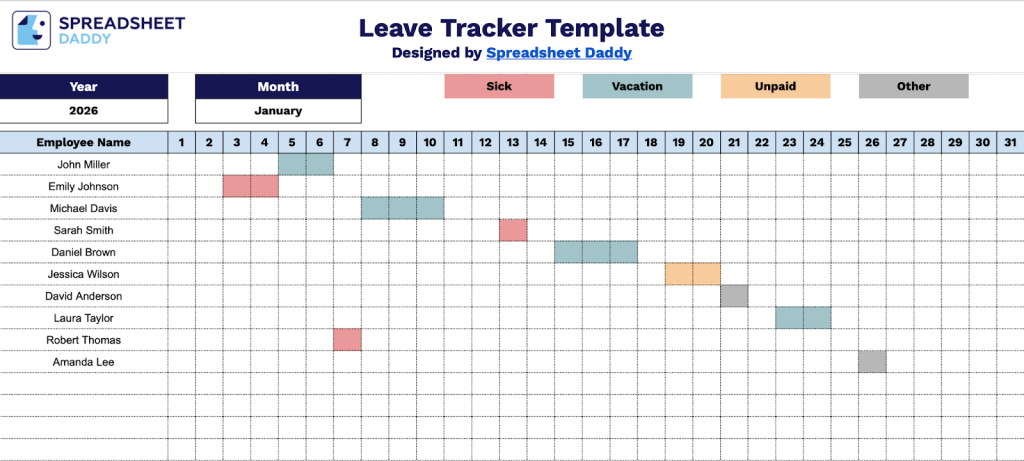
Our Leave Tracker Template provides a simple way to monitor employee absences throughout the year.
What’s included
- Comprehensive monthly calendar grid: The template features a complete 31-day calendar layout with columns numbered 1 through 31, allowing you to track employee leave across every day of the month, including months with fewer days, ensuring complete coverage for all calendar configurations.
- Customizable header fields: The top section includes editable placeholders for Year and Month, enabling you to quickly specify the tracking period, while the Employee Name field allows you to personalize each tracker for individual team members or create separate sheets for different employees.
- Daily attendance tracking columns: Each numbered column (1-31) represents a single day of the month, providing dedicated cells where you can mark various leave types, attendance statuses, or use color coding to distinguish between vacation days, sick leave, personal days, holidays, and regular work days at a glance.
You can easily customize it by adding or removing columns and rows to match your specific tracking needs.
Click the links below to download a free blank leave tracker template in the format that works best for you:
How to Use Our Leave Tracker Template
1. Save this Leave Tracker as an Excel or PDF file, or copy it to Google Sheets for easy use.
2. Enter the year and month you are tracking.

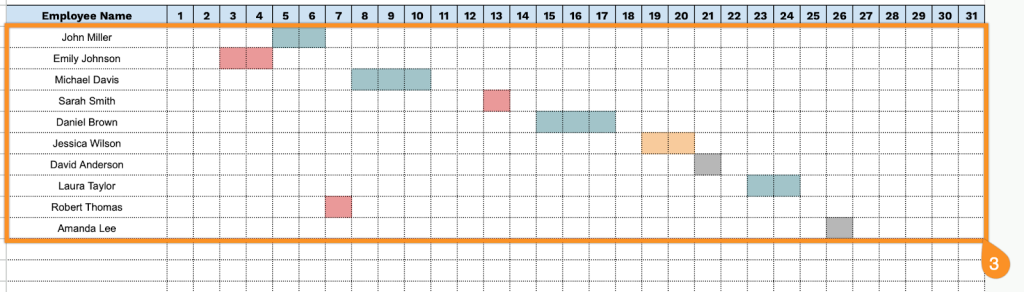
3. Add your employees’ names and record their leave days as they occur.