Skip the setup process and use our free library template instead.
Available in Google Sheets, Excel, and PDF, it’s fully editable and structured for clear, accurate record-keeping.
What Is a Library Template?
A library template is a pre-structured spreadsheet or document designed to help individuals or organizations catalog and manage a collection of books or other resources in a consistent, organized way.
By providing a ready-made framework, a library template eliminates the need to build a tracking system from scratch, making it easy for anyone to maintain an orderly and up-to-date record of their collection.
Download Spreadsheet Daddy’s Free Library Template
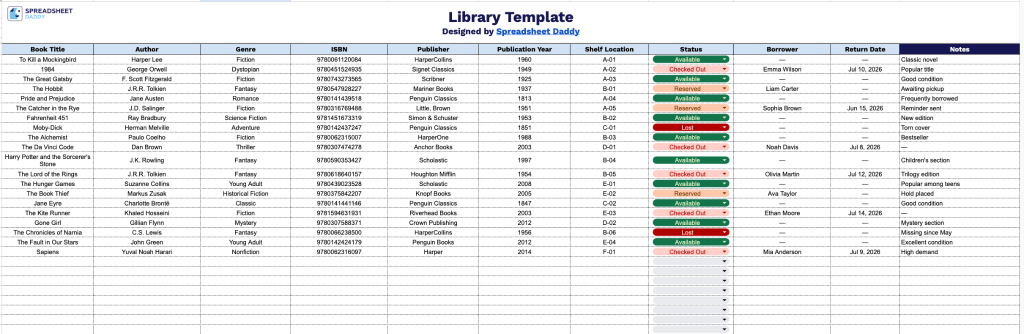
Our Library Template helps you organize and track your entire book collection in one place, from cataloging titles and authors to monitoring borrowing status and return dates.
What’s included
- Comprehensive book cataloging columns: The main tracking sheet includes 11 dedicated columns, including Book Title, Author, Genre, ISBN, Publisher, Publication Year, Shelf Location, Status, Borrower, Return Date, and Notes, giving you a complete record of every book in your collection from acquisition details to real-time availability.
- Borrower and loan tracking fields: Dedicated Borrower, Status, and Return Date columns work together to monitor who currently has a book checked out, whether it’s available or on loan, and when it’s due back, making it easy to manage circulation without any additional software.
- Shelf location and organization support: The Shelf Location column lets you assign and record physical placement codes or section labels for each title, helping staff and personal users quickly locate books within a room, home library, or larger collection without guesswork.
You can add or remove columns as needed to match your library’s specific requirements.
Use the download links below to access a free empty library template tailored to your preferred format:
How to Use Our Library Template
1. Download this template as an Excel or PDF file, or make your own editable copy in Google Sheets.
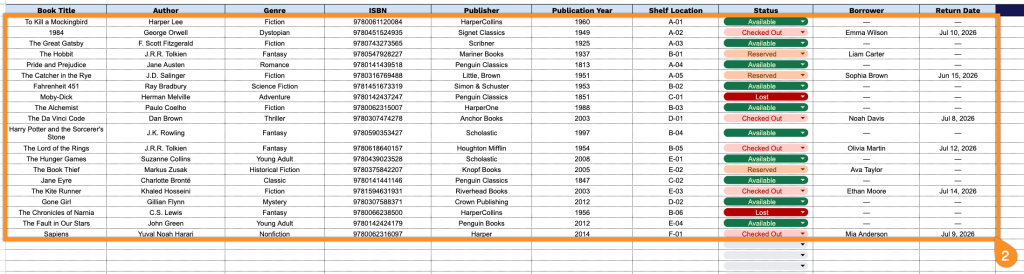
2. For every book, record its title, author, genre, ISBN, publisher, and year of publication, along with where it is located on the shelf. You can also track its current status (available or borrowed), who has it checked out, and the expected return date.
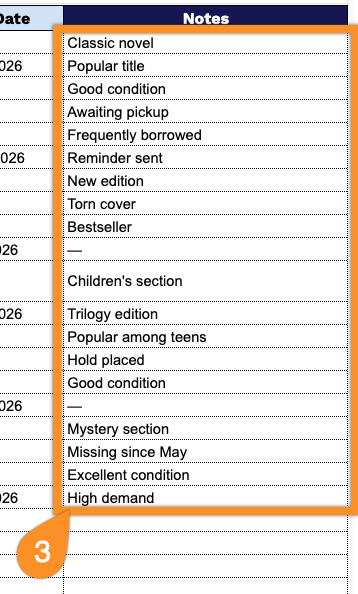
3. Use the Notes section to include any additional details, clarifications, reminders, or important context related to specific entries or overall tracking.