Keep your networking efforts organized with a ready-to-use Networking Tracker Template.
Available for free in Google Sheets, Excel, and PDF, this customizable template makes it easy to record new connections, track communication, schedule follow-ups, and maintain useful notes about your professional relationships.
What Is a Networking Tracker Template?
A networking tracker template is a structured document or spreadsheet that organizes and manages professional relationships and outreach efforts in one place.
By centralizing this information, the template helps individuals stay consistent and intentional in building and maintaining their network over time.
Download Spreadsheet Daddy’s Free Networking Tracker Template
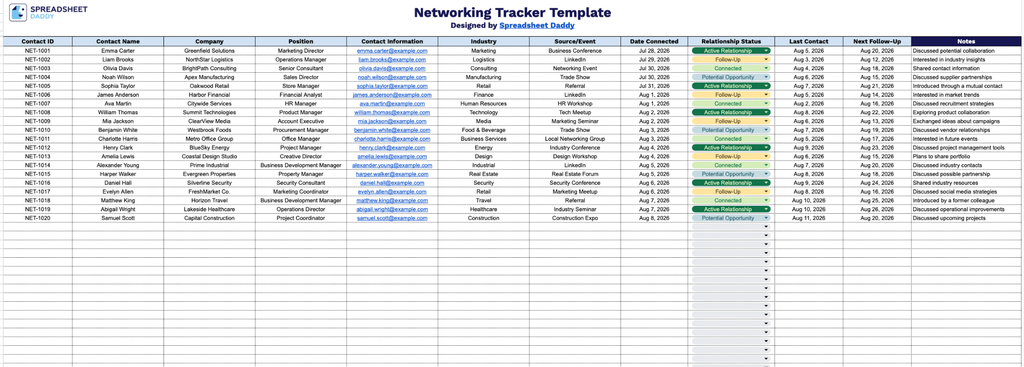
Our Networking Tracker Template helps you keep all your professional contacts organized in one place, from initial connection details to follow-up dates and relationship status.
What’s included
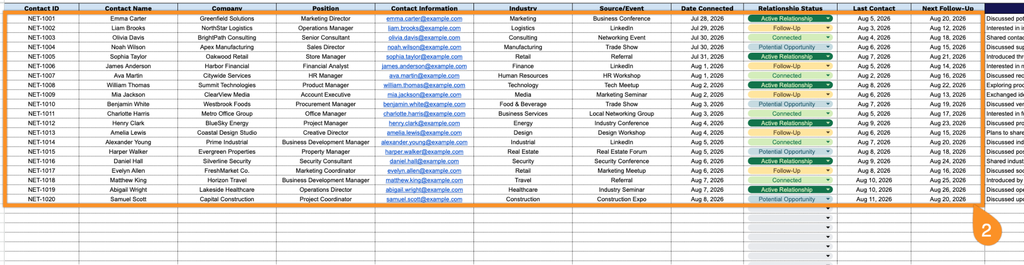
- Comprehensive contact tracking fields: The spreadsheet includes twelve dedicated columns: Contact ID, Contact Name, Company, Position, Contact Information, Industry, and Source/Event, giving you a structured way to log exactly who you met, where they work, what they do, and how the connection originated.
- Relationship management columns: Dedicated fields for Date Connected, Relationship Status, Last Contact, and Next Follow-Up let you monitor the health of each connection over time, making it easy to see at a glance who needs a check-in and who’s overdue for outreach.
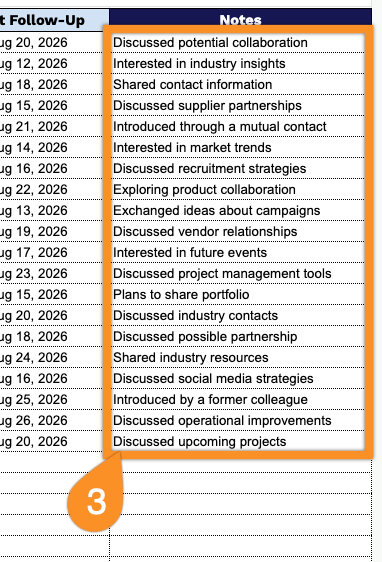
- Open Notes column for context: A wide, unrestricted Notes field at the end of each row lets you capture personal details, conversation topics, shared interests, or reminders that help you personalize future follow-ups and strengthen the relationship.
You can add or remove columns to match exactly what you need to track.
Get your free blank Networking Tracker template by selecting the file format you prefer from the options below:
How to Use Our Networking Tracker Template
1. Download the Networking Tracker as an Excel or PDF file, or make your own editable copy in Google Sheets.
2. Enter each contact’s key details, including their name, company, role, contact information, industry, and how you connected. Then record the connection date, current relationship status, last interaction, and the date for your next follow-up.
3. Use the Notes section to record important details about each contact, such as shared interests, previous conversations, potential opportunities, or other useful information.