

Planning a project doesn’t have to be complicated.
With our free Project Timeline Template, you can outline phases, assign responsibilities, and monitor progress effortlessly.
Available in Google Sheets, Excel, and PDF, it’s built to keep your projects moving forward.
What Is a Project Timeline Template?
A project timeline template is a pre-formatted visual framework that helps teams plan, organize, and track the sequence of tasks and milestones needed to complete a project from start to finish.
Using a template saves time by providing a proven structure that can be customized for specific projects, ensuring nothing is overlooked and keeping everyone aligned on deadlines and deliverables.
Download Spreadsheet Daddy’s Free Project Timeline Template
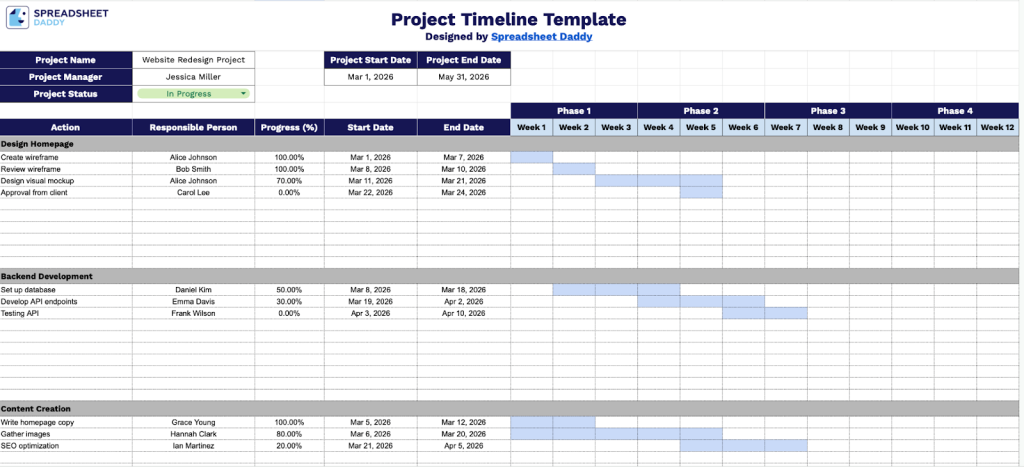
Our Project Timeline Template helps you organize and track tasks across different project phases with clear start and end dates, progress tracking, and team member assignments.
What’s included
- Comprehensive project overview section: The header includes essential fields for Project Name, Project Start Date, Project End Date, Project Manager, and Project Status, providing a complete snapshot of your project’s key information and current state at a glance.
- Multi-phase organizational structure: The template features four distinct phase columns (Phase 1, Phase 2, Phase 3, and Phase 4) that let you categorize and group related tasks, making it easy to visualize project progression across stages or deliverables.
- Detailed task-tracking rows: Each task row includes fields for the specific action item, the responsible person, progress percentage, start date, and end date, enabling comprehensive task management and accountability throughout the project lifecycle.
- 12-week visual timeline grid: The Gantt-style calendar spans 12 weeks (Week 1 through Week 12) and provides a visual representation of task duration and overlap, allowing you to identify dependencies, bottlenecks, and resource allocation at a glance.
Adjust the template by adding or removing columns to fit your specific project needs.
Select your preferred format from the links below to download a free Project Timeline Template:
How to Use Our Project Timeline Template
1. Download a ready-to-use Excel or PDF version, or make a Google Sheets copy for editing.
2. At the top, fill in the key project details: project name, project manager, project status, and the project’s start and end dates.

3. List all your tasks. For each task, specify the actions that need to be completed, assign a responsible person, track progress, and set start and end dates. Then, visually map each task’s duration across the phases using colors to make the timeline easy to follow.

