Tired of losing track of receipts?
Our Receipt Tracker Template makes it simple to stay on top of all your payments. Download it in Google Sheets, Excel, or PDF, and customize it to fit your unique needs.
Plus, check out our full collection of free editable receipt templates to simplify all your financial record-keeping.
What Is a Receipt Tracker Template?
A receipt tracker template is a pre-formatted document or spreadsheet designed to help individuals and businesses systematically record and organize their receipts and expenses.
Using a receipt tracker template simplifies expense management by providing a consistent structure for documenting purchases without creating a tracking system from scratch.
Download Spreadsheet Daddy’s Free Receipt Tracker Template
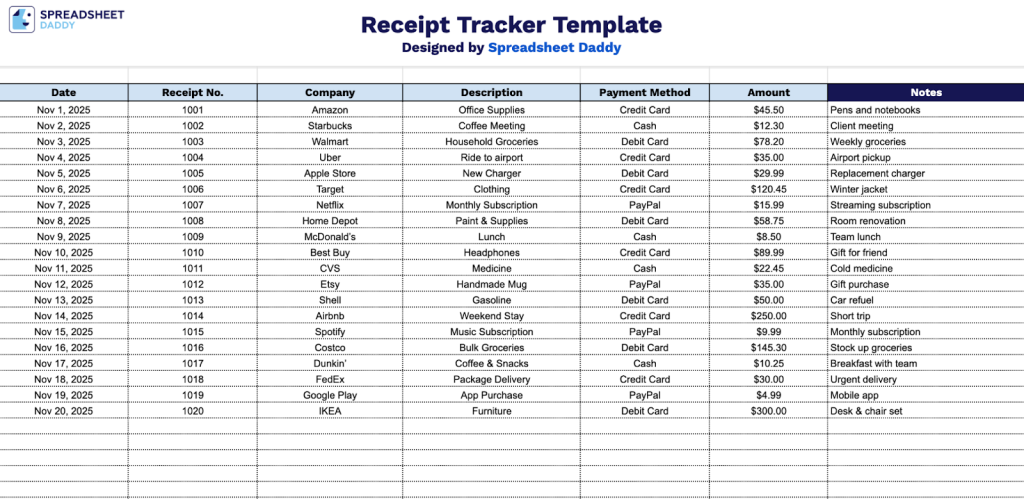
Our Receipt Tracker Template helps you organize and monitor your expenses in one convenient place.
What’s included
- Comprehensive tracking columns: Seven essential fields to capture every detail of your receipts, including Date, Receipt Number, Company name, Description of purchase, Payment Method, Amount, and a Notes field for additional context or categorization
- Clean, organized layout: Simple spreadsheet structure with clearly labeled column headers that make data entry quick and intuitive, with each row representing a single receipt transaction
- Flexible payment tracking: Dedicated Payment Method column allows you to monitor spending across different payment types (credit card, cash, debit, digital wallets, etc.) for better financial oversight
- Chronological organization: The Date column enables you to sort and review expenses by time period, making it easy to compile monthly, quarterly, or annual expense reports
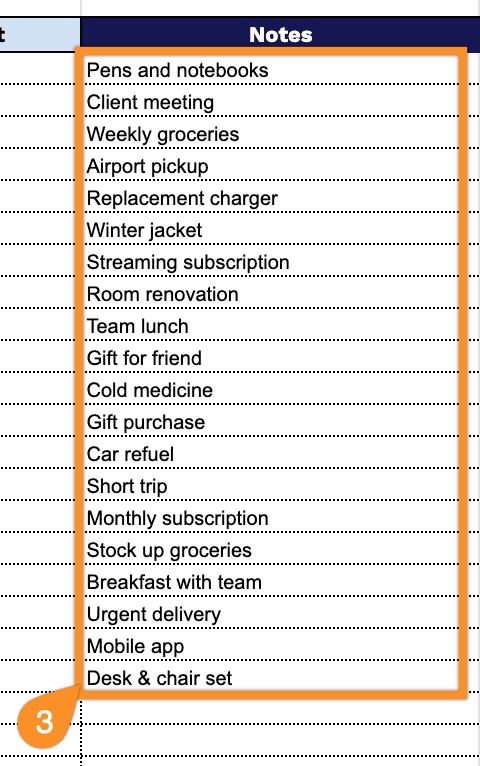
- Custom notes functionality: The Additional Notes column provides space for tax categories, reimbursement status, project codes, or any other relevant information specific to your tracking needs
You can customize it by adding or removing columns based on your specific tracking needs.
Download a free blank receipt tracker template in your preferred format using the links below:
How to Use Our Receipt Tracker Template
1. Access this motorcycle receipt template in Excel, Word, or PDF, or make your own version in Google Sheets or Docs.
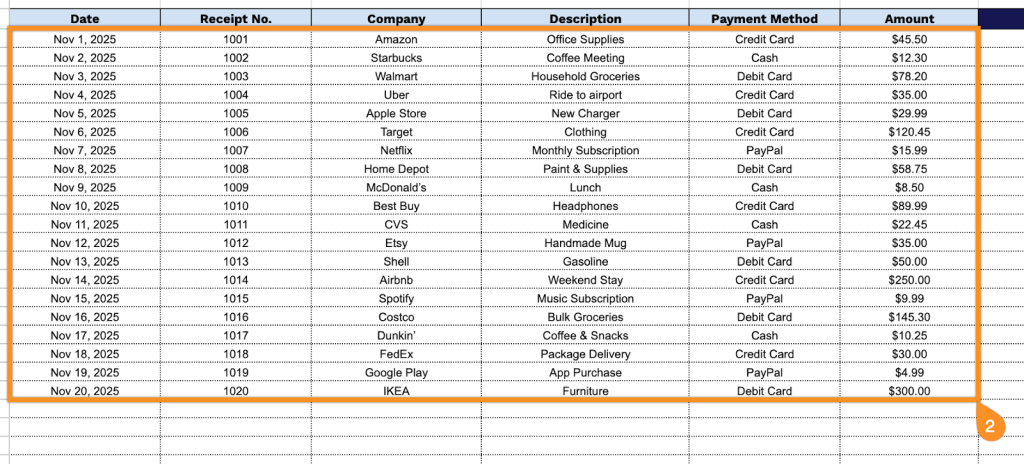
2. Complete the columns by entering all essential transaction information:
- Date: Record the purchase date as shown on the receipt for accurate chronological tracking.
- Receipt No.: Enter the unique receipt number or transaction ID for reference and verification purposes.
- Company: Specify the merchant name or business where the purchase was made.
- Description: Provide a summary of the items or services purchased in the transaction.
- Payment Method: Indicate how the purchase was paid for (cash, credit card, debit card, digital wallet, etc.).
- Amount: Document the total transaction value, including any applicable taxes and fees.
3. Use the “Notes” section for any additional information or important details related to the transaction.