Simplify your mileage tracking with our free Mileage Log Template in Google Sheets, Excel, and PDF.
Designed for accuracy and ease, it helps you log every trip, track expenses, and stay prepared for tax deductions or reimbursement claims.
What Is a Mileage Log Template?
A mileage log template is a pre-formatted document used to track and record vehicle trips for business, medical, or tax-deductible purposes.
This organized record helps individuals and businesses accurately calculate mileage deductions for tax returns or reimbursement claims.
Download Spreadsheet Daddy’s Free Mileage Log Template
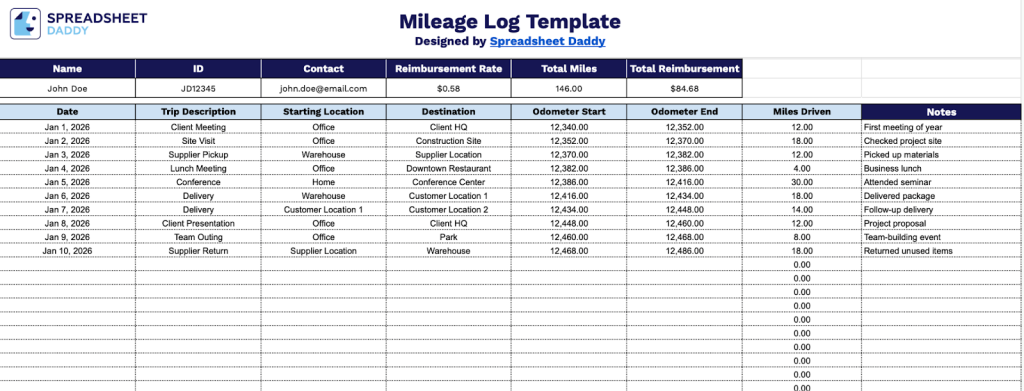
Our Mileage Log template helps you track business travel and calculate reimbursements for tax or expense reporting purposes.
What’s included
- Customizable driver information fields: The header section includes editable placeholders for Name, ID, Contact details, and Reimbursement Rate per mile, allowing you to quickly personalize the log with your specific driver information and current mileage rate for accurate expense tracking and reimbursement documentation.
- Comprehensive trip-tracking columns: Each row captures essential trip data, including Date, Trip Description, Starting Location, Destination, Odometer Start, Odometer End, and Miles Driven, providing complete documentation of every business journey for tax purposes, employer reimbursement, or personal record-keeping.
- Automated calculation system: The template features built-in formulas that automatically calculate Miles Driven from odometer readings for each trip, plus aggregate calculations for Total Miles and Total Reimbursement at the top of the sheet, eliminating manual math errors and streamlining your expense reporting process.
The template is fully customizable, allowing you to add or remove columns based on your specific tracking needs.
Use the links below to download a free blank mileage log template in your preferred format:
How to Use Our Mileage Log Template
1. Get this mileage tracking template as an Excel or PDF file, or copy it to Google Sheets for personal use.
2. Start by entering the driver’s name, ID, and contact information, along with the applicable mileage reimbursement rate. As you log trips, the template automatically calculates total miles driven and the total reimbursement amount.

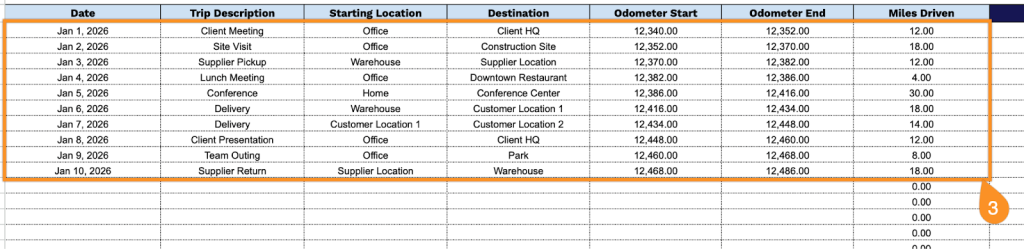
3. Complete the columns by entering all essential mileage tracking information:
- Date: Record the date when the business trip occurred.
- Trip Description: Provide a brief explanation of the trip’s business purpose.
- Starting Location: Enter the address or location where your trip began.
- Destination: Specify the address or location where your trip ended.
- Odometer Start: Record the vehicle’s odometer reading at the beginning of the trip.
- Odometer End: Record the vehicle’s odometer reading at the conclusion of the trip.
- Miles Driven: Calculate the total distance traveled by subtracting the starting odometer reading from the ending reading.
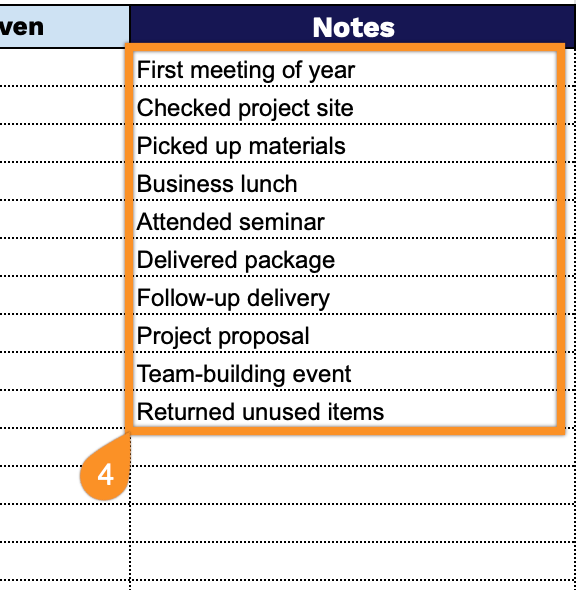
4. Use the Notes section to include additional details such as vehicle information, tolls, or exceptional trip circumstances.