Need a simple way to organize your hiring process?
Download our free Recruitment Tracker Template in Google Sheets, Excel, or PDF.
It’s fully customizable and helps you track applicants, interview stages, hiring status, and key recruitment details in one place.
What Is a Recruitment Tracker Template?
A recruitment tracker template is a structured document or spreadsheet used by hiring managers and HR teams to organize and monitor the entire hiring process from start to finish.
By providing a clear overview of where each candidate stands in the pipeline, a recruitment tracker helps streamline communication, reduce administrative overhead, and ensure no promising applicant falls through the cracks.
Download Spreadsheet Daddy’s Free Recruitment Tracker Template
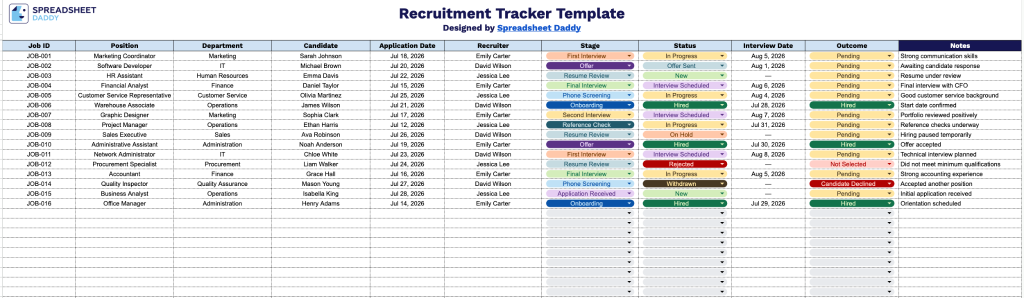
Our Recruitment Tracker Template helps you organize and monitor candidates as they move through your hiring pipeline, from application to offer.
What’s included
- Comprehensive candidate tracking columns: The sheet includes dedicated fields for Job ID, Position, Department, Candidate name, and Application Date, giving you a clear, organized snapshot of every open role and who’s applied for it at a glance.
- Recruiter and pipeline stage tracking: A Recruiter column lets you assign ownership for each requisition, while the Stage column allows you to log where each candidate sits in the hiring process, whether that’s screening, interviewing, or offer, so nothing falls through the cracks.
- Status and outcome monitoring: The Status and Outcome columns let you mark each candidate as active, on hold, or closed, and record the final result of their application, making it easy to see hiring progress across all open positions in real time.
- Interview scheduling field: A dedicated Interview Date column keeps all upcoming and past interview dates in one place, helping recruiters and hiring managers stay on top of scheduling without needing a separate calendar system.
Add or remove columns as needed to fit your own recruitment process.
Select your preferred file format below to download a free Recruitment Tracker Template:
How to Use Our Recruitment Tracker Template
1. Download the Recruitment Tracker template as an Excel spreadsheet or PDF, or duplicate it into your Google Sheets account.
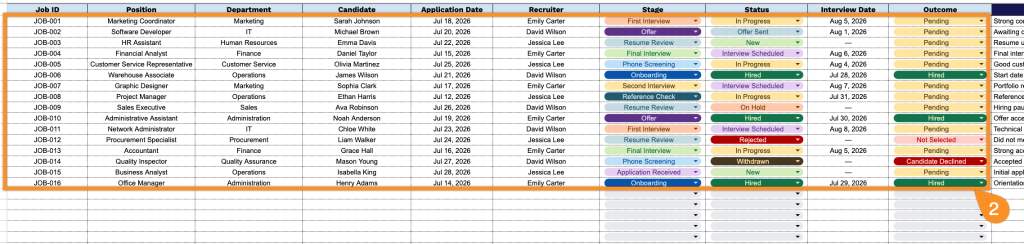
2. Record key hiring details, including the job ID, position, department, candidate, application date, recruiter, current stage, status, interview date, and hiring outcome.
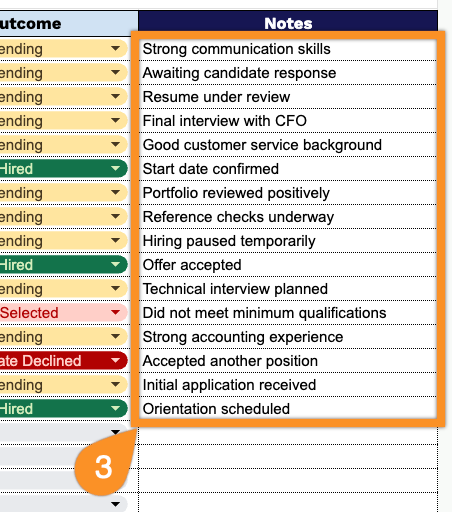
3. Use the Notes section to record follow-up actions, candidate strengths, interview observations, or any other important recruitment details.