Save time creating your own reselling tracker from scratch by using our free, professionally formatted reselling template.
Available in Google Sheets, Excel, and PDF formats, this template is easy to customize and helps you track products, costs, sales, and other important resale details.
What Is a Reselling Template?
A reselling template is a pre-made, customizable document or framework that provides sellers with a ready-to-use structure for listing, pricing, and presenting products they intend to resell.
By using a reselling template, individuals and businesses can maintain a consistent, professional appearance across their sales channels while focusing their energy on sourcing and selling rather than on design and formatting.
Download Spreadsheet Daddy’s Free Reselling Template
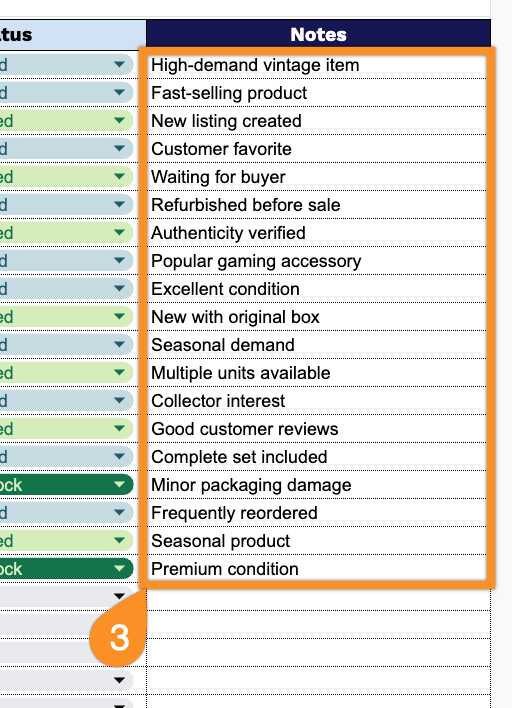
Our Reselling Template gives you a simple, organized way to track your resale inventory from purchase to sale, including product details, costs, pricing, profit, and status.
What’s included
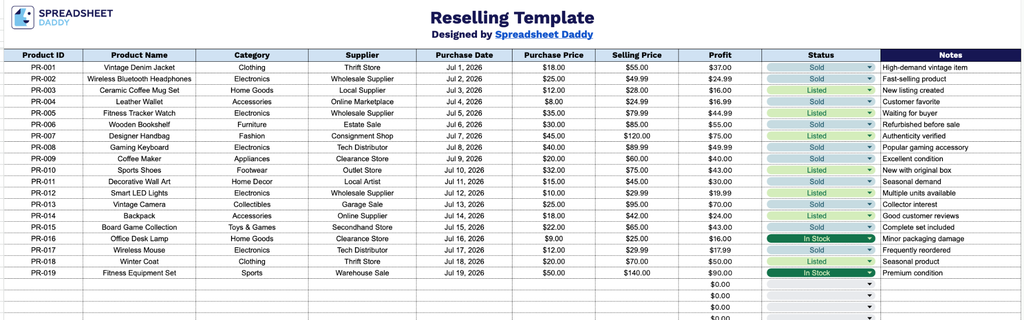
- Comprehensive product tracking fields: Each row includes dedicated columns for Product ID, Product Name, Category, and Supplier, giving you a clear, organized record of every item you source and resell, making it easy to identify and search for specific inventory at a glance.
- Purchase and sale price tracking: The Purchase Date, Purchase Price, and Selling Price columns let you log exactly when and how much you paid for each item, as well as what you sold it for, giving you a complete transaction history for every product that passes through your business.
- Automatic profit calculation: The Profit column is designed to automatically calculate the difference between your Selling Price and Purchase Price, so you can instantly see your margin on each item without manual math.
- Status tracking column: A dedicated Status field lets you mark each item’s current stage (e.g., In Stock, Listed, Sold, or Returned), helping you monitor inventory flow and quickly filter items that need attention.
- Notes section for additional details: The Notes column, highlighted with a bold header for easy identification, provides space to record additional context such as item condition, listing platform, buyer information, or shipping details, keeping all relevant information in one centralized place.
Add or remove columns to match exactly what you need to track.
Get your free blank reselling template by choosing the format that works best for you from the download options below:
How to Use Our Reselling Template
1. Access the Reselling Template by downloading the Excel or PDF version, or create a personal Google Sheets copy to manage your records online.
2. Record your resale inventory by entering product details such as item ID, product name, category, supplier information, purchase date, costs, selling price, and sales status. The template will automatically calculate the profit earned on each sale.
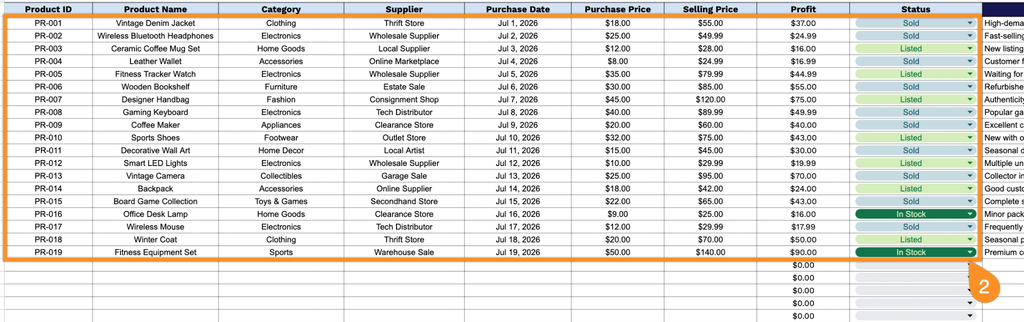
3. Use the Notes section to add additional comments, corrective actions, or recommendations to help prevent future downtime.