

Save time on scheduling with our ready-made roster template.
Available in Google Sheets, Excel, and PDF, it’s easy to customize and perfect for organizing shifts, tracking hours, and managing your team efficiently.
What Is a Roster Template?
A roster template is a pre-formatted document used to organize and schedule employees, team members, or participants for specific shifts, tasks, or activities.
Using a template saves time by providing a reusable framework that can be quickly customized for different scheduling periods or teams, ensuring consistency and reducing the administrative burden of creating schedules from scratch.
Download Spreadsheet Daddy’s Free Roster Template
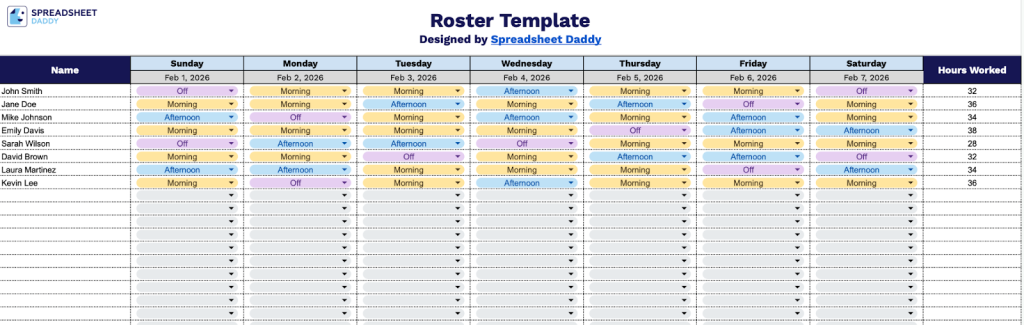
Our Roster Template provides a simple way to organize employee schedules across the week, showing shift assignments and total hours worked for each team member.
What’s included
- Weekly employee scheduling grid: A structured table layout with columns for employee names and each day of the week (Sunday through Monday), plus a dedicated “Hours Worked” column for tracking total weekly hours per employee.
- Customizable date fields: Each day column includes editable date placeholders that can be filled in to specify the exact week being scheduled, making it easy to maintain organized records across multiple pay periods.
- Clean, minimalist design: The template features a straightforward layout with clear column headers and row organization, ensuring easy readability whether printed or viewed digitally.
- Flexible employee capacity: Multiple blank rows allow you to add as many staff members as needed, accommodating teams of various sizes from small businesses to larger departments.
The layout is flexible, allowing you to easily add or remove columns to match your specific scheduling needs.
Use the links below to obtain a free blank Roster Template in the format that works best for you:
How to Use Our Roster Template
1. Access the template by downloading it in Excel or PDF, or duplicating it in Google Sheets.
2. Fill in the roster with team members’ names, daily dates, their shifts for each day, and the total hours worked for the week.

