Don’t want to build a task template from scratch?
Start faster with our free, professionally designed template available in Google Sheets, Excel, and PDF.
It’s simple to customize and helps you clearly document tasks, responsibilities, and completion details in one organized place.
What Is a Task Template?
A task template is a structured form or table that provides designated fields for organizing and tracking work activities.
It serves as a reusable tool that helps individuals or teams consistently document and monitor their work from planning through completion.
Download Spreadsheet Daddy’s Free Task Template
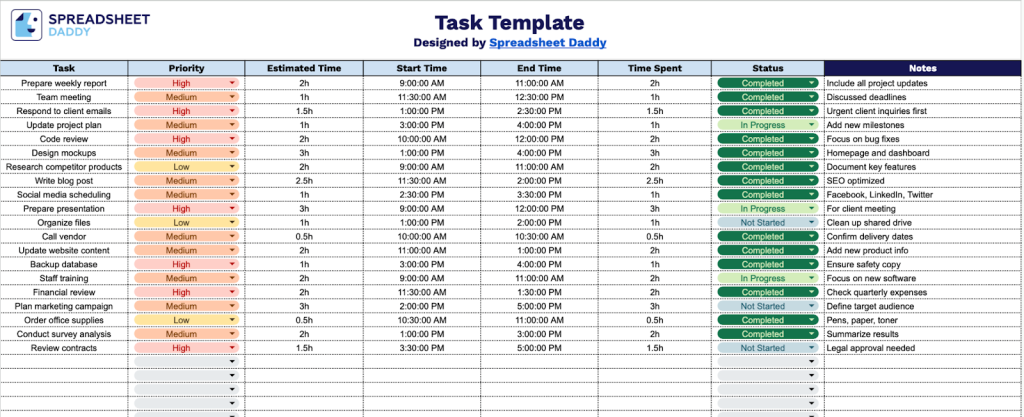
Our Task Template helps you organize and track your daily work activities in a clear, structured format.
What’s included
- Comprehensive task tracking columns: The template includes seven essential fields, including Task name, Priority, Estimated Time, Start Time, End Time, Time Spent, and Status, providing a complete framework for managing your daily tasks and projects with precision and clarity.
- Priority management system: A dedicated Priority column lets you categorize tasks by importance, helping you focus on high-priority items first and organize your workflow by urgency and impact.
- Built-in time tracking functionality: Track both estimated and actual time with dedicated columns for Estimated Time, Start Time, End Time, and Time Spent, enabling you to monitor productivity, identify time-consuming tasks, and improve your time estimation skills over time.
- Status monitoring capability: The Status column provides a quick visual reference for tracking task progress, letting you instantly see which tasks are pending, in progress, or completed, so nothing falls through the cracks.
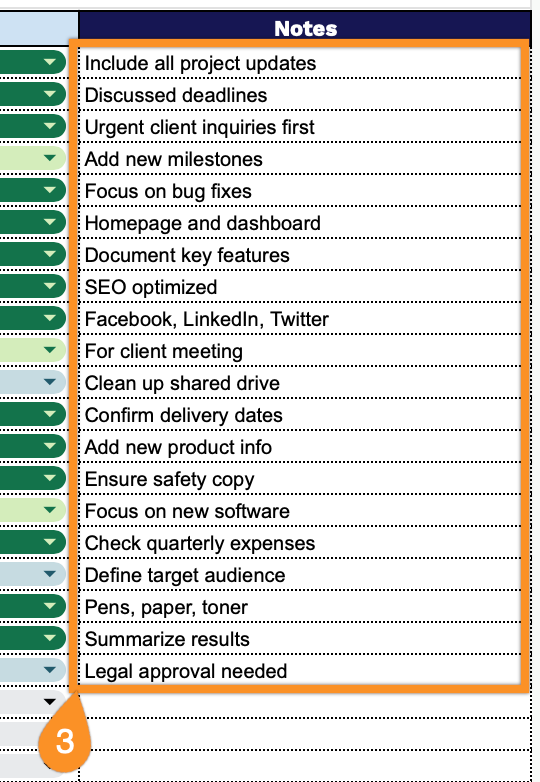
- Notes section for additional context: A flexible Notes field accompanies each task entry, giving you space to add important details, instructions, dependencies, or reminders that provide crucial context for task completion.
You can easily customize it by adding or removing columns to match your specific workflow and requirements.
Select one of the links below to access a free blank task template in the format that works best for you:
How to Use Our Task Template
1. Get started by saving the template as an Excel or PDF file or copying it into Google Sheets.
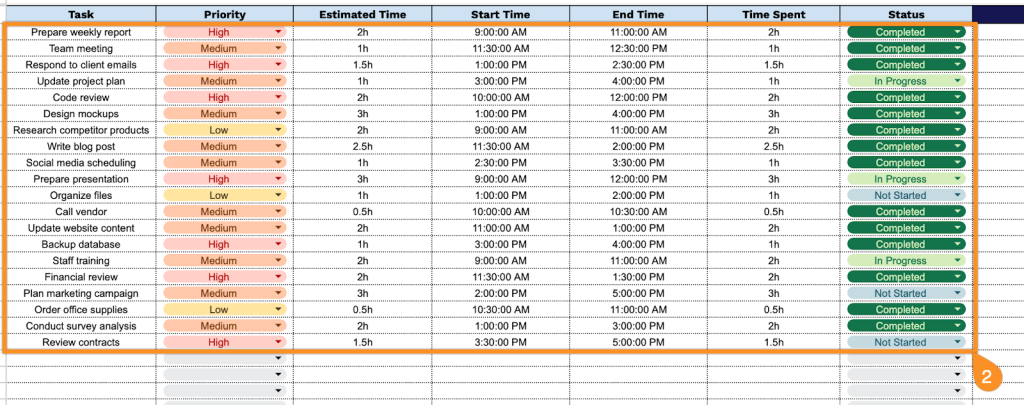
2. Complete the columns by entering all essential task management information:
- Task: Enter the specific action item or activity to be completed, including a clear, concise description of what needs to be done.
- Priority: Assign the task’s importance level (High, Medium, or Low) to support work sequencing and resource allocation.
- Estimated Time: Record the anticipated duration required to complete the task (in minutes, hours, or days).
- Start Time: Document the scheduled or actual time when work on the task begins.
- End Time: Specify the target completion time or deadline for finishing the task.
- Time Spent: Track the actual amount of time invested in completing the task for productivity analysis.
- Status: Indicate the current state of the task (Not Started, In Progress, Completed, On Hold, or Cancelled).
3. Use the Notes section to include any essential instructions, special requests, or additional details related to the task.