

Need a quick way to organize your team’s workweek without starting from scratch?
Our free Team Schedule Template is ready to use in Google Sheets, Excel, and PDF.
It’s fully editable, making it easy to assign shifts, track hours, and ensure everyone knows their tasks and availability at a glance.
What Is a Team Schedule Template?
A team schedule template is a pre-formatted document or digital tool that helps organize and display when team members are working and their assigned tasks.
These templates save time by eliminating the need to create schedules from scratch and help maintain consistency in how team availability and responsibilities are communicated.
Download Spreadsheet Daddy’s Free Team Schedule Template
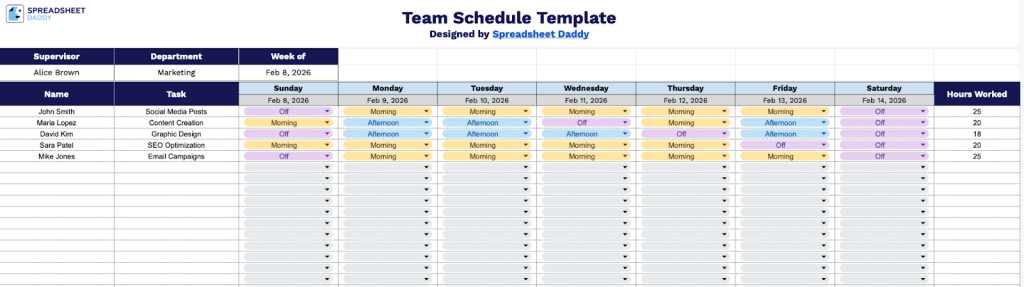
Our Team Schedule Template helps you organize your team’s weekly tasks and work hours in a clear, structured format.
What’s included
- Comprehensive weekly overview layout: The template spans a full 7-day week from Sunday through Saturday, with individual date placeholders for each day that can be customized to match your specific scheduling period, providing a complete at-a-glance view of your team’s weekly assignments.
- Customizable header information fields: The top section includes editable fields for Supervisor name, Department designation, and Week of date, allowing you to quickly identify who manages the schedule, which team or division it applies to, and the specific week being planned for organized record-keeping.
- Individual employee task tracking rows: Each row is dedicated to a single team member with columns for Name and Task assignment, followed by daily scheduling cells across all seven days of the week, enabling you to assign and track specific responsibilities for each employee throughout the entire week.
- Built-in hours calculation column: The rightmost column provides a “Hours Worked” field for each employee row, allowing you to track or calculate total weekly hours for payroll processing, workload balancing, and labor cost management.
You can adjust it by adding or removing columns to fit your specific scheduling needs.
Select your preferred format and download a free blank Team Schedule Template using the links provided:
How to Use Our Team Schedule Template
1. Save this template in Excel or PDF format, or copy it to Google Sheets for customization.
2. Enter the supervisor’s name, department, and the week starting date.

3. Add each team member’s name, their assigned tasks, and the dates for the week. For each day, indicate whether they are scheduled for Morning, Afternoon, or Off, and calculate their total hours worked for the week.

