Stop reinventing your test case structure.
Our free Test Case Template makes it easy to track test scenarios, inputs, and expected outcomes in one place.
Download it in Google Sheets, Excel, or PDF and tailor it to fit your workflow.
What Is a Test Case Template?
A test case template is a standardized document format used in software testing to record the steps, conditions systematically, and expected results needed to verify that a specific feature or functionality works correctly.
Using a template ensures that all necessary information is captured consistently across test cases, making tests more straightforward to execute, maintain, and understand for different team members.
Download Spreadsheet Daddy’s Free Test Case Template
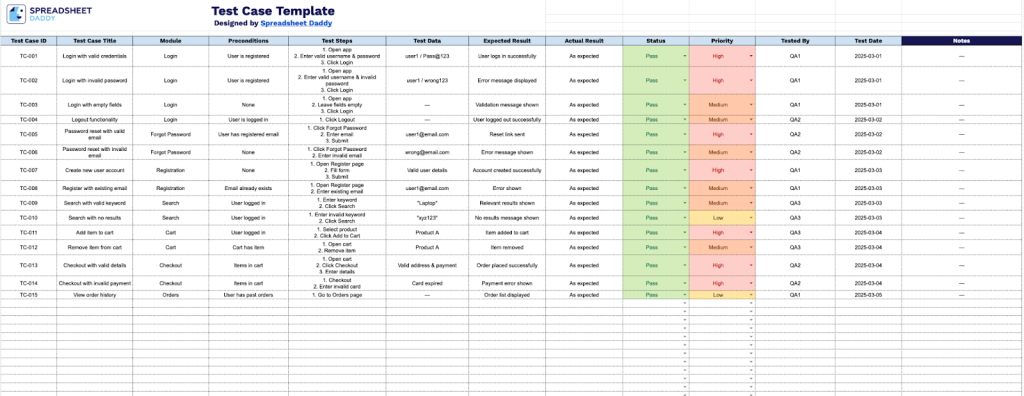
Our Test Case template provides a structured format for documenting and tracking software testing activities.
What’s included
- Comprehensive test case documentation fields: The template includes dedicated columns for Test Case ID, Test Case Title, Module, Preconditions, Test Steps, Test Data, Expected Result, Actual Result, Status, Priority, Tested By, Test Date, and Notes, providing a complete framework for documenting and tracking every aspect of your software testing process.
- Standardized priority and status tracking system: Built-in columns for categorizing test cases by priority level (High, Medium, Low) and recording execution status (Pass/Fail), enabling you to quickly identify critical test cases and monitor testing progress at a glance throughout your QA cycle.
- Team accountability and audit-trail features: Dedicated columns for Tested By, Test Date, and Notes allow you to track who performed each test, when it was executed, and capture any additional observations, creating a complete historical record for compliance, reporting, and continuous improvement.
You can easily customize the template by adding or removing columns to fit your specific testing requirements and workflow.
Use the links below to download a free blank Test Case Template in your chosen format.
How to Use Our Test Case Template
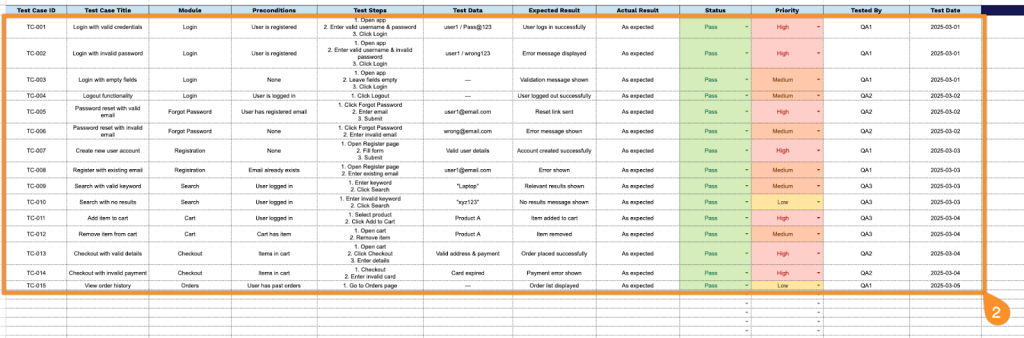
1. Grab your copy of the Test Case Template available in Google Sheets, Excel, or PDF formats.
2. Complete the Test Case Template by documenting all essential testing information and execution details:
- Test Case ID: Enter the unique identifier assigned to track this specific test scenario.
- Test Case Title: Provide a clear, descriptive name that summarizes what functionality is being tested.
- Module: Specify which system component, feature, or application area this test case belongs to.
- Preconditions: List any requirements or system states that must be established before executing the test.
- Test Steps: Document the sequential actions to be performed during test execution.
- Test Data: Include the specific input values, credentials, or sample data needed to run the test.
- Expected Result: Define the anticipated outcome or system behavior when steps are executed correctly.
- Actual Result: Record the observed outcome after executing the test (completed during test execution).
- Status: Indicate the test execution status (Pass, Fail, or Blocked).
- Priority: Set the importance classification for this test case (high, medium, or low priority).
- Tested By: Enter the name of the QA analyst or tester who executed this test case.
- Test Date: Record when the test case was actually performed.
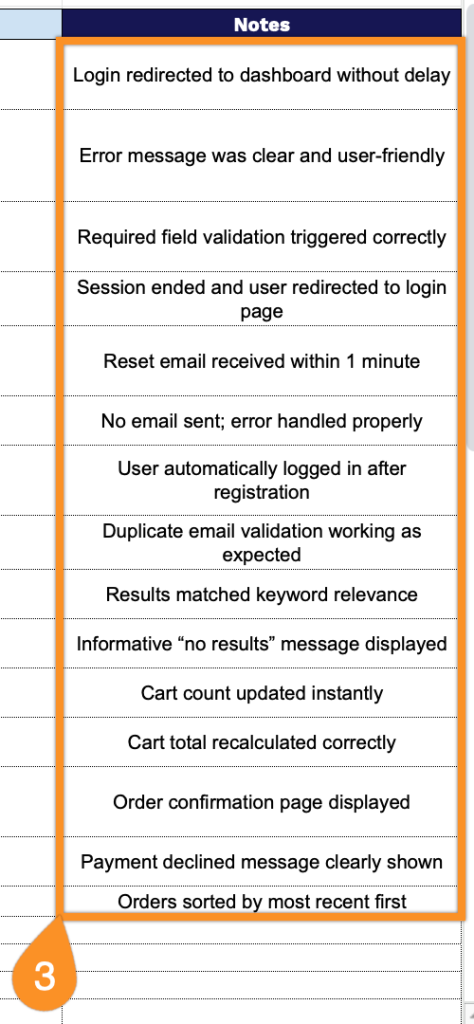
3. Use the Notes section to record extra observations, special conditions, or essential details for each test case.