Looking for a quick and reliable way to track tool usage?
Our professionally formatted Tool Sign Out Sheet Template helps you record who takes each tool, when it is borrowed, and when it is returned.
Download the free template in Google Sheets, Excel, or PDF and customize it to fit your needs.
What Is a Tool Sign Out Sheet Template?
A tool sign out sheet template is a standardized document used by organizations, workshops, or facilities to track the borrowing and return of tools and equipment.
This template helps prevent the loss or misplacement of tools, ensures responsible use, and maintains an organized record of who has which equipment at any given time.
Download Spreadsheet Daddy’s Free Tool Sign Out Sheet Template
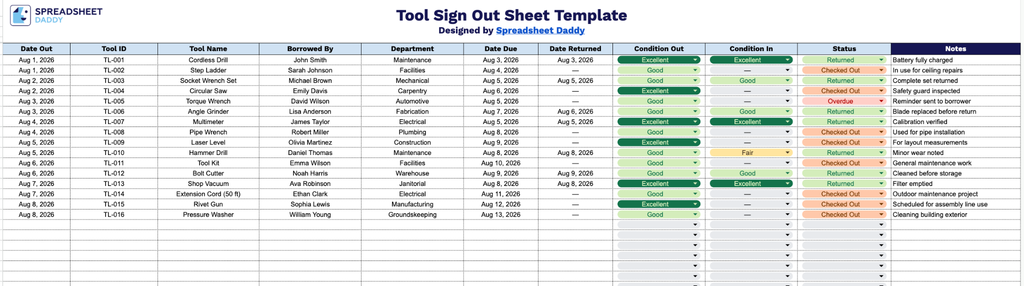
Our Tool Sign Out Sheet Template helps you track which tools are checked out, who has them, and when they’re due back, all in one simple, easy-to-use spreadsheet.
What’s included
- Comprehensive tool tracking columns: The sheet includes dedicated fields for Date Out, Tool ID, and Tool Name, making it easy to log exactly which tool left your inventory and when, so nothing gets misplaced or forgotten.
- Borrower accountability fields: The columns for Borrowed By and Department let you record who checked out each tool and which team or area it belongs to, creating a clear paper trail for accountability and follow-up.
- Return and condition monitoring: The Date Due, Date Returned, Condition Out, and Condition In columns work together to track expected versus actual return dates while documenting the tool’s state before and after use, helping you catch damage or excessive wear early.
- Status and notes for extra context: A Status column allows you to flag whether a tool is currently out, returned, or overdue at a glance, while the wide Notes column at the end gives you space to record any additional details, such as damage descriptions or special handling instructions.
You can add or remove columns to fit your specific tracking needs.
Choose your preferred file format from the options below and download a free blank Tool Sign Out Sheet template:
How to Use Our Tool Sign Out Sheet Template
1. Download the Tool Sign Out Sheet template as an Excel or PDF file, or make a customized copy in Google Sheets for your own use.
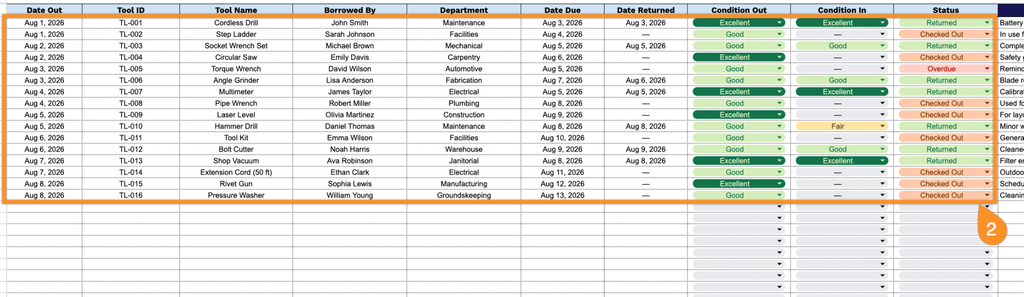
2. Record key tool checkout details, including the date issued, tool ID, tool name, employee borrowing the item, department, expected return date, actual return date, condition before and after use, and current status.
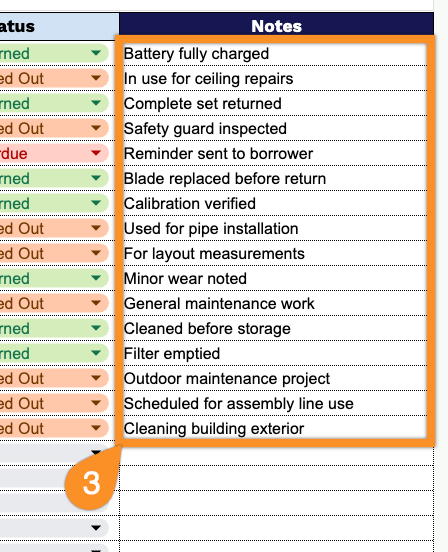
3. Use the Notes section to add any important information, such as tool condition, maintenance requirements, missing parts, or special instructions.