Organize your vendor contacts and business relationships with ease.
This free Vendor List Template, available in Google Sheets, Excel, and PDF, is fully customizable to suit your tracking needs.
What Is a Vendor List Template?
A vendor list template is a structured document used to organize and track information about suppliers and service providers with whom a business works or is considering working.
This tool helps businesses maintain centralized vendor records, streamline procurement processes, and make informed decisions when selecting or managing suppliers.
Download Spreadsheet Daddy’s Free Vendor List Template
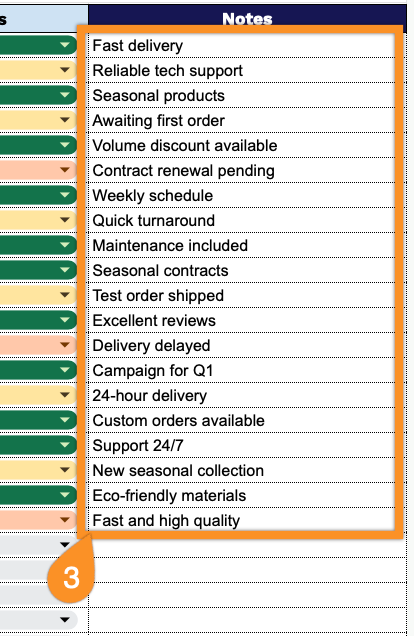
Our Vendor List Template provides a structured way to organize and track your business vendors in one centralized location.
What’s included
- Comprehensive vendor tracking columns: The template includes nine structured columns, including Vendor ID, Vendor Name, Contact Person, Email Address, Phone Number, Company Address, Service/Product Provided, Payment Terms, and Status, enabling complete vendor information management in a single, organized spreadsheet view.
- Contact management integration: Dedicated fields for Contact Person, Email Address, and Phone Number ensure you maintain direct communication channels with key vendor representatives, streamlining procurement processes and relationship management across your supplier network.
- Service categorization and payment tracking: The Service/Product Provided column allows you to classify vendors by their offerings. In contrast, the Payment Terms field helps you monitor negotiated conditions, ensuring better cash flow management and financial planning.
- Status monitoring and notes system: The Status column enables quick visual identification of vendor relationships, complemented by a flexible Notes field for recording key details such as contract renewal dates, performance issues, or special arrangements.
The template includes essential vendor information and can be easily customized by adding or removing columns to fit your specific business needs.
Use it to maintain better vendor relationships and streamline your procurement processes.
Access your free Vendor List template in Excel, Google Sheets, or PDF through the links below:
How to Use Our Vendor List Template
1. Grab this Vendor List template as an Excel or PDF file, or make your own copy in Google Sheets.
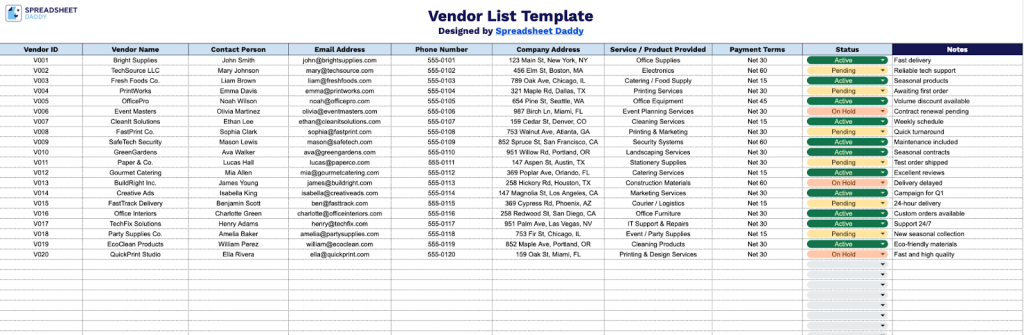
2. Complete the columns by entering all essential supplier details:
- Vendor ID: Enter the unique identifier or code assigned to each vendor for tracking and reference purposes.
- Vendor Name: Specify the complete legal business name or company name of the supplier.
- Contact Person: Record the name of the primary point of contact or account representative at the vendor organization.
- Email Address: Include the business email address for correspondence and communication with the vendor.
- Phone Number: Document the main business phone number.
- Company Address: List the vendor’s complete physical address for its business location or headquarters.
- Service / Product Provided: Specify the type of goods or services the vendor supplies to your organization.
- Payment Terms: Record the agreed-upon payment conditions (Net 30, Net 60, COD, etc.) and any special arrangements.
- Status: Indicate the vendor’s current status in your system (Active, Inactive, Pending, On Hold, etc.).
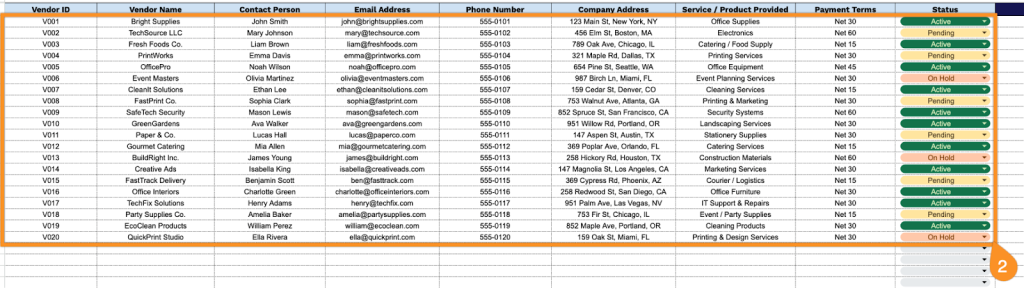
3. Add any additional information or reminders in the Notes section to keep everything organized.