Make wishlist planning simple and stress-free.
Our free Wishlist Template lets you neatly organize desired items, costs, and purchase status in one clear layout.
Available in Google Sheets, Excel, and PDF, it’s fully customizable for any occasion.
What Is a Wishlist Template?
A wishlist template is a pre-formatted document that helps you organize and track items you want to purchase or receive as gifts.
These templates streamline the gift-giving process by providing a clear, organized list that can be updated and accessed whenever needed.
Download Spreadsheet Daddy’s Free Wishlist Template

Our Wishlist Template helps you organize and track items you’d like to purchase in a clear, structured format.
What’s included
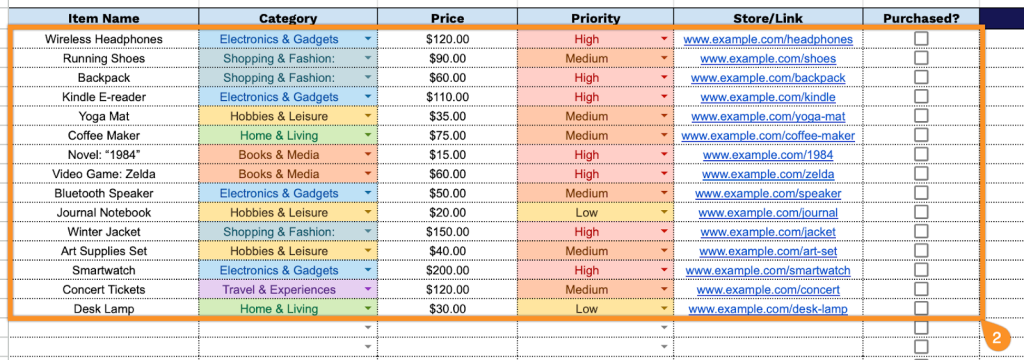
- Comprehensive item tracking fields: The template includes dedicated columns for Item Name, Category, Price, Priority, Store/Link, Purchased status, and Notes, providing a complete profile for each wishlist item to facilitate easy organization and purchasing decisions across your entire wishlist.
- Priority-level tracking: The Priority column lets you designate items as High, Medium, or Low, helping you focus on must-have purchases rather than nice-to-haves and strategically plan your budget based on what matters most.
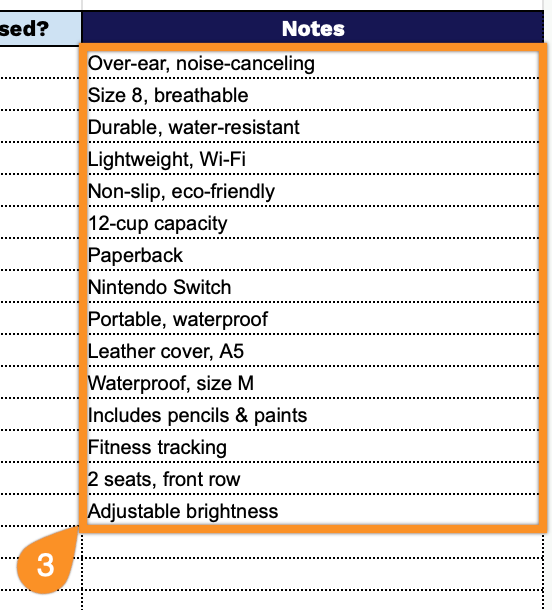
- Detailed notes and specifications: The Notes field captures essential details such as sizes, colors, technical specifications, capacity requirements, and special features, ensuring you remember all critical information when making purchase decisions.
The template is fully customizable, allowing you to add or remove columns based on your specific needs and preferences.
Download a free wishlist template in the format that works best for you using the links below:
How to Use Our Wishlist Template
1. Access this wishlist template in Excel, PDF, or edit it online in Google Sheets.
2. Complete the Wishlist Item Details section by entering all essential product and tracking information:
- Item Name: Enter the specific name or description of the product you wish to purchase.
- Category: Specify the type or classification of the item.
- Price: Record the current cost of the item, including currency if applicable.
- Priority: Set the importance level for this purchase (high, medium, or low priority).
- Store/Link: Include the retailer name or direct URL where the item can be purchased.
- Purchased?: Mark the checkbox when you’ve completed the purchase to track your progress.
3. Use the Notes section to add extra details, reminders, or essential comments for each wishlist item.