Skip the hassle of building a workflow system from scratch.
Download our ready-to-use Workflow Template in Google Sheets, Excel, or PDF format and start organizing your tasks right away.
It’s editable, practical, and built to help you improve efficiency and stay on track.
What Is a Workflow Template?
A workflow template is a pre-designed, reusable framework that outlines the steps, tasks, and processes needed to complete a specific type of work or project.
By using templates, organizations can save time on setup, reduce errors, and help team members quickly understand their roles and responsibilities in common business processes.
Download Spreadsheet Daddy’s Free Workflow Template
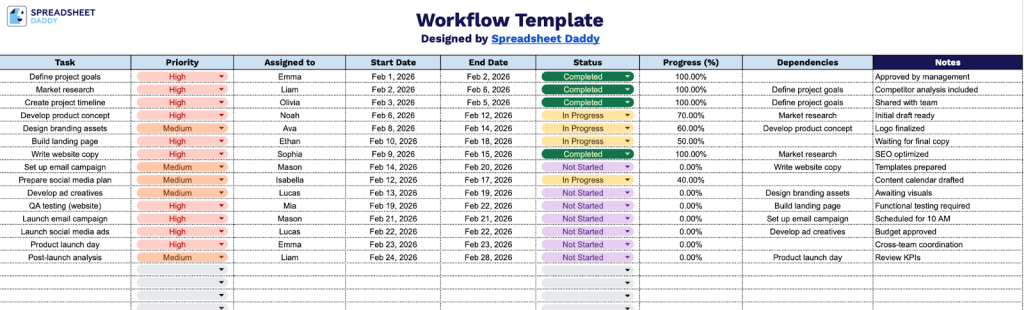
Our Workflow Template helps you organize and track project tasks from start to finish with a clear view of priorities, assignments, deadlines, and progress.
What’s included
- Comprehensive task-tracking columns: The template features 9 essential columns, including Task, Priority, Assigned to, Start Date, End Date, Status, Progress (%), Dependencies, and Notes, providing a complete framework for managing project workflows and monitoring task completion from start to finish.
- Visual progress monitoring system: The Progress (%) column lets you track completion status numerically. In contrast, the Status column provides qualitative updates, giving you dual perspectives on how each task is progressing through your workflow.
- Priority and assignment management: Dedicated Priority and Assigned to columns let you categorize tasks by urgency and clearly designate team member responsibilities, ensuring accountability and proper resource allocation across your project.
- Dependency tracking for sequential workflows: The Dependencies column lets you map relationships between tasks, identifying which activities must be completed before others can begin, helping you visualize critical paths and avoid bottlenecks in your project timeline.
- Flexible date range planning with extensive task capacity: Start Date and End Date columns support detailed scheduling for each activity. At the same time, the template provides 40+ pre-formatted rows ready for data entry, accommodating small projects to complex multi-phase workflows with room for detailed notes and context.
The customizable format lets you add or remove columns based on your specific needs, making it adaptable to any project or team workflow.
Choose your desired format and download the blank Workflow Template for free using the links provided:
How to Use Our Workflow Template
1. Download this template in Excel or PDF, or make your own copy in Google Sheets.
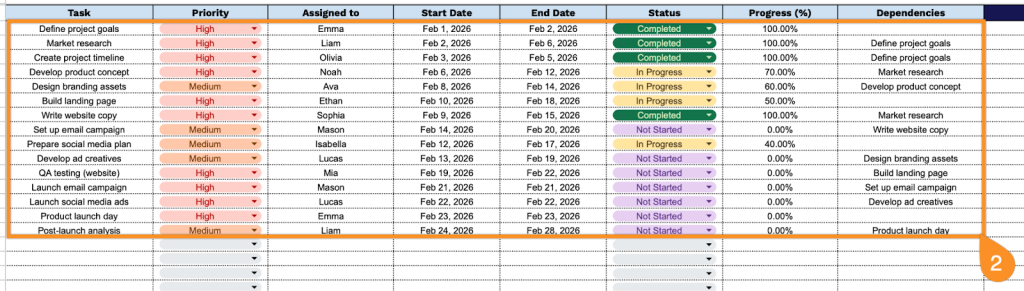
2. Complete the columns by filling in all essential task tracking and coordination information:
- Task: Enter the specific activity or deliverable that needs to be completed.
- Priority: Set the task’s importance level (high, medium, or low).
- Assigned to: Specify the team member or department responsible for completing this task.
- Start Date: Record the planned date when work on this task should begin.
- End Date: Specify the target completion date for this task.
- Status: Indicate the current state of the task (not started, in progress, completed, or on hold).
- Progress (%): Enter the percentage of task completion (0-100%).
- Dependencies: List any tasks that must be completed before this task can begin, or that rely on this task’s completion.
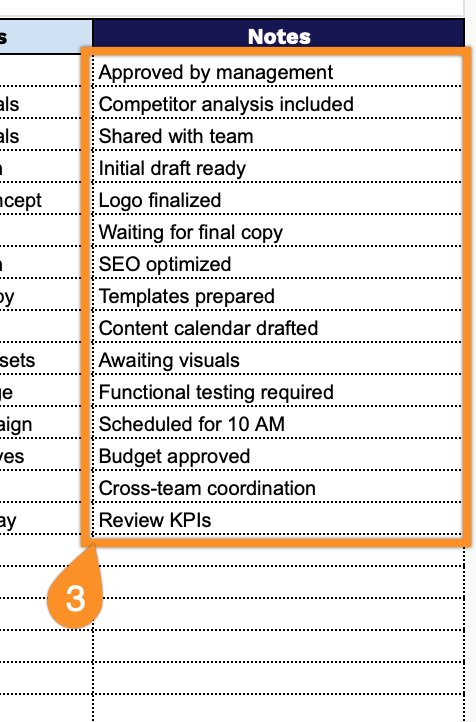
3. Use the Notes section to add important details such as blockers, updates from meetings, changes in deadlines, or additional instructions related to the task.