Take control of your investments with our ready-to-use Stock Tracker Template.
Compatible with Google Sheets, Excel, and PDF, it lets you log stock activity, analyze performance, and manage your portfolio, all without starting from scratch.
What Is a Stock Tracker Template?
A stock tracker template is a pre-formatted spreadsheet designed to help investors monitor and organize their stock portfolio performance in one centralized location.
These templates streamline portfolio management by automating calculations and providing visual summaries of holdings, saving time compared to manual tracking methods.
Download Spreadsheet Daddy’s Free Stock Tracker Template
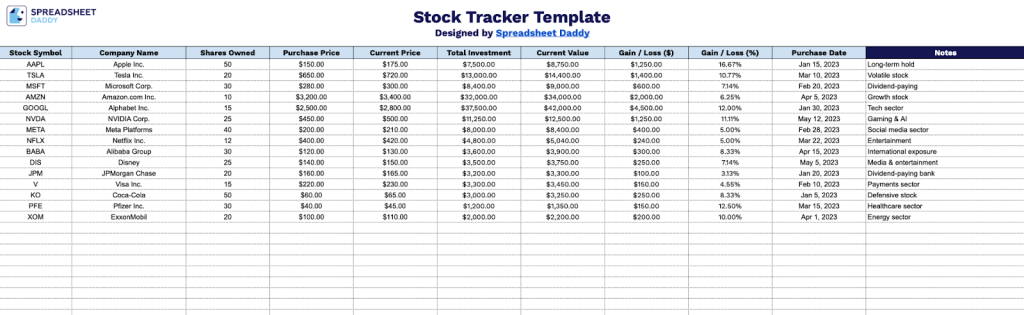
Our Stock Tracker Template provides a structured way to monitor your investment portfolio in a spreadsheet.
What’s included
- Comprehensive stock portfolio columns: The template includes 11 essential data fields for each holding: Stock Symbol, Company Name, Shares Owned, Purchase Price, Current Price, Total Investment, Current Value, Gain/Loss in dollars, Gain/Loss in percentage, Purchase Date, and Notes, providing a complete overview of your investment positions in a single, organized view.
- Automatic calculation fields: Built-in formulas automatically compute Total Investment, Current Value, and both dollar and percentage Gain/Loss metrics, eliminating manual calculations and reducing errors as you track your portfolio performance in real time.
- Extensive tracking capacity: The spreadsheet provides pre-formatted rows for stock entries, allowing you to track a substantial portfolio of individual holdings with consistent formatting and calculation capabilities throughout the entire document.
- Performance visualization at a glance: The Gain/Loss columns display both absolute dollar amounts and percentage returns for each position, making it easy to identify your best and worst performers, assess overall portfolio health, and make informed investment decisions based on actual performance data.
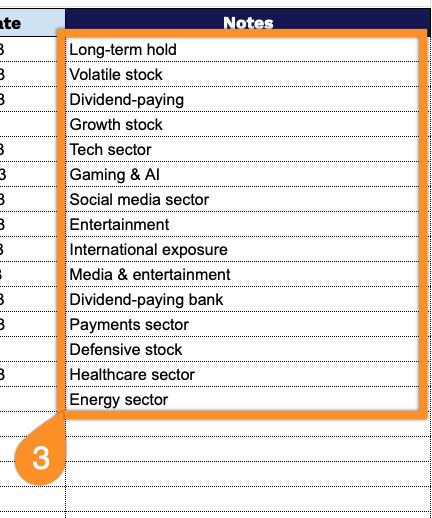
- Flexible notes and documentation: A dedicated Notes column allows you to record important information such as investment thesis, dividend schedules, target sell prices, sector classifications, or any other relevant details specific to each holding, keeping all your investment research and reminders in one centralized location.
You can easily customize it by adding or removing columns to match your specific tracking needs and preferences.
Pick your favorite format and grab a free blank stock tracker template from the links below:
How to Use Our Stock Tracker Template
1. Choose Excel or PDF to download, or copy it to Google Sheets to personalize.
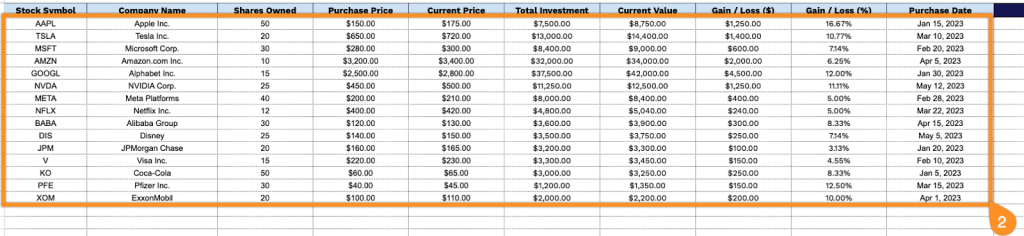
2. Populate the columns with comprehensive investment data for each holding:
- Stock Symbol: Enter the ticker code used to identify the security on the exchange.
- Company Name: Record the full legal or trading name of the corporation.
- Shares Owned: Specify the total number of shares you currently hold in this position.
- Purchase Price: Input the per-share cost at the time of your original acquisition.
- Current Price: Add the latest market value per share (updates automatically if using live data feeds).
- Total Investment: This field is calculated automatically by multiplying shares owned by purchase price.
- Current Value: The system computes this automatically by multiplying shares owned by the current price.
- Gain / Loss ($): This auto-calculates the dollar difference between the current value and total investment.
- Gain / Loss (%): The template automatically determines the percentage return on your investment.
- Purchase Date: Document when you acquired the shares for this particular position.
3. Use the Notes section to add any extra information or reminders about your stock.